About Monkey 2 › Forums › Monkey 2 Projects › Asteroids remake
Tagged: game2d
This topic contains 41 replies, has 7 voices, and was last updated by  AdamStrange
 2 years, 6 months ago.
-
AuthorPosts
-
August 10, 2016 at 1:34 pm #2921
Here’s a thought for you.
I’m busy with Ted21, but my aim is to try and integrate other systems directly into the editor. Sprite editor, atlas, vector editor, sound editor, etc. Sort of one stop shop for the basic development.
I haven’t really looked beyond the concept, but you showing the code for the base vector system is a start. I would need to firm up a lot first though.
What are your thoughts?
August 11, 2016 at 12:36 am #2928Adam,
Yes certainly sounds interesting! The ability to have some basic editing of a number of file types would enhance a game making application such as Monkey2. Doing a great job on Ted21 BTW!
August 19, 2016 at 7:32 am #3210Updated version (0.6)
https://1drv.ms/u/s!AgngrULjSty9kJscgMVwpojeo2pn3w
Added UFOs, extra player every 10,000pts and ability to enter high scores. Also done a general tidy-up of the game play – plays quite well now.
The new change follow the reasonably established Asteroids game play – UFOs have a large and small (after 10,000pts). Large UFO fire randomly whist small UFOs are quite accurate (less accurate initially but get more so the higher you score.
Now onto the bonus stuff and maybe some color changes.
August 19, 2016 at 8:13 am #3213Played it! Really nice man

I have also taken the Asteroids template and I am working on a new game as well. Will post once the prototype generates fun gameplay!
August 19, 2016 at 11:54 am #3226@wiebow looking forward too seeing it!
September 27, 2016 at 1:13 pm #4118@Matthew Q. how are you constructing the vector shapes? graph paper and data or using some other editor?
I’m just about to start work on a vector editor and wondered what approach you took?
September 27, 2016 at 11:11 pm #4119Adam,
With the code I used it stored the data in a 2d array which is laid out in grid co-ordinates (x,y) with centre as 0,0. For example the ship is initialised as follows:
Monkey12345Self.CreatePoint(-8,-8)Self.CreatePoint(12,0)Self.CreatePoint(-8,8)Self.CreatePoint(-5,0)Self.CreatePoint(-8,-8)The one thing you may want to consider is the ability to have multiple start points (I guess you could also overlay multiple vectors as an alternate) which would allow you to construct more detailed vectors – for example with the UFO I did have to draw over the some areas twice to get to the next area I needed to draw:
Monkey123456789101112Self.CreatePoint( -5, -3)Self.CreatePoint( -3, -7)Self.CreatePoint( 3, -7)Self.CreatePoint( 5, -3)Self.CreatePoint( -5, -3)Self.CreatePoint(-12, 0)Self.CreatePoint( -5, 4)Self.CreatePoint( 5, 4)Self.CreatePoint( 12, 0)Self.CreatePoint( 5, -3)Self.CreatePoint( 12, 0)Self.CreatePoint(-12, 0)The vector code I used is available here if you wanted to take a look:
https://github.com/chunkypixel/monkey2/blob/master/Asteroids/src/entity/vector.monkey2
What the code does is initially store the vector in one array and then as scaling or rotation is applied it updates the object into a drawing vector. Then when drawn a virtual scale is also applied (Asteroids runs under a base 640,480 but a virtual scale is applied when drawn to match the actual screen size ie. 1024,768).
Hope that gives you a starting point!
September 28, 2016 at 5:21 am #4120I’ve had a brief look over the code – thanks for that by the way
I particularly liked the general concept of the points being stored then rotated, scaled as needed into a new entity – this is exactly the same concept I’m using, so I must be on to something.
Here’s a very early dev shot of the 2d vector editor. I decided to make it look a but different from the usual dark ui so you have no doubt what section you are dealing with. Also the points snap to the lines so no floating points. Again I think this is the best way to do this as it allows very tightly aligned objects
UI elements will be added above the magnify icons (like pen, move, select, etc). The ui is in keeping with the ui I created for viewing images, so there is a consistency across everything
Attachments:
September 28, 2016 at 6:08 am #4122nice! you don’t need anything too fancy but looks like it will do a great job! Certainly easier than a manual plot!
September 28, 2016 at 6:33 am #4123yep, that’s what I thought. I’m working on the selection stuff at the moment.
It looks to me that a vector is a single line, so to construct something move complex would require multiple lines, which requires some form of grouping system.
What I thought with that is: each vector appears to the left in a sort of directory. Just select multiple entries to make an object with many lines. it would also mean you can have layers and onion skinning, etc
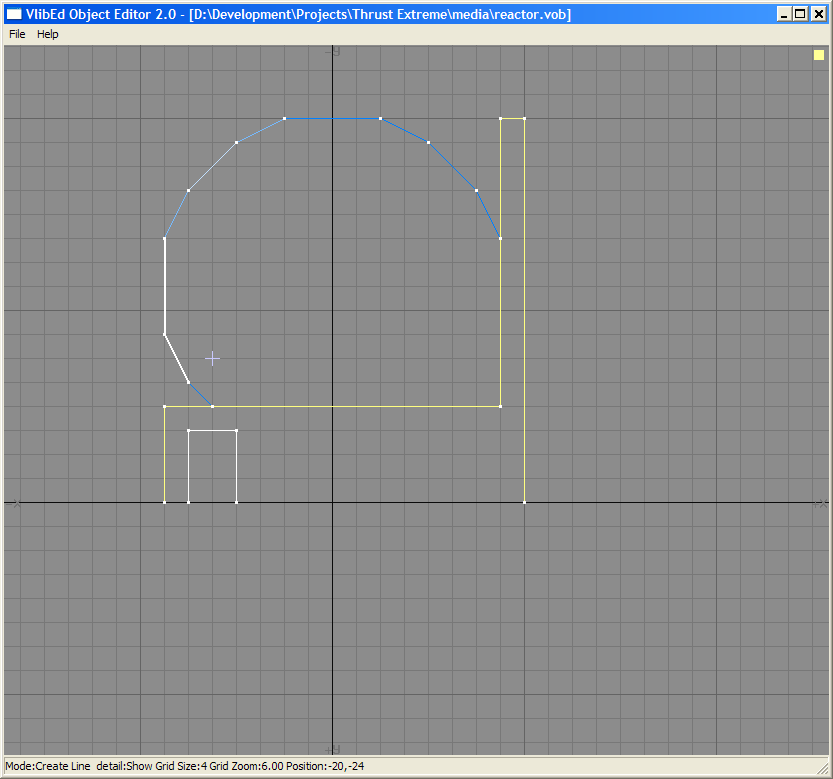
September 28, 2016 at 7:25 am #4124Looks like my vector editor from years back! They’re fun!
http://members.home.nl/wdw/images/wip/objecteditor.PNG
I did use unique lines, each with an end and start point. It allowed me to apply color and attributes to each line. Scaling, rotation, etc was only done when an object got changed. It was a good system, might port it to M2! I could use more vector games anyway!
September 28, 2016 at 7:37 am #4125I Made a png to polygon module, maybe you can use that. Its inside the Ted module manager.
September 28, 2016 at 11:11 am #4129Wiebow definitely a good idea. I’d love to get something that is open and what people want

All basics now complete:
drawing, moving, selecting, moving and zooming the page
September 28, 2016 at 6:13 pm #4135or mine…
ditto everything wiebow said though I did write an save optimizer that removed all duplicate points out. so multiple segments would turn into a polygon if colors and position are the same. the layering idea you mentioned is actually important as you usually want at least 2 polys per object… the visible and the collision which is generally much less complex. my library had lighting as well… I would calculate the segment’s distance and angle from each light source and apply color changes as needed. that worked pretty nice… I even started to add keyframe animation moving each point through easing. though I never put that in a game.
building stuff like this is fun! I miss it

http://ooeyug.com/images/vecedit3.png
September 29, 2016 at 5:53 am #4147the collision is an interesting point. I was thinking of having bounds, box, circle, triangle and poly as collision.
I’ll get the basic system operational first
quick shot of progress so far with placeholder buttons and left view (the browser will live on the left)
Attachments:
-
AuthorPosts



You must be logged in to reply to this topic.