About Monkey 2 › Forums › Monkey 2 Programming Help › Keycodes
This topic contains 13 replies, has 5 voices, and was last updated by  abakobo
 1 year, 10 months ago.
-
AuthorPosts
-
June 11, 2017 at 2:07 pm #8617
OK here’s what I want:
field KeyPress:int
a variable say KeyPress that equals Key.X
and can then be redefined
E.G.
KeyPress = Key.Z
June 11, 2017 at 4:08 pm #8619can’t you do this for now?:
Field keyPress := Key.X
later
keyPress = Key.ZJune 11, 2017 at 5:47 pm #8620Keys are Enums of type Key.
They are defined in mojo/input/keycodes.monkey2
you just have to
[/crayon]Monkey123[crayon-5cba87d98913f681457901 inline="true" ]Field keyPress:Keyand then you can (or just do as Jesse wrote)
[/crayon]Monkey123[crayon-5cba87d989145199668506 inline="true" ]keyPress=Key.Xyou may also
[/crayon]Monkey123[crayon-5cba87d98915a076342500 inline="true" ]Field i:int=Key.XBut you’ll lose it’s Enums properties (mainly the ability to |Key.Raw in this case, wich sould ALWAYS be used for WASD type controls IMO). And you wont be able to reconvert it to the ‘Key’ type easily.
If it’s of the ‘Key’ type you’ll be able to
`keyPressed=keyPressed.Y’
wich can be usefull if you call your keyPressed just k for example.June 12, 2017 at 5:24 am #8655all great but not quite what I was looking for. ;/
but found a solution:
Monkey1234Select int(event.Key)Case Key.EscapeCase _keyXusing the int allowed me to do what I wanted in the OnMouseEvent
and (yep using a hidden command – thanks Mark)
Monkey12If Keyboard.KeyDown( Keyboard.KeyCodeToKey( _keyStrafeLeft ) ) ThenThis was I can redefine the keys (properly IMHO) as ints that can come from external sources and controls
June 12, 2017 at 7:25 am #8657I don’t really get what you’re trying to do here but I know you don’t have to be warned that hidden functionalities are subject to change..
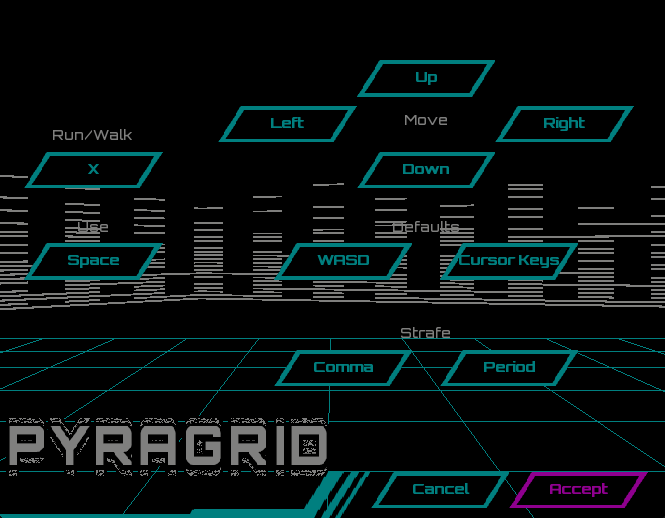
June 12, 2017 at 9:28 am #8659thats what I was trying to do:
a screen where I could change the keybindings
the controls return the key being winded as an int
Attachments:
June 12, 2017 at 10:47 am #8661using the int allowed me to do what I wanted in the OnMouseEvent
I don’t undestand why you want to mix mouse events and key events… or you meant OnKeyEvent?
You want the player to be able to chose between mouse or key controls?June 12, 2017 at 11:37 am #8662My bad – should have been OnKeyEvent ;[
It’s a simple rebinding screen. but it’s not simple to actually do it
June 12, 2017 at 11:59 am #8663can’t you cast it to an integer? I think that’s what I did to one of my games.
June 12, 2017 at 12:47 pm #8664yep I think that’s what the hidden command is doing as well (casting that is)
June 13, 2017 at 12:28 am #8679This is the way I’m currently doing it:
1. Enumerate the in-game commands that are assignable to keys:
[/crayon]Monkey123456789101112131415161718[crayon-5cba87d99b6b4232770497 inline="true" ]Enum CommandExitGame = 0MoveForwardMoveBackStrafeLeftStrafeRightJumpRaiseStanceLowerStanceSpeedFastSpeedSlowInteractLengthEnd2. Store and initialise the keybindings in a global Key array:
[/crayon]Monkey1234567891011121314151617[crayon-5cba87d99b6ba278559967 inline="true" ]Global KeyBindings := New Key[Command.Length]Function InitBindings()KeyBindings[Command.ExitGame] = Key.EscapeKeyBindings[Command.MoveForward] = Key.W | Key.RawKeyBindings[Command.MoveBack] = Key.S | Key.RawKeyBindings[Command.StrafeLeft] = Key.A | Key.RawKeyBindings[Command.StrafeRight] = Key.D | Key.RawKeyBindings[Command.Interact] = Key.E | Key.RawKeyBindings[Command.SpeedFast] = Key.LeftShift | Key.RawKeyBindings[Command.SpeedSlow] = Key.LeftControl | Key.RawEnd3. Check for the bounded keys during the game’s update call:
[/crayon]Monkey12345678910111213141516171819202122232425262728[crayon-5cba87d99b6bf078123029 inline="true" ]Method OnUpdate:Void()'...Local velocity := 0.2If Keyboard.KeyDown(KeyBindings[Command.SpeedFast])velocity = 1.0Elseif Keyboard.KeyDown(KeyBindings[Command.SpeedSlow])velocity = 0.05EndifIf Keyboard.KeyDown(KeyBindings[Command.ExitGame])App.Terminate()Elseif Keyboard.KeyDown(KeyBindings[Command.MoveForward])_camera.MoveZ(velocity)Elseif Keyboard.KeyDown(KeyBindings[Command.MoveBack])_camera.MoveZ(-velocity)Elseif Keyboard.KeyDown(KeyBindings[Command.StrafeLeft])_camera.MoveX(-velocity)Elseif Keyboard.KeyDown(KeyBindings[Command.StrafeRight])_camera.MoveX(velocity)Endif'..._mouseLook.Update()EndThe hope is it will make it easy to add a key-rebinding screen (as you’re wanting to do)…
I’ll probably encapsulate the behaviour in a class but the fundamentals are there…
June 13, 2017 at 7:32 am #8690I like it Impixi. Actually, I’ve been thinking about doing something similar on and off for ages – very ‘top of my head’ code follows…
Monkey12345678910111213141516171819202122232425262728293031323334353637383940414243444546474849505152Enum GameButton 'or just 'Button'?UpDownLeftRightFire1Fire2EtcEndClass GameController 'or 'GamePad'?Method ButtonDown( button:GameButton ) VirtualMethod Joyx:Float() VirtualMethod Joyy:Float() Virtual...etc...more 'useful' gamecontroller stuff.EndClass KeyboardController Extends GameControllerMethod ButtonDown:Bool( button:GameButton ) OverrideReturn Keyboard.KeyDown( _unmap[button] )End'Customize...Method MapKeyToButton( key:Key,button:GameButton )_map[key]=button_unmap[button]=keyEnd'Some stock mappings...Function WASDController:KeyboardController()Function IJKLController:KeyboardController()Function NumpadController:KeyboardController()Function ArrowKeysController:KeyboardControler()EndClass JoystickController Extends GameController'...etc...EndThe basic idea being your code would only really have to deal with GameControllers and GameButtons.
Possibly a bit ‘high level’ for monkey2? Or not?
June 14, 2017 at 12:31 am #8724@Mark Sibly:
Yes, nice idea, and probably the way it “should” be done.

Possibly a bit ‘high level’ for monkey2? Or not?
Not at all: extra functionality is always welcome. But don’t spread yourself too thin: you have enough to do already!
June 14, 2017 at 3:58 pm #8731Like impixi, it’s welcome but can be part of 3rd party framework too. You probably have more interresting things to achieve.
But it would be nice if the KeyboardDevice (and others InputDevices) had a ‘Last(pressed)Button’ method in order to make controls setupscreen without the need of the OnKeyEvent method override (or other On(INPUT)Event)I made a little controls setup demo (without the use of ints, only Key) to show it. In the case I missed something.
Monkey12345678910111213141516171819202122232425262728293031323334353637383940414243444546474849505152535455565758596061626364656667686970717273747576777879808182838485868788899091929394#Import "<std>"#Import "<mojo>"Using std..Using mojo..Global w_width:=600 'initial window sizeGlobal w_height:=100Class CtrlsOptions Extends Window'control KeysField kUp:Key=Key.UpField kDown:Key=Key.DownField kLeft:Key=Key.LeftField kRight:Key=Key.RightField kBoost:Key=Key.LeftShift'cycle fieldsField lastKey:=Key.NoneField screen:="Game"Field optionStep:=0Method New( title:String,width:Int,height:Int,flags:WindowFlags=WindowFlags.Resizable )Super.New( title,width,height,flags )EndMethod OnKeyEvent( event:KeyEvent ) OverridelastKey=event.KeyEnd MethodMethod OnRender( canvas:Canvas ) OverrideApp.RequestRender()canvas.DrawText("F1 for game screen / F2 for Ctrls Setup screen",10,15)If Keyboard.KeyPressed(Key.F1) Then screen="Game"If Keyboard.KeyPressed(Key.F2) Then screen="Options"Select screenCase "Game"canvas.DrawText("Game",10,35)If Keyboard.KeyDown(kUp) Then canvas.DrawText("Up",400,40)If Keyboard.KeyDown(kDown) Then canvas.DrawText("Down",400,60)If Keyboard.KeyDown(kLeft) Then canvas.DrawText("Left",350,50)If Keyboard.KeyDown(kRight) Then canvas.DrawText("Right",450,50)If Keyboard.KeyDown(kBoost) Then canvas.DrawText("!Boost!",520,50)Case "Options"canvas.DrawText("Options",10,35)Select optionStepCase 0canvas.DrawText("Press the new up button",200,60)If lastKey<>Key.F2 And lastKey<>Key.F1kUp=lastKeyoptionStep+=1EndCase 1canvas.DrawText("Press the new down button",200,60)If lastKey<>Key.F2 And lastKey<>Key.F1 And lastKey<>kUpkDown=lastKeyoptionStep+=1EndCase 2canvas.DrawText("Press the new Left button",200,60)If lastKey<>Key.F2 And lastKey<>Key.F1 And lastKey<>kUp And lastKey<>kDownkLeft=lastKeyoptionStep+=1EndCase 3canvas.DrawText("Press the new Right button",200,60)If lastKey<>Key.F2 And lastKey<>Key.F1 And lastKey<>kUp And lastKey<>kDown And lastKey<>kLeftkRight=lastKeyoptionStep+=1EndCase 4canvas.DrawText("Press the new Boost button",200,60)If lastKey<>Key.F2 And lastKey<>Key.F1 And lastKey<>kUp And lastKey<>kDown And lastKey<>kLeft And lastKey<>kRightkBoost=lastKeyoptionStep=0screen="Game"EndEndEndEndEndFunction Main()New AppInstanceNew CtrlsOptions( "Ctrls",w_width,w_height )App.Run()End -
AuthorPosts




You must be logged in to reply to this topic.