About Monkey 2 › Forums › Monkey 2 Programming Help › Mojo Render Lagging
This topic contains 21 replies, has 9 voices, and was last updated by  peterigz
 2 years, 3 months ago.
-
AuthorPosts
-
December 19, 2016 at 1:14 am #5901
To hide the mouse:
Monkey1Mouse.PointerVisible = FalseDecember 19, 2016 at 2:09 am #5902Hi,
I have included an image of cursor movement within my Monkey 2 application. In view are both a system (OS) cursor and a local application cursor (the larger one) that is drawn using Mouse.x/y. Here I am capturing the screen while moving the cursor from right to left (moderate/slow movement). As you can see the locally drawn cursor is some distance from the actual system cursors position. This lag or delay in reporting position is noticeable. Whether it is a Linux, SDL or Monkey 2 issue it is a thing and noticeable.
It makes me also wonder why I get smooth mouse position data in my monkey 2 application but applications like Ted2 or Ted2GO seem to have wild positioning/scaling issues with console and treeview, at least on Linux. Why is it that the mouse position in my application is reported fine but seems out of control in some others? If I recall Mark linked the Ted2 issue to an SDL issue, but why does that same issue not extend to my application?
Attachments:
December 19, 2016 at 2:26 am #5904[/crayon]Monkey123[crayon-5cb9b92017a40605217762 inline="true" ]Mouse.PointerVisible = FalsePeter beat me to it.
December 19, 2016 at 11:34 am #5913deleted.
December 19, 2016 at 5:46 pm #5917Does anybody know if it is possible to get the mouse coordinates when the pointer is outside the app window?
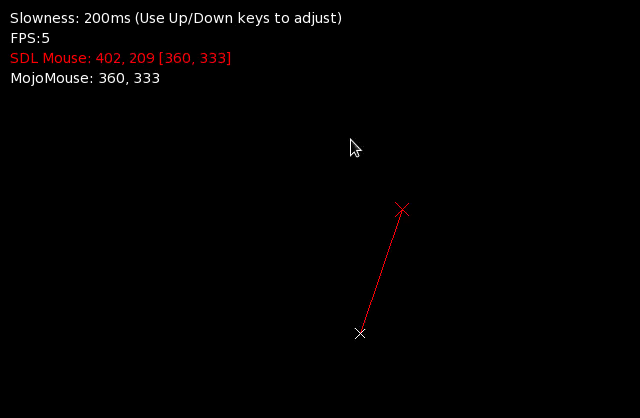
January 10, 2017 at 11:28 pm #6387There is something lagging, somewhere. I tried to ignore it but it kept bugging me so I decided to try bypassing mojo and used a direct SDL call to get the mouse coordinates and… they are one frame ahead of mojo’s. Or at least, they are here, anyway. Attached is the code I used to test this and a screenshot of how it looks here. Can anybody else test this? Is it just my hardware or is it a mojo bug (I suspect the mojo bug atm).
Monkey123456789101112131415161718192021222324252627282930313233343536373839404142434445464748495051525354555657585960616263646566#Import "<std>"#Import "<mojo>"#Import "<sdl2>"Using std..Using mojo..Using sdl2..Function Main()New AppInstanceNew MyWindowApp.Run()EndClass MyWindow Extends WindowPublicField slowness:Int = 200Field xsdl:Int, oxsdl:IntField ysdl:Int, oysdl:IntMethod New()ClearColor = Color.BlackSDL_CaptureMouse(SDL_TRUE)'SwapInterval = 1'Local timer := New Timer( 60, RequestRender )EndMethod OnKeyEvent( event:KeyEvent ) OverrideSelect event.TypeCase EventType.KeyDownIf event.Key = Key.Down Then slowness -= 10If event.Key = Key.Up Then slowness += 10If slowness < 0 Then slowness = 0EndEndMethod OnRender( canvas:Canvas ) Override'Plot mouse according to SDL_GetMouseState()canvas.Color = Color.RedSDL_GetMouseState(Varptr xsdl, Varptr ysdl)canvas.DrawLine(xsdl - 7, ysdl - 7, xsdl + 7, ysdl + 7)canvas.DrawLine(xsdl - 7, ysdl + 7, xsdl + 7, ysdl - 7)canvas.DrawLine(xsdl, ysdl, oxsdl, oysdl)canvas.DrawText("SDL Mouse: " + xsdl + ", " + ysdl + " [" + oxsdl + ", " + oysdl + "]", 10, 50)oxsdl = xsdloysdl = ysdl'Plot mouse according to Mojo Mouse.X and Mouse.Ycanvas.Color = Color.Whitecanvas.DrawLine(Mouse.X - 5, Mouse.Y - 5, Mouse.X + 5, Mouse.Y + 5)canvas.DrawLine(Mouse.X - 5, Mouse.Y + 5, Mouse.X + 5, Mouse.Y - 5)canvas.DrawText("MojoMouse: " + Mouse.X + ", " + Mouse.Y, 10, 70)canvas.DrawText("FPS:" + App.FPS, 10, 30)canvas.DrawText("Slowness: " + slowness + "ms (Use Up/Down keys to adjust)", 10, 10)Sleep(Float(slowness)/1000)RequestRender()End MethodEnd ClassAttachments:
January 11, 2017 at 1:27 pm #6412Does it as well here. The “fix”, and I use that word loosely because there could be a reason why Mark did it like this, is to change the order the mouse.Update is called in the UpdateEvents() method of app.monkey2
The original version looks like this:
Monkey123456789101112131415161718192021Method UpdateEvents()Keyboard.Update()Mouse.Update()Touch.Update()Local event:SDL_EventWhile SDL_PollEvent( Varptr event )DispatchEvent( Varptr event )WendLocal idle:=IdleIdle=Nullidle()EndSo move the Mouse.Update() after SDL_PollEvent (I moved keyboard and touch after as well):
Monkey123456789101112131415161718192021Method UpdateEvents()Local event:SDL_EventWhile SDL_PollEvent( Varptr event )DispatchEvent( Varptr event )WendKeyboard.Update()Mouse.Update()Touch.Update()Local idle:=IdleIdle=Nullidle()EndIf that’s an ok fix then maybe Mark can update or I can do a pull request. I just tried it with the game I’ve been doing and everything still works fine.
-
AuthorPosts


You must be logged in to reply to this topic.