About Monkey 2 › Forums › Monkey 2 Programming Help › My Character Runs into the Skybox.How do I make my Skybox Large and further Away
Tagged: Skybox
This topic contains 2 replies, has 2 voices, and was last updated by  En929 3 months, 1 week ago.
-
AuthorPosts
-
January 9, 2019 at 8:59 am #15868
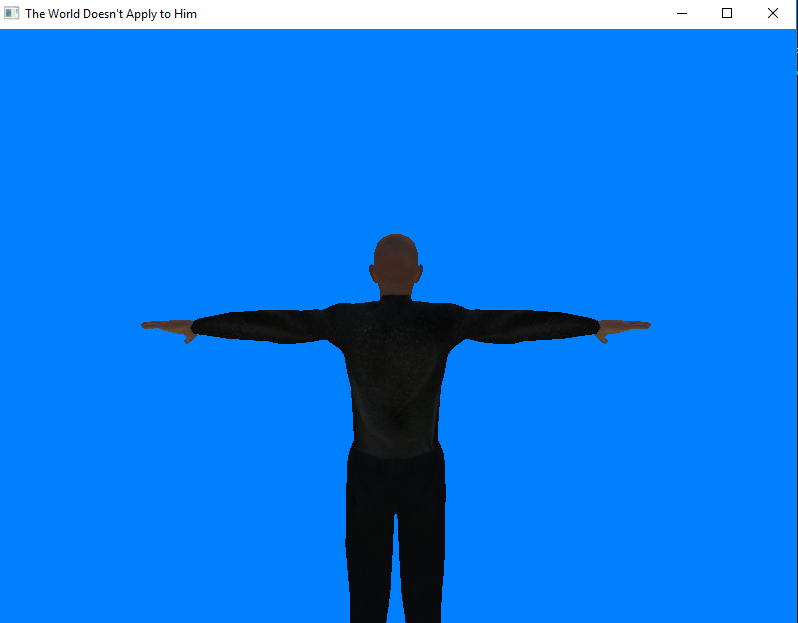
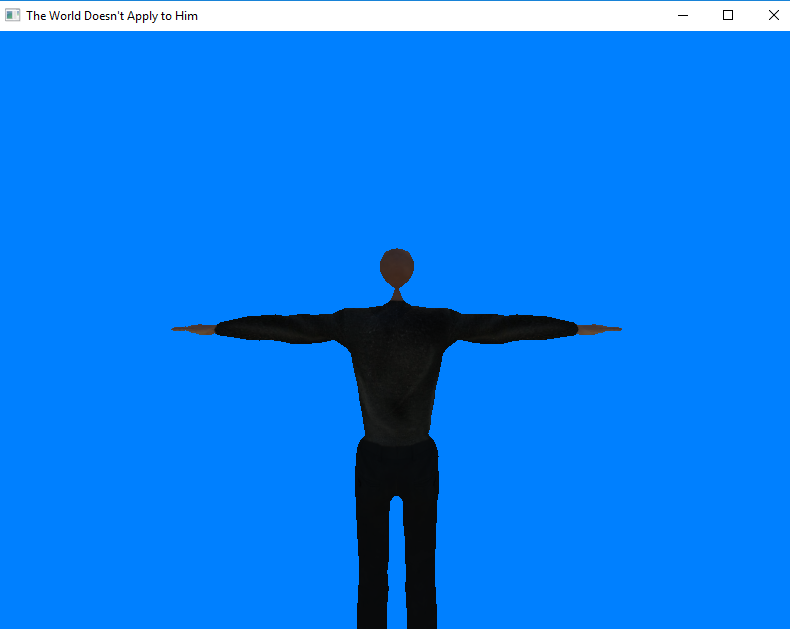
I was trying to make a 3D game and my character keeps running into the Skybox (or maybe Cubemap or blue background) in front of him when the game starts. I barely hold the keys down for long and it does that. Such could be seen in the pictures below. Thus, I was wondering how do I make the Skybox bigger and further away so that the character won’t run into the Skybox as easily. What do I add to my code? My code and picture is below.
Thanks
(By the way, the game below was made based off of the “ninja.monkey2” example. I started with that example and only switched the character and added controls to it so that it could move forward and backwards. But, I didn’t actually put the background there. It is what came with ninja.monkey2 example)
Pic 1: This is before my character moves
Pic 2: This is after my character moves just a little bit. It runs into the Skybox/Cubemap/or blue background in front of it.
What do I add to the code below to fix this.
 Monkey123456789101112131415161718192021222324252627282930313233343536373839404142434445464748495051525354555657585960616263646566676869707172737475767778798081828384858687888990919293949596979899100101102103104105106107108109110111112113114115116117118119120121122123124125126127128129130131132133134135136137138139140141142143144145146147148149150151'Skybox 1015 X 1030 and 2045 X 995 for a 4095 X 3070 sized'pictureNamespace myapp#Import "<std>"#Import "<mojo>"#Import "<mojo3d>"#Import "<mojo3d-loaders>"#Import "HenryB3DAnim.b3d"#Import "Henry_color.jpg"#Import "Tower.png"Using std..Using mojo..Using mojo3d..Class MyWindow Extends WindowField _scene:SceneGlobal _camera:CameraField _light:LightField _ground:ModelField Henry:ModelField _animator:AnimatorField HenryX:Float = 512 '// x position on the mapField HenryY:Float = -130Method New( title:String="The World Doesn't Apply to Him",width:Int=800,height:Int=600,flags:WindowFlags=WindowFlags.Resizable )Super.New( title,width,height,flags )'create scene'' _scene=New Scene' Local _bloom := New BloomEffect( 2 )' _scene.AddPostEffect( _bloom )' _scene.SkyTexture=Texture.Load( "asset::Tower.png",TextureFlags.FilterMipmap|TextureFlags.Cubemap )' _scene.EnvTexture = _scene.SkyTexture'create camera'_camera=New Camera( Self )' _camera.AddComponent<FlyBehaviour>()_camera.Near=.1_camera.Far=100'_camera.Move( 0,5,-20 )'create light'_light=New Light_light.Rotate( 75,150,0 ) 'aim directional light 'down' - Pi/2=90 degrees._light.CastsShadow=True'create ground'_ground=Model.CreateBox( New Boxf( -5,-5,-5,1,0,100 ),1,1,1,New PbrMaterial( Color.Green ) )_ground.CastsShadow=False'create turtle'Henry=Model.LoadBoned( "asset::HenryB3DAnim.b3d" )_animator=Henry.Animator'Henry.RotateY( 0 )'The lower the number the shorter the playerHenry.Scale=New Vec3f( .90 )Henry.Position = New Vec3f(0, HenryY,40)_animator.MasterSpeed=0.5Local anim2:=_animator.Animations[0].Slice( "Idle",1,1,AnimationMode.Looping )Local anim1:=_animator.Animations[0].Slice( "Walk",2,30,AnimationMode.Looping )Local anim3:=_animator.Animations[0].Slice( "Punch",31,99,AnimationMode.OneShot )_animator.Animations.Add( anim1 )_animator.Animations.Add( anim2 )_animator.Animations.Add( anim3 )EndMethod OnRender( canvas:Canvas ) OverrideRequestRender()If _animator.Animating?.Name<>"Punch"If Keyboard.KeyHit( Key.Space )_animator.Animate( "Punch",.2 )Else If Keyboard.KeyDown( Key.Up )_animator.Animate( "Walk",1)' _camera.MoveZ( -1,True )Henry.MoveZ(1, True)Else If Keyboard.KeyDown( Key.Down )_animator.Animate( "Walk",1)' ' _camera.MoveZ( -1,True )Henry.MoveZ(-1, True)Else 'idle_animator.Animate( "Idle",.2 )EndifEndif' _scene.Update()_camera.Render( canvas )canvas.Scale( 640.0, 480.0 )canvas.DrawText( "Hold [Enter] to strut, [Space] to Punch! anim time="+Henry.Animator.Time,0,0 )EndEndFunction Main()New AppInstanceNew MyWindowApp.Run()EndJanuary 9, 2019 at 9:46 am #15869
Seems like you’re hitting the camera far clipping plane. Try setting _camera.Far to a much higher value, like 1000 or 10000.
While you’re at it, you may want to check your model’s scale. Ideally, you should keep 1 unit = 1 meter. Some apps like Maya seem to default to 1 unit = 1cm, which makes everything 100 times larger than it should and causes all sorts of precision issues in large scenes (not just in games, even in pre-rendered stuff like feature films).
Cheers.
January 10, 2019 at 1:03 am #15871Thanks Ethernaut! That worked. And thanks the advice about the model scale too.
-
AuthorPosts


You must be logged in to reply to this topic.