About Monkey 2 › Forums › Monkey 2 Development › odd sound (wav) issue
This topic contains 8 replies, has 4 voices, and was last updated by  AdamStrange
 2 years, 1 month ago.
-
AuthorPosts
-
March 9, 2017 at 2:03 pm #7435
OK, this is something odd relating to sound.
I”ve tested it in V1.0.2 and V1.0.19, but not currently in V1.0.3
Basically I thought that on loading a 16 bit mono wav, the beginning was being missed.
The waveform looked ok (it was showing exactly what I was expecting), but it was not sounding right.
The only way to describe this is it sounded like the wav was playing through a muffled speaker.
I wen’t back and checked the actual wav file was not corrupted in some way (I used an blitzmax sound loader) and the loaded sound was loud and very punchy.
I know that Monkey2 uses a completely different sound system, but on constructing my own audiosamples, they sound bright and loud and not muffled.
I have a feeling it is something to do with the wav loader itself?
At this stage I am really just fielding for anyone else noticing this?
I should add, that the blitzmax wav loader is not the default one but one I wrote myself. so I will need to dig out the code and report back with some findings.
Odd indeed…
March 10, 2017 at 6:42 am #7446ok, update on this.
The sound is being loaded, so everything there is fine, but still not sounding right. Doing some tests I found the following:
- Sound is being loaded
- when played non looped sound plays, but sound quiet. but it is actually not playing the beginning!!
- when played looped, the sound plays (missing the beginning) then loops back to the correct start – the punchy load bit!
So it looks like when the sound plays it is missing a portion of the beginning – around 4096 bytes – which seems to be about the buffer size (off the top of my head)
I then tried augmenting the mojo audio code to force the playhead (AL_SAMPLE_OFFSET) to be at 0, but still missing the beginning.
But the 4096 thing make me think that the buffer is not being filled first time around. I’ll report more later.
Note this is a very short waveform (drum sound) so it is very apparent.
March 10, 2017 at 7:48 am #7447more on this one.
I’ve writing a quick prog just to test by using the asset:: with a Sound.Load and the problem still persists.
Further investigation with another editor shows that the first 1024 bytes are not being played, but skipped
Mark can you share your thoughts on this?
I can post audio highlighting the issue if needed?
To Recap – Monkey2 ignores the first 1024 bits in any audio waveform (pitch not adjusted)
March 10, 2017 at 10:08 am #7452Mark wants to see every bug report on GitHub. Opening an issue
on github increases the chance for a fix, as far as I understand it.March 10, 2017 at 2:30 pm #7457ok, added to the git bug
Update to this. I’ve done a quick test with the VSynth, and it seems to play the samples correctly without missing the beginning. so I think It can now be definitely a bug
March 10, 2017 at 7:42 pm #7460Are you testing audio directly from Main and not inside an app window method? From the looks audio is initialized after bbMain (I may be wrong) so that may be problematic.
The SDL wav loader “supports” not only plain PCM but floating point, MS_ADPCM_CODE and IMA_ADPCM_CODE so I would be happy to look into this if you can post actual sample.
I suspect the problem is to do with the mono property of your sample if things are working OK with stereo samples.
March 11, 2017 at 7:04 am #7466no, it’s definitely both mono and stereo samples.
I had to run a number of tests after your suggestion – and used the samples from the vsynth demo.
Can confirm that .025 milliseconds is missing from the beginning of both mono and stereo.
I should add that you will need a second editor (one that you know gives correct results) to hear the difference. It is very subtle and extremely difficult to hear, but it happening.
It’s not first run with the playing. it is all playing of all waveforms.
Sample I was using to test from the vsynth was bassdrum1.wav
on playing. the sound sorta sounds fine – but it’s not, it’s missing about .025milliseconds from the beginning
Here’s the code:
Monkey12345678910111213141516171819202122232425262728293031323334353637383940414243Class MyWindow Extends Windowfield sound:SoundMethod New()Super.New( "My Window", Size.X, Size.Y, WindowFlags.Resizable )' Layout = "letterbox"Layout = "fill"' sound = Sound.Load( "asset::kick.wav" )sound = Sound.Load( "asset::bassdrum1.wav" )' sound = Sound.Load( "asset::MHBB_SN.wav" )EndMethod OnRender( canvas:Canvas ) Override'fill the screen canvas with a colorcanvas.Color = Color.Blackcanvas.DrawRect( 0, 0, Width, Height )canvas.Color = Color.Whitecanvas.DrawText( "return to play", 10, 10 )End'respond to any key pressesMethod OnKeyEvent( event:KeyEvent ) OverrideSelect event.Typecase EventType.KeyDownSelect event.KeyCase Key.Entersound.Play()End SelectEnd SelectEndEndMarch 13, 2017 at 9:40 pm #7490I can post audio highlighting the issue if needed?
…that would be useful.
March 14, 2017 at 6:54 am #7492Hi Mark – I know this is an odd one. BTW it’s MacOS just so you know.
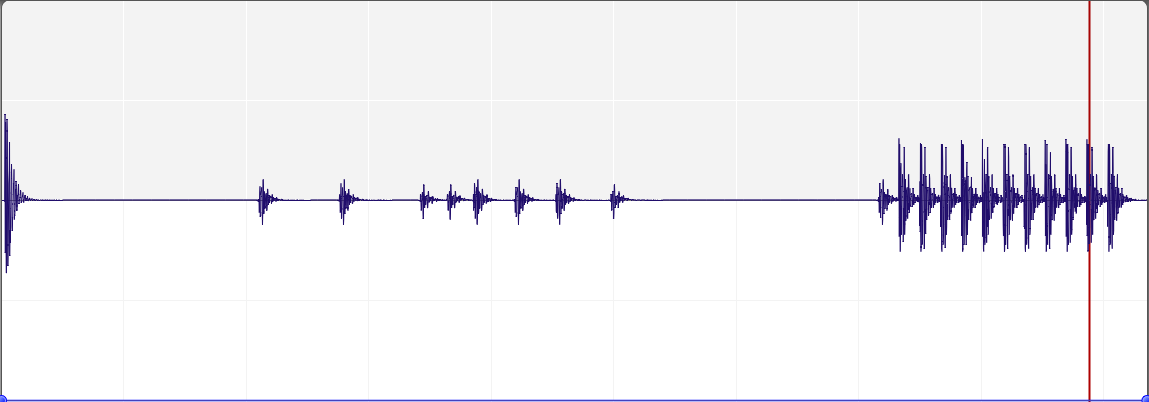
Right, you will need an audio editor to view this as I saved it as a mp3 for space. An audio editor is also a great tool to really show what is going on, so I’ve posted a screenshot as well
The first sound is the kick drum being played from the file browser.
The second is the loaded kick drum being played by Sound.Play(). you can see that the played sound is definitely not playing the full sound and clipping the beginning – resulting the ‘muffled’ sound I was hearing. it seems to be about 0.02 seconds of the file isn’t being played.
The third is the loaded kick drum being played as a loop Sound.Play( true ). Now this is interesting as you can see the beginning is missing but the loops plays correctly, going back to the start and playing all the sample. as can be seen and heard.
Here’s the code I used:
Monkey12345678910111213141516171819202122232425262728293031323334353637383940414243444546474849505152535455565758596061626364Namespace myLetterboxApp#Import "<std>"#Import "<mojo>"Using std..Using mojo..#Import "assets/kick.wav"Const Size := New Vec2i( 640,360 )Function Main()New AppInstanceNew MyWindowApp.Run()EndClass MyWindow Extends Windowfield sound:Soundfield channel:ChannelMethod New()Super.New( "My Window", Size.X, Size.Y, WindowFlags.Resizable )Layout = "fill"sound = Sound.Load( "asset::kick.wav" )EndMethod OnRender( canvas:Canvas ) Overridecanvas.Color = Color.Blackcanvas.DrawRect( 0, 0, Width, Height )canvas.Color = Color.Whitecanvas.DrawText( "z to play, x to play looped", 10, 10 )EndMethod OnKeyEvent( event:KeyEvent ) OverrideSelect event.Typecase EventType.KeyDownSelect event.KeyCase Key.Zsound.Play()Case Key.Xchannel = sound.Play( True )End Selectcase EventType.KeyUpSelect event.KeyCase Key.Xchannel.Stop()End SelectEnd SelectEndEndAnd also the kick drum sample.
I haven’t tested on windows.
But have tested a completely different method using the vsynth demo. It played correctly.
-
AuthorPosts


You must be logged in to reply to this topic.