About Monkey 2 › Forums › Monkey 2 Development › Optimizing drawing of lots and lots of images
Tagged: performance, tilemap
This topic contains 6 replies, has 4 voices, and was last updated by  Ethernaut
 2 years, 1 month ago.
-
AuthorPosts
-
March 3, 2017 at 5:18 am #7359
Hi,
I’m working on a little “retro” game that adopts many of the graphic limitations of old MSX computers, like 8×8 pixel BG tiles.
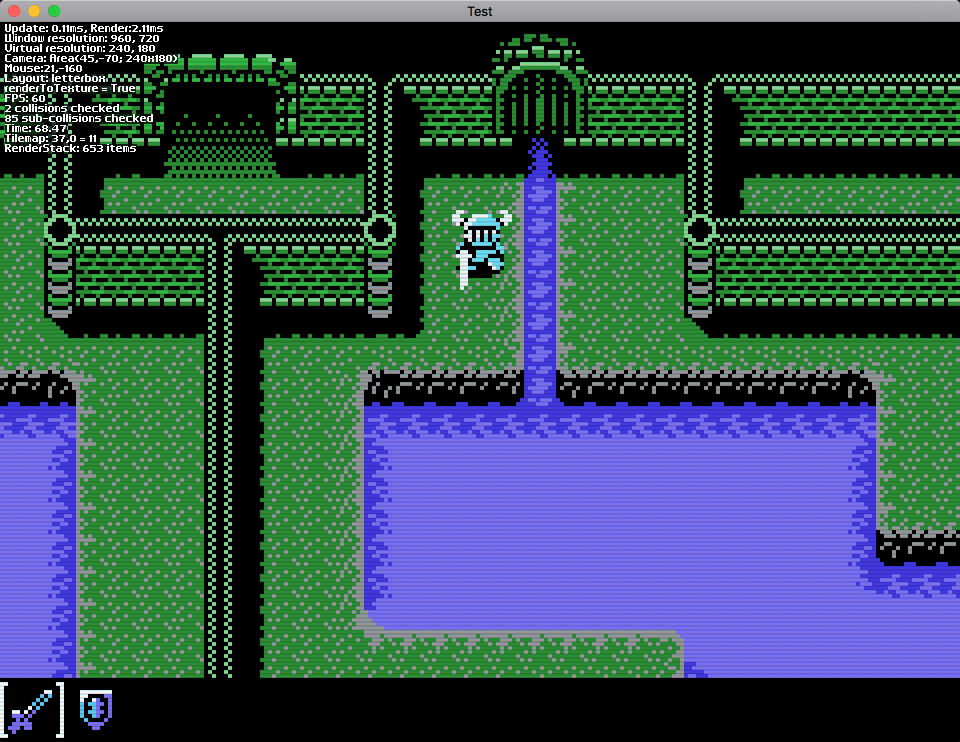
Despite being so old fashioned, drawing so many tiles – usually between 600 and 800 for the resolution I’m using – seems pretty slow. I get about 2ms on my new laptop with a discreet GPU, which isn’t bad at all, but my wife’s old laptop renders dangerously close to the 16.7ms limit for a 60fps rate.
You may notice from these screenshots that the update loop is super fast, 0.1ms even with collisions on, it’s just the drawing loop that’s slow. I overlaid a grid to one of the screenshots to make the size of each tile apparent.
I’m already culling out of screen tiles. During the update loop it figures out which row and column to start and finish drawing based on the camera, then draws only visible tiles. Commenting out the line that actually draws the tiles drops it to about 0.3ms (which includes drawing other sprites, overhead from drawing the text info, etc.), so I don’t think there are other main factors here, it’s just the drawing of necessary images that’s slower than I expected.
In Unity3D there is a lot of concern about “batching” image drawing operations. This seems like the perfect candidate for that, since each tile is just a rect from the same image atlas. Is there a batching equivalent in Mojo?
Thanks!
Attachments:
March 3, 2017 at 7:58 am #7362How are you approaching all of this? As I’ve got some stuff here that might help – sprite editor, map editor, etc
Don’t know if it will speed things up, but I would like to help?
https://adamstrange.itch.io/fontsprite
It’s all in monkey 2 so I can give you any needed code
March 3, 2017 at 8:24 am #7363You could batch a big load of quads using Canvas.DrawPrimitives.
A module that did this for you would be quite handy but I don’t think anyone has done anything in this area. GL especially on Mac has pretty low overhead for discrete draw calls (compared to fill rate) but it may be a big win for GL-Emulated-Angle-Windows platforms.
March 3, 2017 at 4:16 pm #7369Thanks!
DrawPrimitives seems like the way to go.I also found another inefficient bit: my RenderStack object, which does the y-coordinate sorting I need (so that sprites may be drawn in front of or behind objects, depending on the screen placement) accounts for almost half of the drawing time. Here’s the code for that:
Monkey12345678910111213141516Method Draw( canvas:Canvas )Echo( "RenderStack: " + items.Length + " items", False )items.Sort( Lambda:Int( a:RenderItem, b:RenderItem )Return a.depth <=> b.depthEnd )For Local r := Eachin itemsr.entity.TransformDrawingMatrix()canvas.DrawRect( r.left, r.top, r.width, r.height, r.img )canvas.PopMatrix()Nextitems.Clear()EndIf I comment out the canvas.DrawRect line, the images aren’t drawn but it still takes 1 ms (from the original 2 ms) to sort the stack and transform all coordinates.
Turns out the r.entity.TransformDrawingMatrix() is a repeat operation – I can store each item with the coordinates already transformed. Now I only have to figure out a quicker way to sort the drawing queue. Maybe sort as I insert the items in the stack, instead of all at once?
Thanks.
March 4, 2017 at 8:45 am #7376Switched the drawing to Canvas.DrawPrimitives and… Wow!
On the discreet GPU I’m getting 2 to 3 times faster, and on the slower laptop with Intel integrated GPU it’s a whopping 15 to 20 times faster!
I made a simplified version of my new RenderStack class, without any references to entities or drawing matrices (which means you can only draw non-rotated quads), and uploaded a simple example to GitHub if anyone is interested. It automatically generates the batches, accumulating render items that share the same texture until it tries to draw an item with a new texture (in this example all images share the same texture, so a single batch is drawn).
https://github.com/DoctorWhoof/RenderStack
Feel free to improve and share.The only bummer is that this example will crash if you set the total number of drawings too high – definitely crashes at 20000, so the difference between batching and not batching is not that clear. But in my project using much larger image atlases (with hundred of tiles) the difference is massive.
Cheers!
March 5, 2017 at 9:00 pm #7385One obvious opt. would be to use uvStack.Data and vertStack.Data instead of ToArray() method. This provides direct access to the stack array, whereas ToArray() creates/copies a new array.
March 6, 2017 at 4:37 am #7390Thanks Mark! Updated.
Also added full transformation support for render items (position, rotation and scale).One thing I could not get working yet is the “colors” argument. I tried passing a Uint stack populated with Color.ToARGB(), with pitch 4, but I just can’t get it to look right, and not sure what I’m doing wrong. I left those lines commented out in the Github code.
Cheers.
-
AuthorPosts


You must be logged in to reply to this topic.