
Forum Replies Created
-
AuthorPosts
-
Thanks! So I’m pretty unsure what I’m doing, and what it’s doing isn’t quite right, but I bet I’m making a simple error:
Monkey1234567891011121314151617181920212223242526272829303132333435363738394041424344454647484950515253'struct tm *gmtime(timep) const time_t *timep;'{' static struct tm tmbuf;' register struct tm *tp = &tmbuf;' time_t time = *timep;' register long day, mins, secs, year, leap;' day = time/(24L*60*60);' secs = time % (24L*60*60);' tp->tm_sec = secs % 60;' mins = secs / 60;' tp->tm_hour = mins / 60;' tp->tm_min = mins % 60;' tp->tm_wday = (day + 4) % 7;' year = (((day * 4) + 2)/1461);' tp->tm_year = year + 70;' leap = !(tp->tm_year & 3);' day -= ((year * 1461) + 1) / 4;' tp->tm_yday = day;' day += (day > 58 + leap) ? ((leap) ? 1 : 2) : 0;' tp->tm_mon = ((day * 12) + 6)/367;' tp->tm_mday = day + 1 - ((tp->tm_mon * 367) + 5)/12;' tp->tm_isdst = 0;' return (tp);'}Function TimeToString:String(ut:ULong)Local day:ULong,mins:ULong,secs:ULong,year:ULong,leap:ULongLocal tf:ULong=24day=ut/(tf*60*60)secs=ut Mod (tf*60*60)Local oSecond:ULong=secs Mod 60mins=secs/60Local oHour:ULong=mins/60Local oMinute:ULong=mins Mod 60Local oWeekDay:ULong=(day+4) Mod 7year=(((day*4)+2)/1461)Local oYear:ULong=year+70leap=Not(oYear & ULong(3))day-=((year*1461)+1)/4Local oYearDay:ULong=dayIf day>58 Or leapIf leapday+=1Elseday+=2EndElseday+=0EndLocal oMonth:ULong=((day*12)+6)/367Local oMonthDay:ULong=day+1-((oMonth*367)+5)/12Local oISDST:ULong=0Return String(oMonthDay)+" of month:"+String(oMonth)+" of year:"+String(oYear)+" Hour:"+String(oHour)+" Minute:"+String(oMinute)+" Second:"+String(oSecond)+" Day of week:"+String(oWeekDay)EndIt produces this output when provided with the time value for the bit of code that contains it (so should be bang on compile time)
1 of month:6 of year:118 Hour:13 Minute:18 Second:0 Day of week:0
Which is nearly right in a lot of ways. It is the first of the seventh month of 2018 (only 1900 years out) and it’s 14 hours n 18 minutes etc. The hours value being one hour out could be down to UK daylight savings?
Edit… the above description is of how accurate it was. Is that obvious lol?
What’s the obvious error I’m making? I guess this:
leap=Not(oYear & ULong(3))
produces something wrong because oYear is of the wrong class. I’m not sure what the class of the variable in the example are.
I realise you may want a different sort of output to this, but if someone knows what I’m doing wrong it looks like this could be modified to provide the correct date n time however you want it.
This is a problem I relegated to “think about later” last year when I made my file requester and I still have it on that pile. Searching around I found this thread:
https://www.avrfreaks.net/forum/converting-unix-time-date-stamp-human-readable-form
In the fifth post david.prentice posts this code, which apparently works, but is it exactly what you’re looking for? It seems to be what I’m after. It doesn’t look hard to convert.. (?)
struct tm *gmtime(timep) const time_t *timep;
{
static struct tm tmbuf;
register struct tm *tp = &tmbuf;
time_t time = *timep;
register long day, mins, secs, year, leap;
day = time/(24L*60*60);
secs = time % (24L*60*60);
tp->tm_sec = secs % 60;
mins = secs / 60;
tp->tm_hour = mins / 60;
tp->tm_min = mins % 60;
tp->tm_wday = (day + 4) % 7;
year = (((day * 4) + 2)/1461);
tp->tm_year = year + 70;
leap = !(tp->tm_year & 3);
day -= ((year * 1461) + 1) / 4;
tp->tm_yday = day;
day += (day > 58 + leap) ? ((leap) ? 1 : 2) : 0;
tp->tm_mon = ((day * 12) + 6)/367;
tp->tm_mday = day + 1 – ((tp->tm_mon * 367) + 5)/12;
tp->tm_isdst = 0;
return (tp);
}The Mod keyword is reserved in M2, but I can’t actually find the command. Apparently % is mod? I know nothing about… C? (ignorance!)
I have to go and do other work, but I’m going to try to convert it myself later today.
I’ve kept pluggin away at easy stuff for a while. Text and TextRails are next, but that meant making Fonts editable… really just selecting letters from a texture. When I first imagined this iteration of an editor I didn’t really think about making this part of it. After only a little thought it was clearly a necessity, but I’ve only had a vague notion of how I’d arrange it til now. This is a first draft, like most of the things in my editor
 Allowing the user to lock the various components of the boxes seemed an ok way to make selecting letters easy.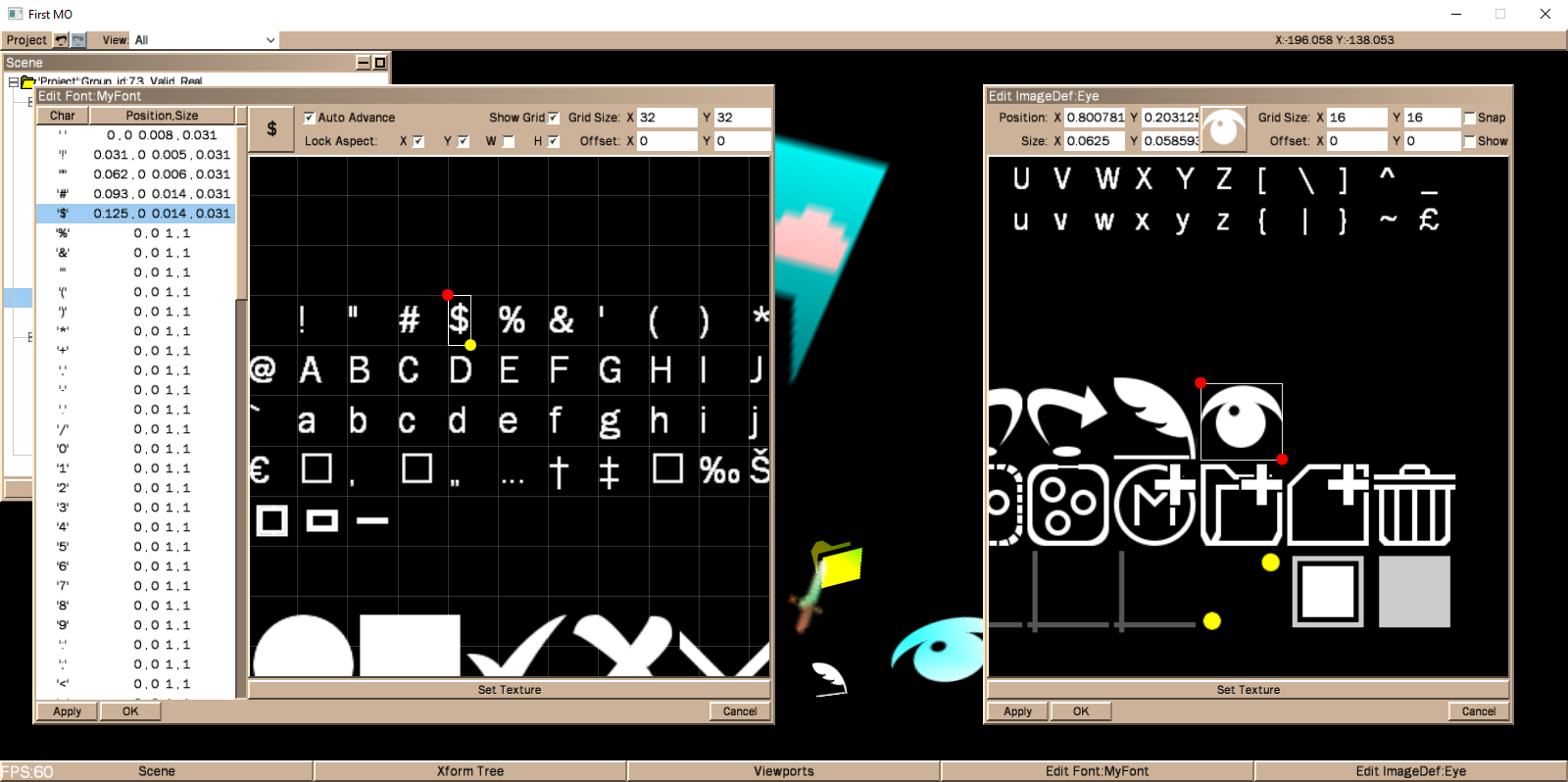
It’s really just an extension of the imageDef editor with cleverer grid controls.
Here’s a subjectively fascinating video of me using it to clip out the first 20 or so characters.
I swear I’ll figure out how to stop the vid being so fuzzy next time.
The code has a long way to go, obviously, but with this addition it’s getting nearly sensible for me to think about how I might export info from the editor. Ultimately it’ll export code for me to use, but I may put in options for exporting simple image or bitmap font definitions much sooner.
Also I must get a blog site of some sort. I might just copy my posts from this topic into as a history and continue the pair from here on. I’d like somewhere to put my GUI as it may as well be up. Anyway I’ve tired myself out again. Text is next.
Very nifty
I played til the shuttle level, but had developed no strategy to deal with even slightly clever enemies, so failed quick when things got tricky. Feels like a pretty faithful reproduction of the cannon-fodder controls, too!So it seems making videos of apps in Windows10 is easy if I use it’s built in functionality. It recorded it at fine quality but I guess I need to do some reading about what’s good for youtube as it went a bit fuzzy, but you get the idea…
https://www.youtube.com/watch?v=AqLq2x4usGI&feature=youtu.be
The video actually shows a tiny bug in my Quad definition
And also I certainly need practice thinking of interesting content for demo videos. But it gives you the gist…Well, I’ve not braced myself for the really tricky things. Instead I just did a couple more easy ones to have a rest but keep things moving.
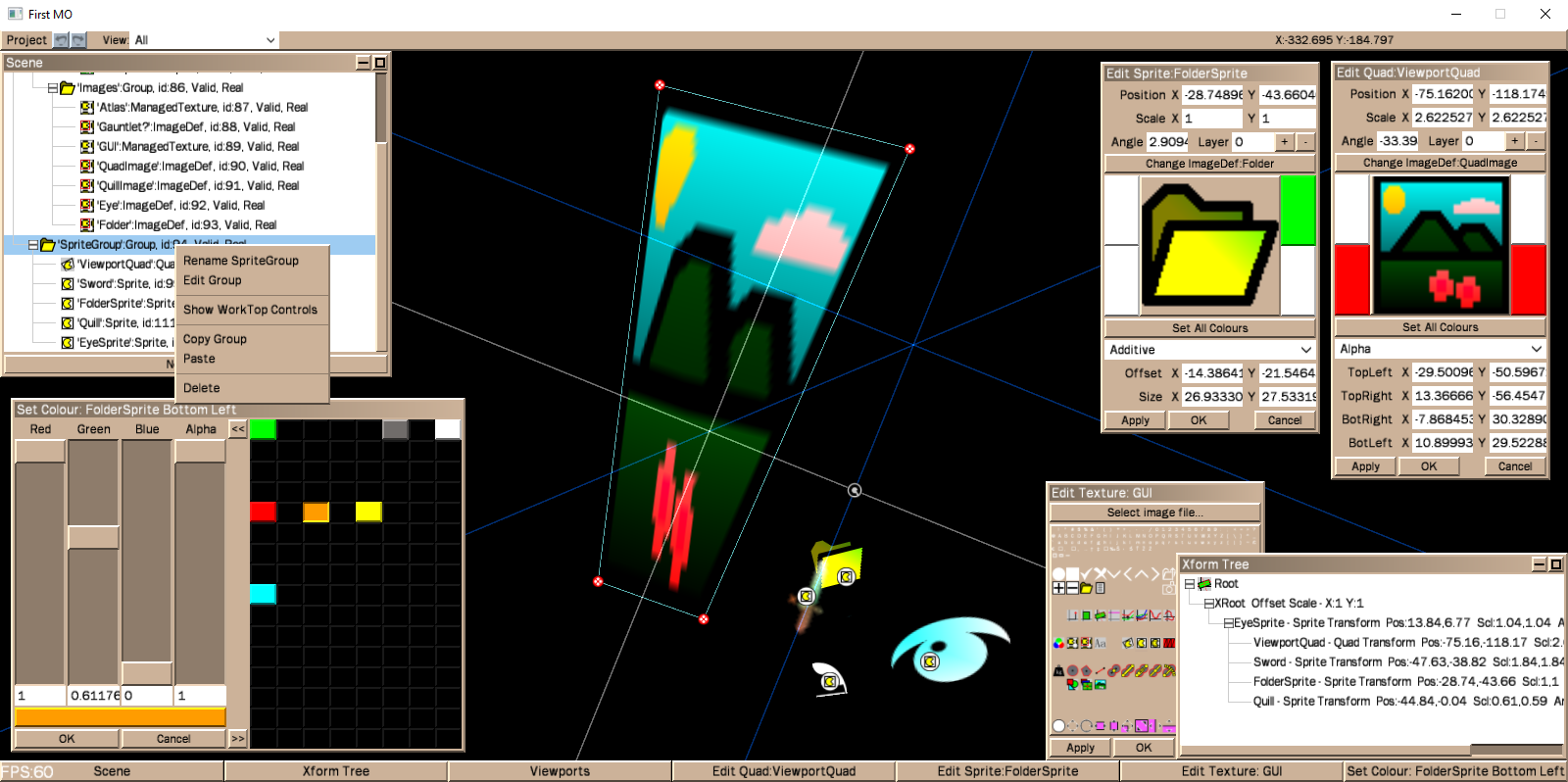
But Quads are now editable. They’re very similar to Sprites, so once I’d settled (for now) on the re-arranged Sprite EditBox it wasn’t much work to modify it for Quads. I’m getting used to making the Worktop controls now as well so the quad handles were pretty easy. And I made the smallest concession to improving my colour picker by adding a super simple persistent palette. Also fixed it so right-clicking on any worktop handle will open the EditBox for the appropriate object (Or pulls it to the front if one is already present for that object.) Another small thing that pushes it closer to feeling like a usable program.
Quads need to be handled with care if they’re to look ok. I did try switching my pairs of triangles to “4” primitives, but unsurprisingly it didn’t help much. It’s good to have them in though, and it was pleasingly easy to expand all the things I have there already to make them work.
I’m still expecting problems to arise. I’m at about 16000 lines of source and I’m damned if I know what’s happening at all times.
All fun, though.
Next is… I guess text and textRail objects. That way I still avoid having to write the spline editing panel. It’s a thing I wrote something very similar to in BlitzMax a long time ago, that allows to you define splines and then add and multiply them together. It’s great fun and dynamic looking, sliding each component spline around the display and seeing the effect on the overall curve, but I’m intimidated by the writing of it. It needs to be somewhat fancier this time round…
Edit: Looking at that screenshot, it appears I have a couple of labels misplaced in the Quad EditBox. Glitch 5231… Also, as I play with the objects, I wonder if I’m drawing them as well as I might. I’m pretty ignorant of the workings of OpenGL… can I adjust normals to improve the appearance of quads? <Hypothetical question I will try to answer.
Lots of minor adjustments that have been waiting a while. I’m relieved to have had some donkey work to do after the last week :).
Sprite is now fully editable! I’ll probably arrange it’s editbox more vertically than it is just now, but all the functionality is there and it’s worktop control is pretty much as I imagined it being. An Xform set of axis to control it’s frame of reference and a box with a pair of handles to control it’s position within that frame. It’s the simplest graphics object, but all the more complicated ones will be variations of this.
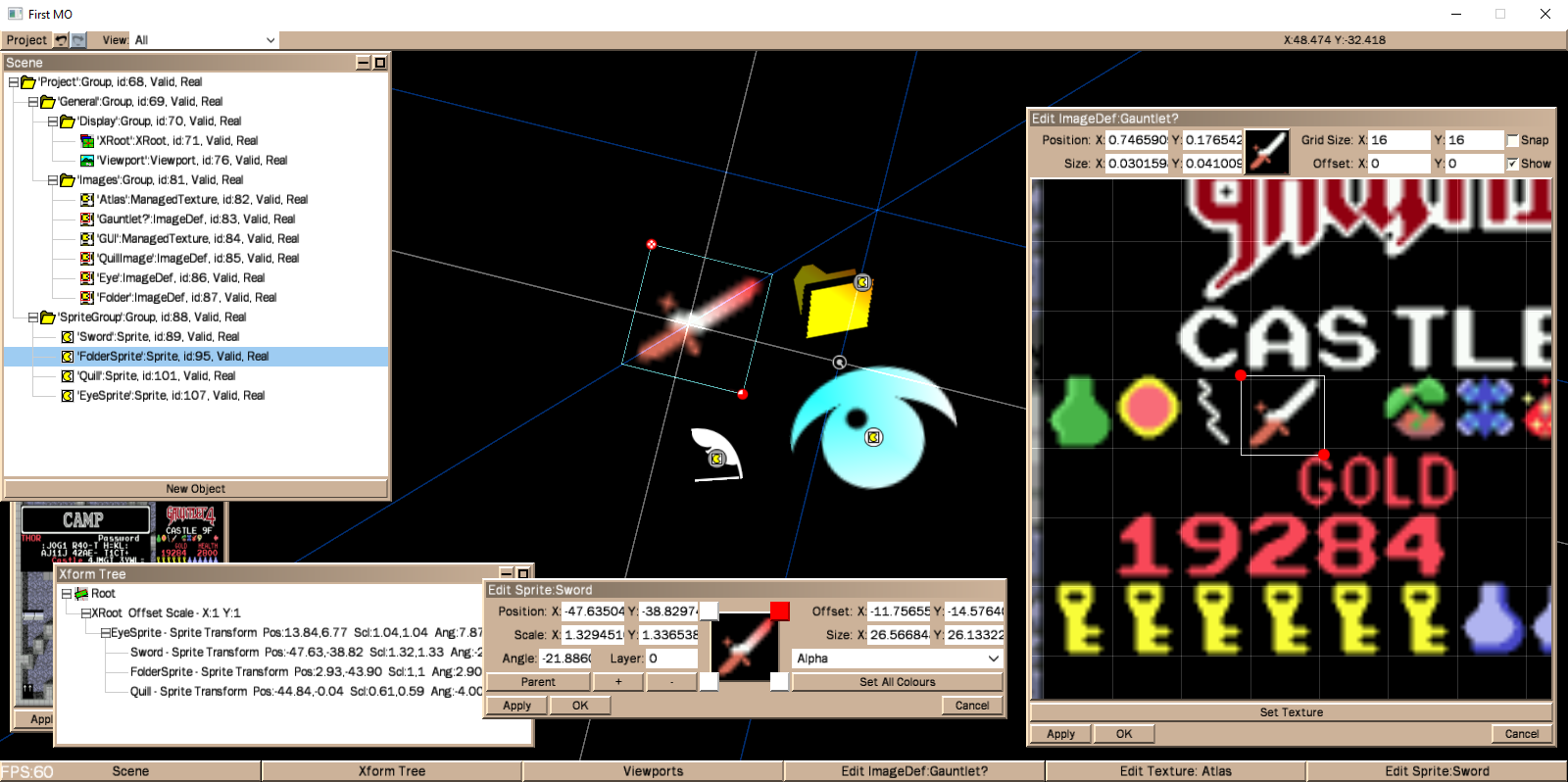
I made the ImageDef edit box more pleasant to look at and much roomier. A handful of other small updates have made the whole thing feel more coherent. The Scene tree context menu has an option to display an item or group’s worktop widgets, double clicking on an object now opens it’s editbox and all the info on the screen updates properly whenever an object changes. They sound like small changes, but it’s starting to feel like an actually useful thing at long last. Even though that’s a bit of an illusion and there’s still unimaginable (for me) masses to do.
After a small re-arrange of the Sprite Editbox I’m back to having dozens of options.
EditBoxes are one group of things I’ve to do. I’ve a set of Editboxes for easy and simple objects, a set for more complicated objects, and a couple that’ll be a nightmare. I’m tempted to go straight for the worst. If I can make the box and widgets for my SplineStrip class, it’ll REALLY get a few problems out of the way.
Wittering again cos I’m knacked! But chuffed enough
Pretty much on schedule, all the errors I spent the last week making are now corrected.
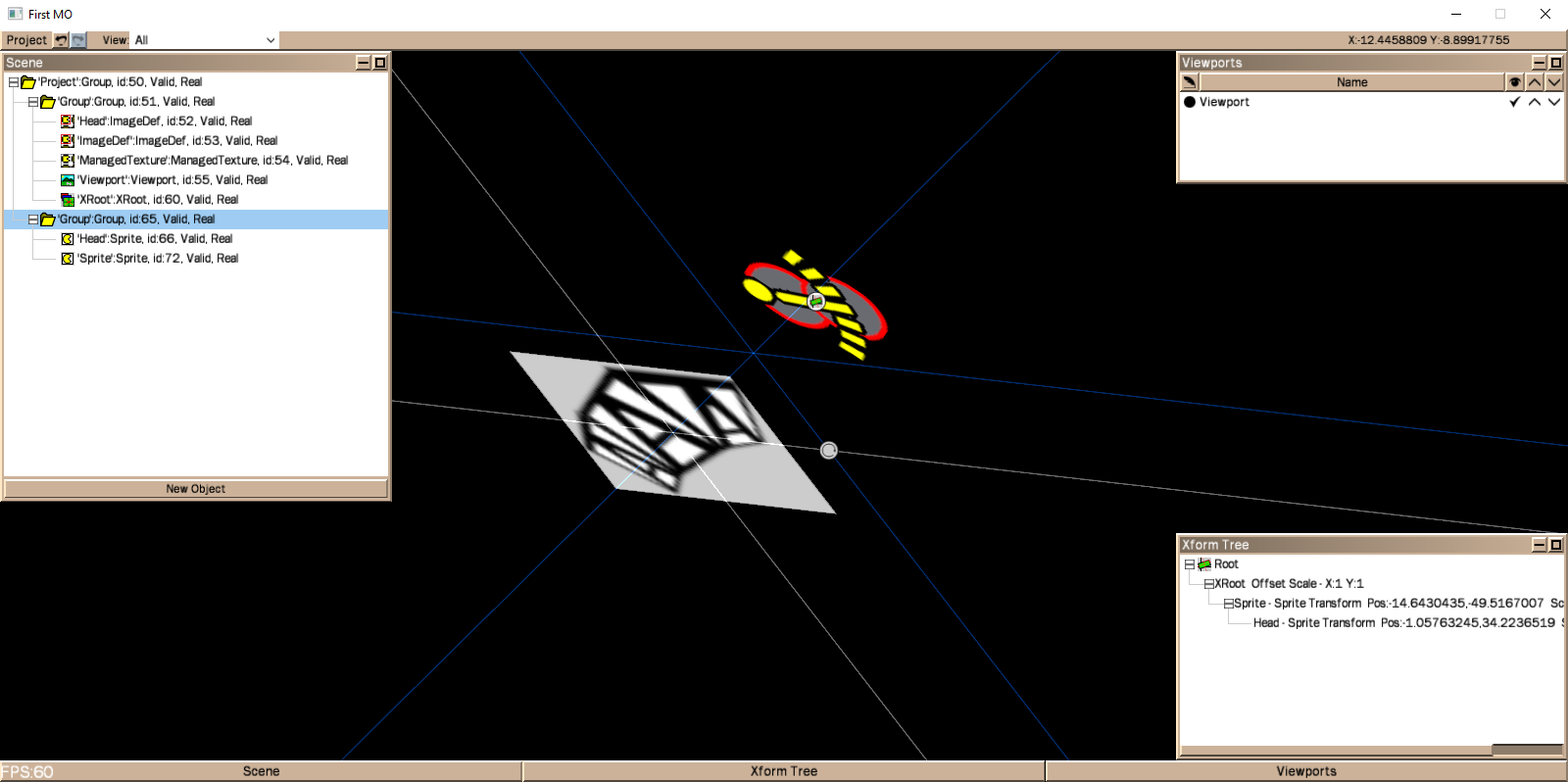
All the lines now respond as they should. Light up nicely as you roll the mouse over them and affect the right things when dragged. The spacing of the lines adjusts itself to be independent of the any of the scales involved, so the controls stay neat. I took out the grid altogether, it really wasn’t required for the Xform control. The grid aspect of the FrameDisplay thing will have other uses, like a world-coordinate grid.
I have a hangover problem from before with these controls, which is that when scaled negatively, my rotate control causes the object to flip 90 or 180… an error in my sums that I’ll just have to come back to. It is sort of important, but I’ll think about it as I change the subject for myself for a bit. Looking back I see it’s more than a fortnight since I started working on this aspect, and I’m really tired of it. In spite of the above problem, though, it feels like a another long-foreseen hurdle now overcome. I might be tired of it, but I’m very pleased with the way it feels and pretty pleased with the way it looks. Colours and things will be tweaked.
It’s getting to the stage that seeing it in motion is fun and sort of informative, but as a program it’s mainly dead-ends when using it, so a demo of any sort seems a bit pointless. I may put up a youtube video of me playing with it. Depends on how easy that is to do…
Now I need something more easy for a bit. I need to make some small changes so that all parts of the editor are updated when objects change, it’ll be fairly easy given the structure and it’ll look nifty to see values spin in string fields as I play with objects on the Worktop. That’s among a few other easier ui-things.
The next important thing is extending the sprite Worktop Widget to have those controls beyond just its Xform lines. When that’s done it’ll make the Sprite the first significant fully editable object. Which given how much of that functionality is shared among all objects, will be quite a milestone.
Not for a wee while yet
My lines are very ugly, I know and I’m gonna try to make them a little smoother.
Two hours of correcting errors later and the Xform display grid is at least now appearing in close to it’s final form, if not quite responding correctly yet…
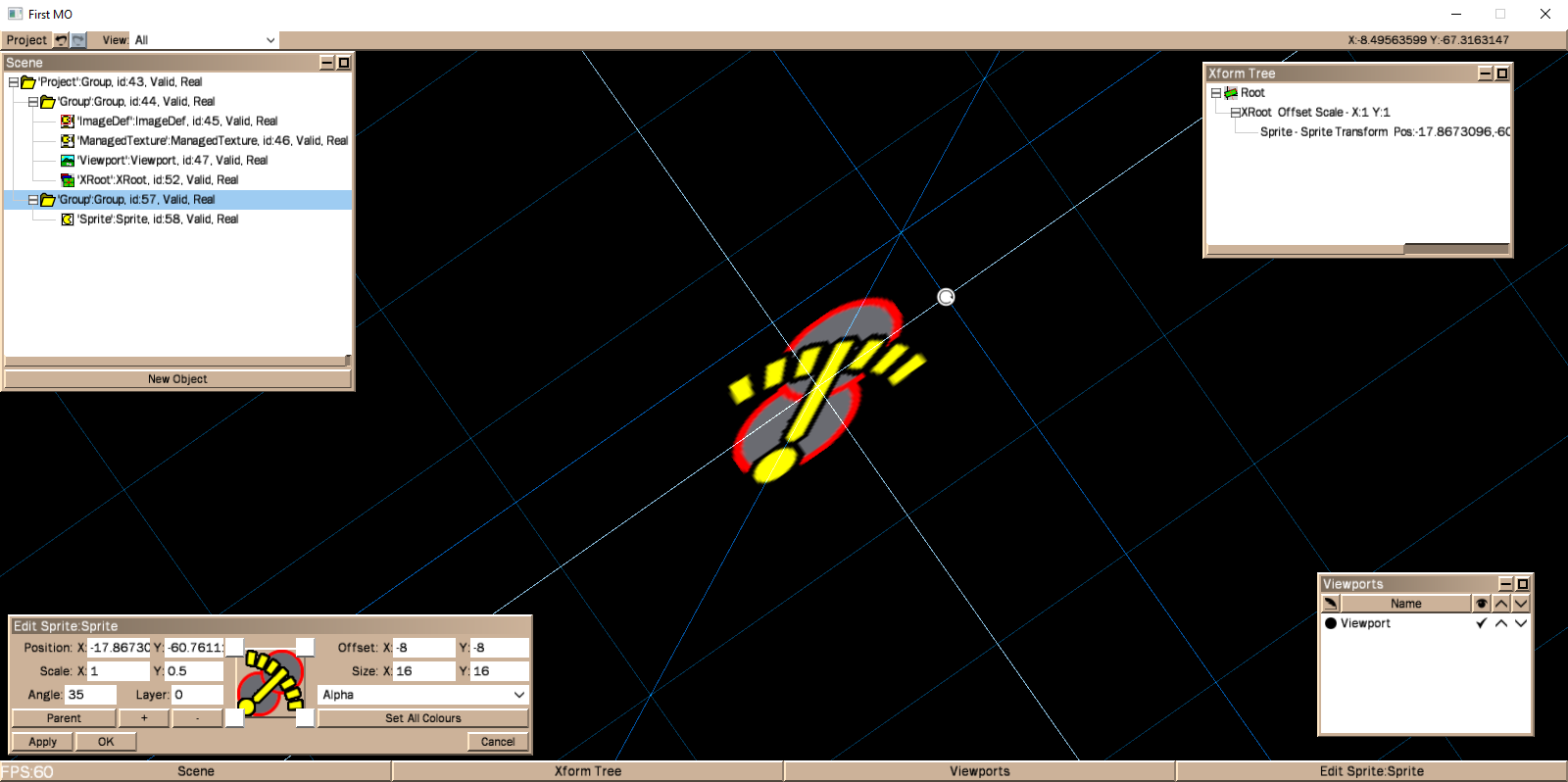
The bright lines being the axis of the frame, grabbing either of them will (soon) slide it along the opposing axis. Grabbing their intersection already moves the position. The blue lines are for adjusting the x-scale and y-scale for the ones aligned with the axis, and adjusting the scale proportionally for the diagonal. Grabbing the blue lines at the intersection is for free scaling.
The darkest blue lines are just an infinite grid which represent the frame.
Only one remaining hotspot required for rotation, much cleaner than before and leaving plenty room for object specific controls.
Satisfying couple of hours.
For all my moaning about maths, figuring out how to draw nice clipped grid and line segments took about a day and a half.
Building a half-way elegant logic to integrate the draggable lines with my existing handles has taken a week (edit – much more than that!), and what I’m formulating barely qualifies as half-way elegant.
It’s just running again after 4 or 5 days of having code heaved into it, as is my wont. It’s not working properly at all, but that’s not unexpected. A couple of days of solving all the problems I’ve created will follow, but it’s coming along.
Really just a post to celebrate having running code again, to say that work is continuing, and to complain in a tiny way about having to think about hard things. There’ve been some very confusing moments, an there are still a few to come obv.
Grids!

Ok, they’re not very interactive yet and I still need all those hotspots. I’m just delighted to have got through a couple of days of fighting my maths skills to get to this point, I’ve pursued a couple of dead ends to get here
But now they’re drawn perfectly in the correct frame of reference. I can draw a dim one for the world coordinates and a bright one for the currently selected object. Now I’ll do the stuff to make them sense the mouse. All of the hotspots that are there will go except for the rotate one, which I’m not sure how to get rid of and still have the thing usable.
I’m pretty pleased with my method as well… I’m sure it’s standard stuff for proper maths people but I feel awful proud of myself
Edit- thinking about this, it wasn’t putting them in the correct frame of reference that was tricky, but just being properly efficient about what I’m going to draw. In the past I’d certainly have taken a vaguer approach in a misguided attempt to save having to think too hard. Anyway I’m wittering.
Work actually came to a halt as a bug emerged in my undo routine.
It’s not interesting, just a reminder for me about how my code has grown well beyond what I keep in my head, and some bugs will just need hours n hours of looking at lists of numbers. It’s much nicer and more common for a good guess to sort things out.
It seems resolved now, though, and I’m much happier with the system having gone through it all to examine it. Not to mention getting it to produce reams of debugging info, poring through which has reassured me that really it is doing what I think it should be. Even in the small areas it was going wrong, I’m pretty confident I’ve made it right and sewn up any gaps.
But it’s tiring at this stage when I feel pretty close to having a lot of the really tricky things sorted, but expect serious and mysterious problems frequently. One by one I’ll find n fix problems like the one today, but it’s pretty knackering.
Well, I guess I could then! But really I should change it anyway if I’m going to release it, there’s no reason to confuse matters by demanding you use a different Canvas class. I actually should just go the whole hog and make it render to its own texture as well.
I don’t really have a page with my stuff on it. I sort of did a blog thing before, but I’d rather just update this topic with what I’m up to. The point is I don’t have a standard place I’d put code or anything. Let me look into getting somewhere and I’ll stick up the version I have, but it could use a tighten up even without changing the Canvas thing. I’m totally ignorant about where’s a good place to put webpages and small files for free. (poor man)
As far as the editor is concerned, just now drawing grids is making my head spin, but I’ll get there…
Actually, when I think about this, I’m not sure how useful it would be. MyCanvas (my modifed canvas) is basically a change to the Mojo source, so I shouldn’t put it up anywhere. Without MyCanvas, my GUI wont do much!
Let me have more of a think about how hard moving it back to Canvas would be. It really might be easy and make no difference to my use of it.
Edit – but again, if you think you’d like to see my own source, I’ll stick it somewhere…
-
AuthorPosts