Forum Replies Created
-
AuthorPosts
-
I’m not sure on that last one — I actually want to move the ball-pivot to the bottom of the rocket here, rather than the centre of the body.
By reset key, did you mean for resetting the rocket itself (rather than camera)? I can do that… still fighting my f***ing camera always wanting to point ‘north’ at the moment!
Will update all to latest develop probably tomorrow now.
Kinda getting there…
Still hard as hell, but the camera’s a bit better. One thing I still need to figure out is getting the camera to sit at a rearward offset from the rocket’s direction (like it does here), but not to always end up pointing “north”. (I think this is also something to do with why the camera occasionally does a wild arc around the mountains!)
A little linear damping makes landing more manageable now, as the rocket slows itself a little, rather than needing constant little back-and-forth corrections. Might try adding a little auto-levelling when near the ground too (or maybe just when going slow)…
Joint is probably friendlier, yeah, and BallSocketJoint does describe PointToPoint more understandably, so yeah on that too.
Still to try those axis restrictions, been a bit carried away with full 3D, sorry!
WIP update… this is VERY hard to control, but it’s not due to the rocket itself, the control of which is now working as it should in 3D — the problem now is my quick work-in-progress camera!
I recommend small, slow movements near the terrain for best effect. The camera goes nuts if it gets too close to the rocket (eg. when you correct direction towards the camera) — hit R to reset when this happens — and there’s sometimes a weird camera judder that’s way more pronounced in the web version than on desktop. (Yet sometimes it’s fine.)
I need to try and get the camera to orient itself ‘behind’ the rocket in terms of the rocket’s heading, as it’s always at a fixed offset at the moment.
Best I could do for now in order to ‘see’ if the 3D directional control is working, which it is.
Source is a mess (same link as first post), definitely “WIP”! Needs latest MX2 ‘develop’ version.
Good troubleshooting, thanks, Arpie, but… over to Mark for that!
Just got the camera-relative movement working really easily (camera.Basis * vec3)! Camera currently ‘stuck’ to the rocket, but it’s really freaky, weird to control at first, but actually makes sense… only had it going 5 minutes:
Will tweak and post later, but it was so cool to get working!
BTW To test the damping, download the source in first post and comment-out Class Rocket -> New ->
body.AngularDamping = 0.75
Get some height, then hold left or right and note that, after you let go, it just keeps turning. Now enable damping and try again, and you should see it settles in its rotation.
It means you’re not constantly battling to correct by contra-rotating all the time.
I’ll try the axis stuff soon (maybe tomorrow), though do want to get the full 3D working too!
Hmm, must have forgotten I was copying mserver manually!
Email summary said you were looking for thing-on-a-string… guessing you’ve found it, but hit ‘O’ for orb! (Away from the ground.)
Hi Mark,
Working well here, are you using the new damping stuff? Does it actually do anything?
Yes, definitely — see the post before that one! You should find it much more controllable now, at least compared to the original… reasonably Thrust-like, as long as you don’t touch the ground and get knocked into the 3rd dimension!
Yeah, I realise collision group/masking is down to Bullet, but of course if you can simplify the interface to it, all the better. Thanks for adding axis restriction when you do!
I think the slowdown thing for some people surely has to be down to individual browser/driver/platform combinations. (I would guess that some don’t implement specific features and they drop to software-only?)
Yeah, I was trying to do the transform stuff earlier this evening, but got confused — full 3D control from camera perspective is my aim, though suspect it’ll take me a lot of swearing/giving up/coming back.
I did, however, get my smoke particles thrusting out from the ship correctly! Just needed:
body.ApplyImpulse (rocket.model.Basis * Thrust)
BTW Has the mserver thing been dropped? Doesn’t appear in my devtools after checkout/rebuildall2go any more (as of a few ‘develop’ versions ago).
Added collision groups — the smoke now collides with the ground (but not the ship), which is cooler, and clears up quicker, so seems to keep to 60 fps again here now, same link. (Source link is in first post.)
Note that orb/rocket collisions with ground can still make for z-movement. Would need this to restrict to x/y movement entirely.
That said, I do intend to try and make it controllable in all axes! More of a camera problem than anything…
EDIT: Think smoke is colliding with orb, knocking it into z-axis…
EDIT2: Nah, I haven’t grasped collision groups properly, smoke colliding with ground but not ship appears to be a fluke! Need to get properly into the whole bitmask thing…Happy to report that angular damping has made a massive difference to controllability!
However, I believe it would also need constraint damping to be added, in order to be able to tame the rotation of the orb.
This now defaults to rocket only (no orb) — O now toggles Orb on/off:
I’ve also temporarily limited control to left/right only, though you can still end up being knocked into the z direction by collisions with ground. (R resets!)
Just try to hover the thing, or boost at an angle (to put it out of default straight landing), then try to land gently.
Crude cheat of a smoke particle effect thrown in. Turned off particle collisions, as smoke colliding with ground was cool, but I need to set up collision groups to only collide with ground (otherwise throws rocket out!); also need to apply force to particles in correct orientation, just go straight down for now.
[EDIT: If you lose FPS, it’s most likely just due to the particles not fading out quickly enough!]
[EDIT2: Yeah, definitely need to be less generous with the particles… only shows up on web version!]Updated source is linked in first post.
Thanks for the answers, Mark — and I feel the same way in regards to “Like all games these days, too freakin’ hard for me though!”
Don’t anybody worry about not being able to “play” it — I can’t either!
It’s just a simple demo/experiment using the new PointToPointConstraint feature. Best I can manage is to stick to very small left/right movements (don’t touch forward/back!), tapping/holding space for short periods to keep it in the air.
I’ll look into the other ApplyImpulse options, but damping should really help control, I think, as will applying forces from the camera’s perspective — I’m currently using ApplyTorqueImpulse to lean the rocket and ApplyImpulse to boost it in the direction it’s pointing.
I do really like the AddComponent way of building physics bodies, by the way, does make it pretty easy, even if I’m still ropey on the whole Component concept (despite previous explanations)… I don’t really need to grasp it to use these, though!
Oh, yeah (for Mark) — in addition to last set of queries, is there a way to detect collision at the moment? I couldn’t see it!
Just found that giving the orb body a bit of restitution (0.5) makes for much nicer interactions with the ground, though of course it needs to explode on impact…
Sounds like they may be going into software-rendering mode for some reason, whereas Safari isn’t. If your stuff runs OK in FF/Chrome then my ill-informed guess would be that something isn’t implemented in their WebGL versions (assuming you’re on Mac?) and it goes into software mode.
All runs 60 fps on Firefox/Windows 7 here!
That looks great!
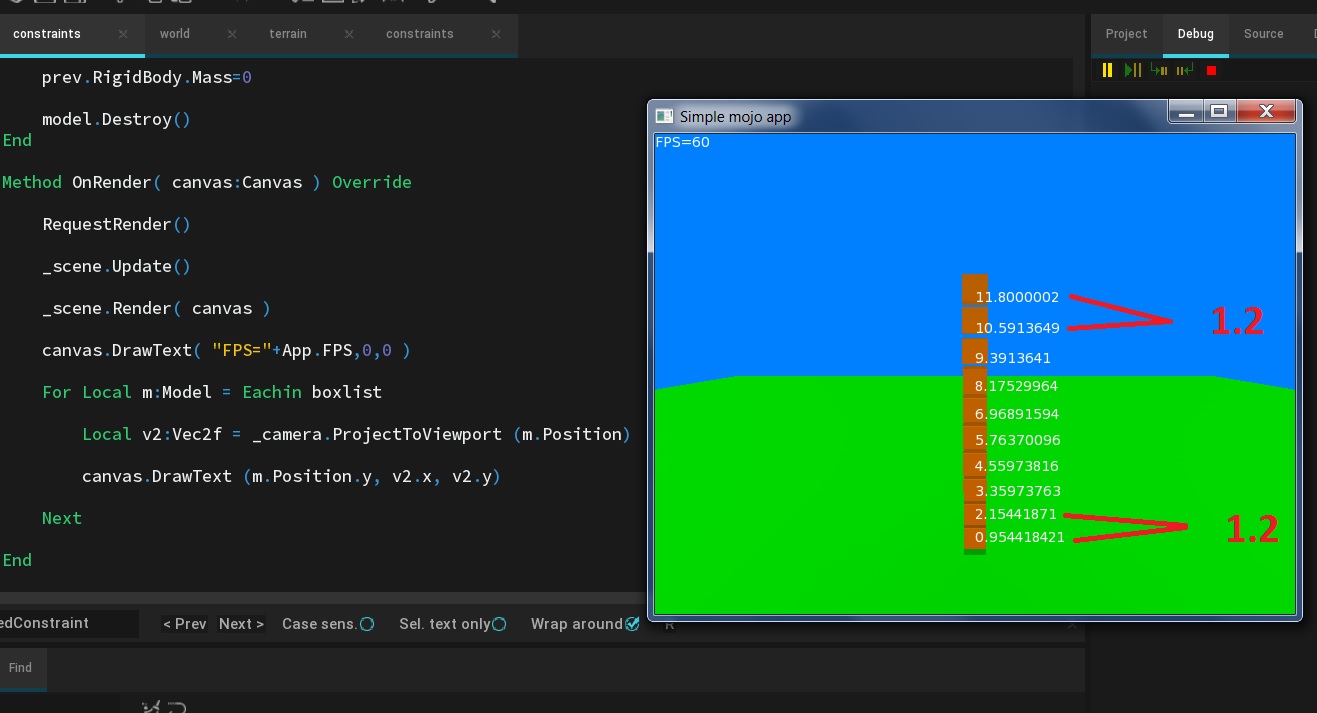
Little bit of debugging output in attached image… not sure what it means yet!
Once settled, there’s (as expected) ~1.2 distance between each box, with 10 boxes, but their y-position isn’t at the original y-position, so I think the constraints must have a default ‘looseness’ to them. Tried the bullet docs, but they’re impenetrable and don’t actually detail what the constraint settings are for (ERP??).
Attachments:
-
AuthorPosts