Forum Replies Created
-
AuthorPosts
-
1. When someone says that he wants to help make the docs, I wonder if you have enough skill?
2. You can clone any branch in the repo but Mark dislike to merge anything.
3. What about FAQ section in this forum? It is closed but can be opened to fill by community.
4. I prefer to read articles about using mx2 on doing real things instead of ‘plain’ lang reference.
Let’s leave docs for Mark (with requests for him to improve some parts when needed) and write usage examples.

I know nothing. All I use in console app for UI-interaction is Print function.
Monkey1Class Console Extends TextViewSo it’s true widget. It incapsulate work with process class.
Console = TextView + Process.
I know that. And it don’t sounds like impossible.
I started ted2go versioning, initial version is 2.0.
You can see a version in app title, like: Ted2Go v2.0 – [ file name here ].
It helps me to make releases by splitting work on a portions. And simplify my trello’s todo-board .
Did you do these steps:
- Pull new ted2go sources.
- Build new version of ted2go by current one.
- Check help fixes in this new version just started by compiler.
When you decide to use the newest version you have to copy files from [ ted2go/products/macos/ ] into [ monkey2/bin/ ] folder.
What the word is under cursor?
Pressing F1 again does not always open the docs here.
It always open the docs tab but there is sometime nothing to display? Or don’t open docs tab at all?
Press F1 and see the status bar. Do you see quick help here?
If yes – press F1 again and you will be jumped to docs for module member, or jumped to member declaration.
Quick help
is a nice feature – you can see any your code members description in status bar, like params list.
Format:
member_description | namespace | file | line_in_file
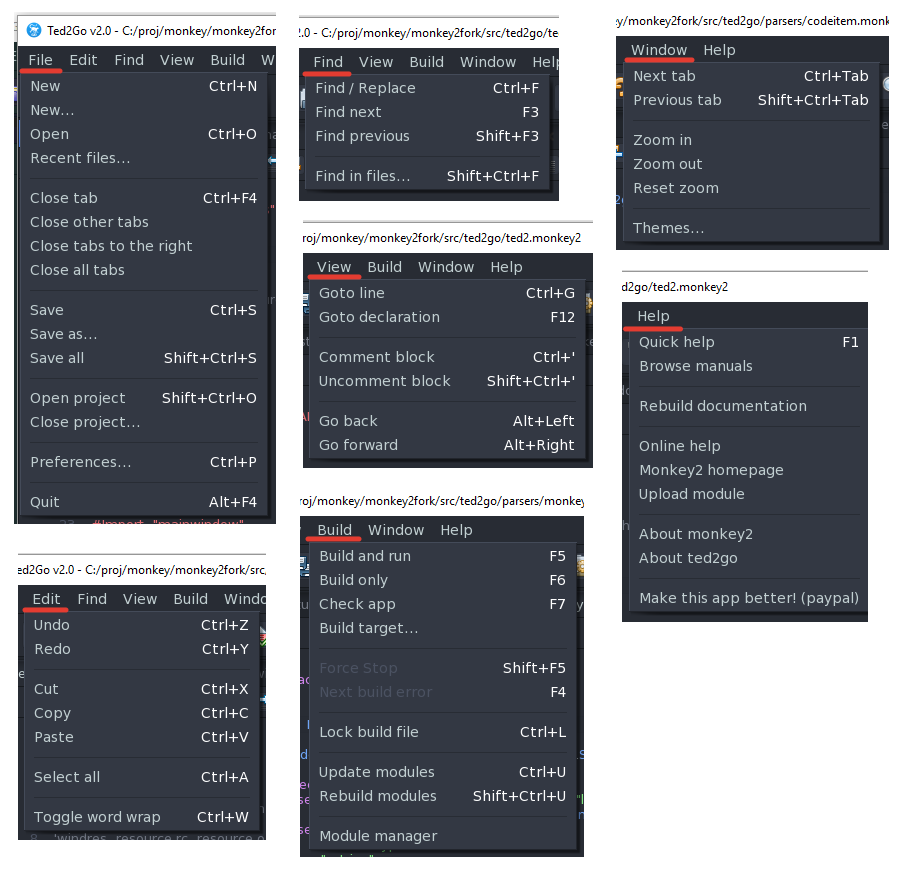
What should happen if I click this menu entry? Should it open a help window?
It should open %PATH_TO_MONKEY2% / docs / index.html page in your default browser.
Pressing ‘F1’ key on keywords and classes also does nothing.
Does your ted2go version have status bar (is it the latest)? If no update version. The reasons are:
- there is no keywords help in prev version
- if you press F1 on monkey’s class right after start app – probable module with needed class name don’t parsed yet. type this word – if you see it in autocomplete then it parsed.
Hi @danilo,
- Did you makemods before using “Help/Browse manuals”?
- and 3. It seems Mark did some changes on the site. I can’t touch original links. I’ll fix links after he done if needed.
Create your own theme to change fonts and colors. Just copy one existing theme and make changes. Look at \bin\ted2_windows\assets\themes\. Also see the default.json to understand how to change fonts.
I didn’t try to change fonts, hope it works.
@jesse thanks.
I got few donations, less than expect, heh, but I want to make this app better. Until my interest is go away.Unfortunately I can make windows binaries only to ‘sale’. Don’t know how many windows users is here.
So I just make my name more famous.
New stuff !
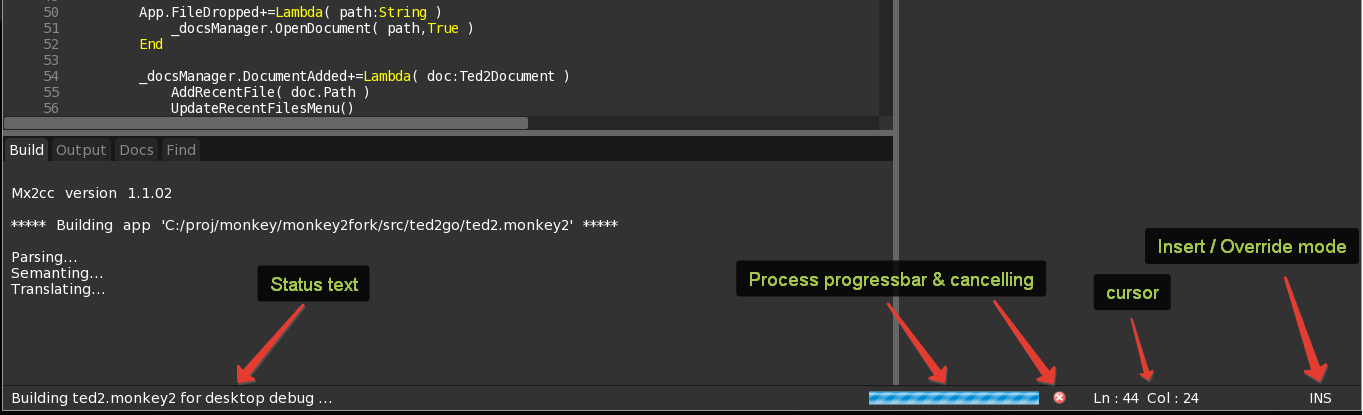
- Added status bar:
- quick help
- line number info
- building progress bar
- insert / override mode marker
- Building dialog moved into status bar. Also there is a cancellation button.
- More accurately keywords detection for F1-help. [*]
- Showing quick help in status bar. Also there is a description of user’s code members, not only modules members.
See screenshots.
[*] – more accurately help will be available after Mark update mx2cc.
In previous version if we press F1 on word ‘String’ we’ll see help for chipmunk.cpVersionString – incorrect.
In new version we’ll see help for monkey.types.String – correct!Attachments:
-
AuthorPosts