Forum Replies Created
-
AuthorPosts
-
Added toolbar with basic buttons.
Added global funcs ShowHint(), HideHint(). You can see the hint “Open project…” on the screenshot.
Attachments:
Thanks!
Hint for func/method parameters is in todo.
We will see

In new (current) version:
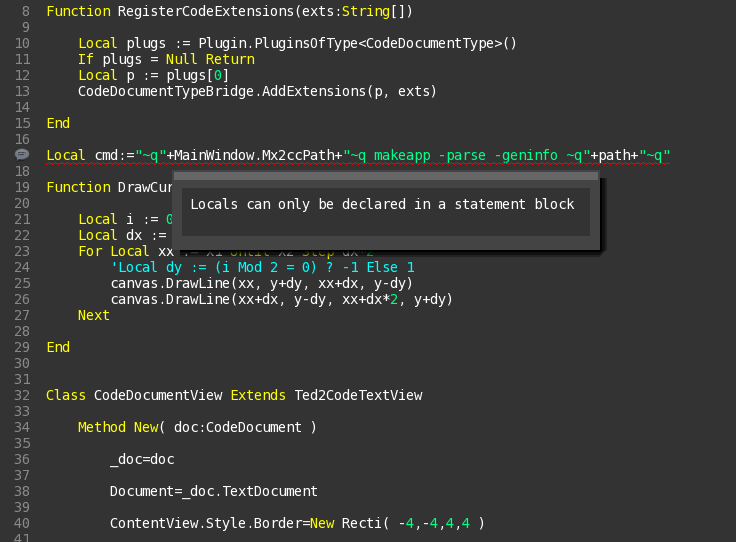
- Try to add error checking “on the fly”, do background parsing after 3 secs from latest code changes. Modified file saved to ‘ted2go/tmp/tmp’ file and parsing via mx2cc.
- Added errors hints – mouse over on line with error shows us error message. And errors now marked with curved underline (see sreenshot).
My logic for background parsing is (pseudocode):
- Add callback to TextChanged signal (TextChanges += OnTextChanged)
- Inside of OnTextChanged attaching to App.Idle signal (App.Idle += OnParseBg)
- Inside of OnParseBg checking time – are we ready to parse, 3 secs is over.
- if YES – do parsing and reset changed time (DoParse)
- if NO – re-attaching to App.Idle
- Inside of DoParse create new Fiber and read mx2cc output inside of it
- Goto 1, so wait other textchanged event.
I tried to use Timer with 1 hz interval, but timer stops to work after some time, so I decide to use App.Idle.
What is not good – saving to tmp file, need to improve.
Attachments:
I vote +1 for this too
Thanks for description.
Hm, I’ll try do it, but a bit later. Yes, ‘If’ keyword is not simple.
To fix cursor, go to [ted2go]/views/textviewext.monkey2 and comment 2 lines inside TextViewExt.New() method like this:
Monkey123456789Method New()Super.New()CursorColor=New Color( 1,1,1, 0.6 )SelectionColor=New Color( .4,.4,.4 )'CursorBlinkRate = 2.5'BlockCursor = FalseEndAnd you got default ted2 cursor.
Further, there will be Preferences dialog, allowed to simple change IDE params.
I use Frame as the first found way to do resizing.
Adam, try this
Monkey1234Local r := MainWindow.Framer.Right += 50r.Bottom += 50MainWindow.Frame = rMark there is a minor omission in the mojo/app that needs to be added so the user can alter the size of a window programatically.
You can use ‘Frame’ property to change bounds of a window. All views in mojox have this property because it’s a part of base View class.
A Mx2cc addition to allow files to be parsed but not compiled: checkapp
I thought it already exists but not documented when saw your ted21.
My TODO is here: https://trello.com/c/aFUo5SgH/1-new-version
@everyone
Question about “Check for errors” action. I did it this way:
- Find “Compiling…” in console
- Print “Done.” and call console.Terminate()
Is it good solution?
@adamstrange uses “checkapp” parameter for mx2cc. It looks like a better solution.
Hm?
Implemented the latest sources from original repository – v1.0.8.
It brings us themes support and zoom in/out for whole UI.
Some improvements are here.
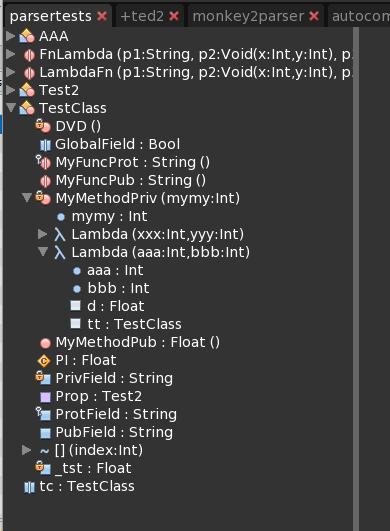
- Icons – new icons for CodeTree and Autocompletion, almost all taken from Netbeans IDE (see attached screenshot). Also icons reflect member’s access modifiers now.
- Parser:
- added support for ‘Alias’;
- added simple checking for case: “b := ok ? xx else yy” and “b := Not …”;
- improved checking of numbers (now checks minus sign);
- fixed type extraction for ‘operator’.
- Autocompletion – now it shows aliases and generic types members. It’s very simple variant – strip generic type, so not replace generic type with user’s declared type. But to see geteric type <T>,<V> is better than to see nothing.
Icons mapping to members is in attach too.
Monkey1234Notes:field_static => Globalmethod_static => FunctionAttachments:
Just commited new release!
- Parser work with Extends and Implements, so you can see inherited members in autocompletion;
- Improved scope checking for autocompletion:
- show all members inside it’s own classes,
- show protected members inside derived classes,
- show public for other cases,
- inheritance checking is recursive, so show members for multiple inheritance. probably, only public for this time.
-
AuthorPosts