About Monkey 2 › Forums › Monkey 2 Projects › Monkey2 Bunnymark (github)
This topic contains 31 replies, has 12 voices, and was last updated by  Abe _King_
 1 year, 3 months ago.
-
AuthorPosts
-
November 4, 2017 at 11:06 pm #11479
Unfortunately, the random order for the draw-calls is necessary, the only workaround for this at the moment would be loading it all into one texture and drawing from separate areas off that texture. That’s why I was looking for what the support is for atlases. Thanks for the code nonetheless, always interesting to see more Monkey2 in action
 November 5, 2017 at 3:10 am #11484
I wanna play too!
I forked the original, and added a simple Atlas class so we can batch all four bunnies with a single texture, without worrying about bunny order. Also added borders and made the bunnies bounce on top, to ensure we’re seeing all bunnies at any time (and cleaned the git ignore settings a bit).
Other changes include ditching the bunny array and using a stack instead, to avoid resizing the array all the time.
https://github.com/DoctorWhoof/Monkey2-BunnyMark
I get about 16000 bunnies on my MacBook Pro 2015 before the framerate starts to get unstable.
 November 5, 2017 at 3:26 am #11485
@ethernaut
Very nice improvements I saw! I’d be very happy if you could send a pull request! I enjoy the padding you added there too, very appealing!I’m going to give your repo a whirl myself before hand
[ EDIT ]
I can now render about 1,000 more bunnies! So instead of 3.4k it’s now about 4.2-4.3k at 61 fps :). Not as much as I would have predicted, but definitely an improvement! I compared the stack against the array and it doesn’t seem to have increased performance on my end (comparing them side by side).
Thanks for the update nonetheless!November 5, 2017 at 6:22 am #11491Try the new one!
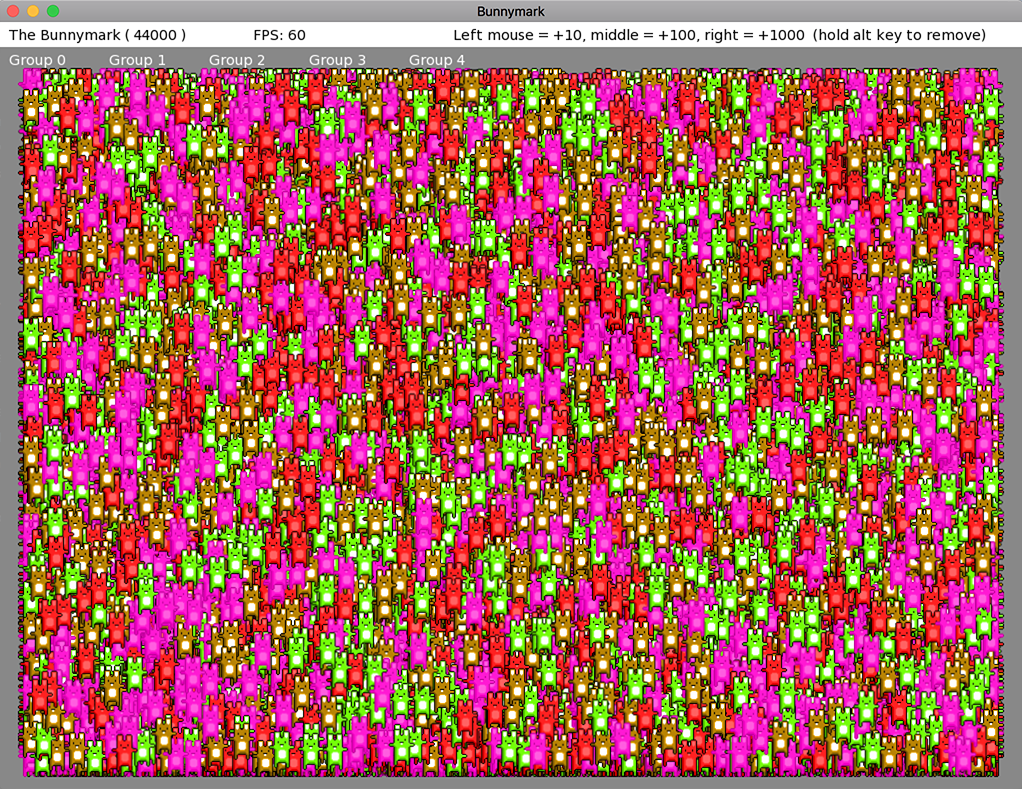
https://github.com/DoctorWhoof/Monkey2-BunnyMarkI added “proper” sprite batching, using Canvas.DrawPrimitives, and can now go up to 44000 on my laptop, a near 3X faster result!

If I switch the GPU to Intel Iris instead of the faster AMD Radeon R9 it’s still pretty good, around 30000. All on MacOS High Sierra. Curious to see the difference on Windows.
Instead of calling each Bunny.Draw, I now call bunnyAtlas.DrawBatch() a single time. Each bunny still updates a render queue with bunnyAtlas.QueueSprite( x, y, frame ). Take a look!
The only bummer is that I hit some DrawPrimitive() limit (something around 16000 primitives, I believe) and had to group the render queue into smaller groups, so the code isn’t as clean as it could be.
 November 5, 2017 at 2:29 pm #11498
I have now:
35.5k on a 3630QM laptop with GT635M ON, on W10 (had to force GPU manually (optimus thing))
13.4k on a 3630QM laptop with the i7(HD4000) integrated graphics, on W10. One strange thing is that when I reach the limit it switches to 30FPS directly and stays there! and if I want to go back to 60fps I first have to go back to 8k…?
14.3k on a 3630QM laptop with the i7(HD4000) integrated graphics, on MacOs ElCapitan. no strange FPS switching to 30FPS on this one! Mac performs better that W10 on the exact same hardware! Who would have guessed it?)
November 5, 2017 at 7:52 pm #11505Yay, decided to do my own bunnymark based on ethernaut’s and found a pretty major issue in mojo!
You’re supposed to be able to use images as atlases in mojo, and New Image( image,x,y,w,h ) is supposed to ‘grab’ a frame from an atlas.
This works BUT currently also creates a new material for the frame instead of just sharing the same material as the atlas – so my version was initially slower than ethernaut’s by a large margin! Fixing this so that all images created from other images ‘share’ the same material gives a considerable speed up – was getting about 50K images @60hz with ethernaut’s version, now get about 180K with mine!
Will push this change to the repos soon.
My bunnymark (works but will be slow with current mx2):
Monkey123456789101112131415161718192021222324252627282930313233343536373839404142434445464748495051525354555657585960616263646566676869707172737475767778798081828384858687888990919293949596979899100101102103104105106107108109110111112113114115116117118119120121122123124125126127128129130131132133134135136137138139140141142143144Namespace bunnies#Import "assets/wabbit_alpha.png"#Import "<std>"#Import "<mojo>"Using std..Using mojo..Const initialCount := 10000Function Main()New AppInstanceNew BunnymarkApp.Run()End Function'******************************************************************************************************Class Bunnymark Extends WindowGlobal atlas:ImageGlobal frames:=New Image[4]Field bunnies := New Stack<Bunny>Method New()Super.New("Bunnymark", 1024, 768, WindowFlags.Resizable )atlas=Image.Load( "asset::wabbit_alpha.png" )For Local j:=0 Until 2For Local i:=0 Until 2frames[ j*2+i ]=New Image( atlas,i*32,i*64,32,64 )NextNextFor Local n := 0 Until initialCountbunnies.Push( New Bunny( 512, 384,frames[ Rnd(4) ] ) )NextEndMethod OnRender( canvas:Canvas ) OverrideApp.RequestRender()If Keyboard.KeyReleased(Key.Escape) Then App.Terminate()canvas.Color = Color.Whitecanvas.DrawRect( 0, 0, App.ActiveWindow.Width , 25 )For Local bunny:=Eachin bunniesbunny.Update( canvas )Nextcanvas.Color = Color.Blackcanvas.DrawText("The Bunnymark ( " + bunnies.Length + " )",10,5)canvas.DrawText(" FPS: " + App.FPS, 250, 5 )canvas.DrawText(" Left mouse = +10, middle = +100, right = +1000 (hold alt key to remove) ", 450, 5 )EndMethod OnMouseEvent( event:MouseEvent ) OverrideIf event.Type = EventType.MouseDownLocal _len := 0If event.Button = MouseButton.Left_len = 10Elseif event.Button = MouseButton.Middle_len = 100Elseif event.Button = MouseButton.Right_len = 1000EndIf Keyboard.KeyDown( Key.LeftAlt ) Or Keyboard.KeyDown( Key.RightAlt )For Local n := 1 To _lenIf bunnies.Length Then bunnies.Pop()NextElseFor Local n := 1 To _lenbunnies.Push( New Bunny( Mouse.X, Mouse.Y,frames[ Rnd(4) ] ) )NextEndEndEndEnd'******************************************************************************************************Class BunnyGlobal gravity := 0.1Global border := 32.0Field x: FloatField y: FloatField xspeed: FloatField yspeed: FloatField maxBounce:= 5.0Field image:ImageMethod New( x:Float,y:Float,image:Image )Self.x = xSelf.y = yxspeed = Rnd( -10, 10 )Self.image=imageEndMethod Update:Void( canvas:Canvas )yspeed += gravityy += yspeedx += xspeedIf y < border*2y = border*2yspeed *= -1yspeed = Clamp( yspeed, 0.0, Float( maxBounce ) )EndIf y > App.ActiveWindow.Height - bordery = App.ActiveWindow.Height - borderyspeed = -random.Rnd( maxBounce * 3 )EndIf( x < border ) Or ( x > App.ActiveWindow.Width - border )xspeed *= -1x = Clamp( x, border, Float(App.ActiveWindow.Width - border ) )Endcanvas.DrawImage( image,x,y )EndEndNovember 5, 2017 at 8:38 pm #11508Yeah I saw the Image.Window function but I had no idea what it did exactly. xD
I guess it clips a section of an Image like an Atlas.
Does is pass by value, ptr, or just out-right makes a copied section of referenced atlas?November 5, 2017 at 8:52 pm #11509Hmm, can’t find an Image.Window, do you perhaps mean Pixmap.Window?
It might have been more consistent if I’d used Image.Window, but the idea was for New Image( image,rect…) etc. to create a ‘window’ into an atlas that shares the same ‘material’ (ie: texture) as the atlas, thus minimizing renderstate changes.
But I messed up here, and each image created with New Image( image,rect… ) actually ended up with a new ‘material’ too, which caused a renderstate change for each DrawImage. Pretty easily fixed, although there’a a minor chance it may affect some existing code out there – will deal with that if/when it happens.
November 5, 2017 at 9:25 pm #11510Oops yep, Pixmap. My bad. Awesome! I don’t really see how that would be an issue as long as a
MaterialSet() .Material = bleh
and MaterialCopy:Material()
Functions exists at some point.Monkey is really fast. Way faster than (excluding optimized libs) Python and a bit faster than Java from my very limited testing in the past. Very nice work Mr Sibly.
November 6, 2017 at 5:27 am #11515Wow this is all great news! Glad to hear it from all of you. @ethernaut I got around 30-40k, a magnificent improvement I’d say :). That’s literally 10x the power! You did a lot of great work very quickly, obviously, Monkey2 is a very productive language!
Glad to hear about the dramatic improvement from your fix @MarkSibly, stellar news :D. I’ll definitely have to give Monkey2 a whirl after the GitHub Jam!
November 6, 2017 at 12:03 pm #11520This works BUT currently also creates a new material for the frame instead of just sharing the same material as the atlas – so my version was initially slower than ethernaut’s by a large margin! Fixing this so that all images created from other images ‘share’ the same material gives a considerable speed up – was getting about 50K images @60hz with ethernaut’s version, now get about 180K with mine!
Will push this change to the repos soon.
Super-good!
November 7, 2017 at 3:57 pm #11533Hi
just had a rebuild of the latest dev branch (rebuild mx2cc + rebuildall) because I saw the commit about the atlas thing but no luck I get the same results as etheraut’s version (with drawPrimitive).
 too bad. Maybe there’s still something to add to the repo before I can test the code below?November 9, 2017 at 4:05 am #11582
I actually get the exact result on my version and on Mark’s, 44K on AMD GPU and 30K on Intel on a Mac laptop. Of course it’s better to get the same result with less code!
By the way, for the tests to look absolutely identical, you need to change this line:
Monkey1frames[ j*2+i ]=New Image( atlas,i*32,i*64,32,64 )Into this (using the ‘j’ coordinate for vertical axis to actually use all four frames, plus centered handle):
Monkey12frames[ j*2+i ]=New Image( atlas,i*32,j*64,32,64 )frames[ j*2+i ].Handle = New Vec2f(0.5)Cheers!
November 18, 2017 at 5:11 pm #11803To improve the number of draws, don’t forget to change the coordinates of all the draws from Float’s into Int’s.
For me this makes 6K into 25K.
Mind you that I replace the line that draws into canvas.DrawRect and used a larger sprite size of 64×64.
Regardless of drawing method, the scaling factor going from 6K into 25K is remarkable.November 18, 2017 at 5:30 pm #11805I can inform that fullscreen performance in some MacOS revisions are simply TERRIBLE.
Of course that has nothing to do with this example, it’s just a general statement.I’ve had Monkey1 and a semi-fresh MacOS for a long time and enjoyed it very much. I didn’t update on purpose as I knew about the risk of updating and I loved the retro feel to have a working fullscreen equally powerful as windowed apps. Last week I had to update MacOS & Xcode to get Monkey2 a try, and things broke terribly.
Anyways, I digress. The numbers for Monkey2 and freshest MacOS you can get are :
– fullscreen manages 12K while – Windowed manages 25K.
You’ll notice that things gets cut in half, there’s probably a screen-buffer in the way in the system.
-
AuthorPosts


You must be logged in to reply to this topic.