About Monkey 2 › Forums › Monkey 2 Code Library › Seamless textures or tiles generator
This topic contains 0 replies, has 1 voice, and was last updated by  Pakz 9 months, 2 weeks ago.
Viewing 1 post (of 1 total)
-
AuthorPosts
-
July 3, 2018 at 3:12 am #14975
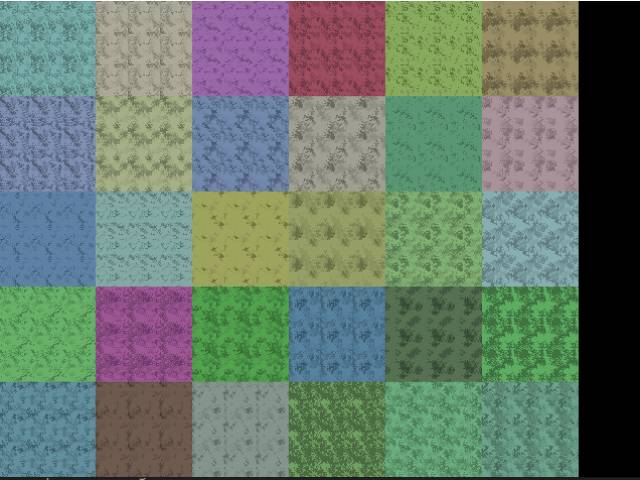
Was working on a project and got sidetracked with one part of it and I turned it into this example. It creates seamless textures or tiles. It takes a set of inputs. It is also on my github but I though I would also share it here.
I commented most of the code.
Monkey123456789101112131415161718192021222324252627282930313233343536373839404142434445464748495051525354555657585960616263646566676869707172737475767778798081828384858687888990919293949596979899100101102103104105106107108109110111112113114115116117118119120121122123124125126127128129130131132133134135136137138139140141142143144145146147148149150151152153154155156157158159160161162163'' Create seamless grow tiles.'''#Import "<std>"#Import "<mojo>"Using std..Using mojo..'' Here is our tile class.'Class tile' width and height of the tileField tilewidth:Float,tileheight:Float' our image and canvasField tileim:ImageField tilecan:Canvas' number of different colors on the tileField numzones:Int' (0..x)' our base colorField col:Color' how dense(much) should the added zones be (0.1)Field density:Float' how much should these zones be spread out (0.1)Field spread:Float' Here we create our tileMethod New(tilewidth:Float,tileheight:Float,numzones:Int,density:Float,spread:Float,col:Color)Self.tilewidth = tilewidthSelf.tileheight = tileheightSelf.numzones = numzonesSelf.col = colSelf.density = densitySelf.spread = spread' Call the generatetiles methodgeneratetiles()End MethodMethod generatetiles()' create our image and canvastileim = New Image(tilewidth,tileheight)tilecan = New Canvas(tileim)'' Create a array with the image width and height' where we create zones(numbers) on.' This with the spread and number of zones takes into accountLocal m:Int[,] = New Int[tilewidth,tileheight]For Local i:Int=0 Until (tilewidth*tileheight/50)*(spread*3)m[Rnd(0,tilewidth),Rnd(0,tileheight)] = Rnd(1,numzones+1)Next'' Here we grow the zones. We exit if the desired density is reachedLocal maxdensity:Int=(tilewidth*tileheight)*(density/1.5)Local curdensity:Int=0While curdensity<maxdensity' pick a random x and y spot in the arrayLocal x:Int=Rnd(0,tilewidth)Local y:Int=Rnd(0,tileheight)' pick a position on or besides this spotLocal nx:Int=x+Rnd(-2,2)Local ny:Int=y+Rnd(-2,2)' if this new spot is a zoneIf m[x,y] > 0'Make sure that we make it seamless' This is done by jumping to the other' side if the new position is out of the edge.If nx<0 Then nx=tilewidth-1If nx>=tilewidth Then nx=0If ny<0 Then ny=tileheight-1If ny>=tileheight Then ny=0' put the chosen spot on the new spotm[nx,ny] = m[x,y]End If' Count or current density' This is done by counting every value above 0curdensity = 0For Local a:Int=0 Until tileheightFor Local b:Int=0 Until tilewidthIf m[a,b] > 0 Then curdensity += 1NextNextWend'' Here we should have the actual image data' finsihed. All we need to do is to turn it' into a image.'' create the tile image' cold is used to get a shade based on the base colorLocal cold:Float=1.0/Float(numzones*3)' Loop through every pixel of the array and imageFor Local y:Int=0 Until tileheightFor Local x:Int=0 Until tilewidth' set the color base on the array valuetilecan.Color = col.Blend(Color.Black,Float(m[x,y])*cold)' plot this color into the tile imagetilecan.DrawPoint(x,y)NextNext' flush the imagetilecan.Flush()End Method' Here we draw a map of desired widht and height using the tile' at the x and y positionMethod draw(canvas:Canvas,xpos:Int,ypos:Int,w:Int,h:Int)For Local y:Int=0 Until hFor Local x:Int=0 Until wcanvas.DrawImage(tileim,xpos+(x*tilewidth),ypos+(y*tileheight))NextNextEnd MethodEnd ClassClass MyWindow Extends Window'' Create a array of world with dimensions 6 wide and 5 heigh'Field maps:tile[,] = New tile[6,5]Method New()' create the initial set of tilesmakethetiles()End methodMethod OnRender( canvas:Canvas ) OverrideApp.RequestRender() ' Activate this method'' If we press space then create new set of tilesIf Keyboard.KeyReleased(Key.Space)makethetiles()End If'' Draw our tiles to the screenFor Local y:Int=0 Until 5For Local x:Int=0 Until 6'Method draw(canvas:Canvas,xpos:Int,ypos:Int,w:Int,h:Int)maps[x,y].draw(canvas,x*96,y*96,3,3)NextNextcanvas.Color = Color.Whitecanvas.DrawText("Press Space to generate new tiles",0,0)' if key escape then quitIf Keyboard.KeyReleased(Key.Escape) Then App.Terminate()End Method'' Here we create the tiles in our world arrayMethod makethetiles()For Local y:Int=0 Until 5For Local x:Int=0 Until 6'Method New(tilewidth:Float,tileheight:Float,numzones:Int,density:Float,spread:Float,col:Color)maps[x,y] = New tile(32,32,Rnd(1,20),Rnd(.2,1),Rnd(.2,1),New Color(Rnd(.3,.7),Rnd(.3,.7),Rnd(.3,.7)))NextNextEnd MethodEnd ClassFunction Main()New AppInstanceNew MyWindowApp.Run()End FunctionAttachments:
-
AuthorPosts
Viewing 1 post (of 1 total)
You must be logged in to reply to this topic.