About Monkey 2 › Forums › Monkey 2 Programming Help › Unfinished Display/Resolution Dialog
This topic contains 0 replies, has 1 voice, and was last updated by  Cole Chapman
 1 year, 9 months ago.
Viewing 1 post (of 1 total)
-
AuthorPosts
-
July 23, 2017 at 1:58 pm #9484
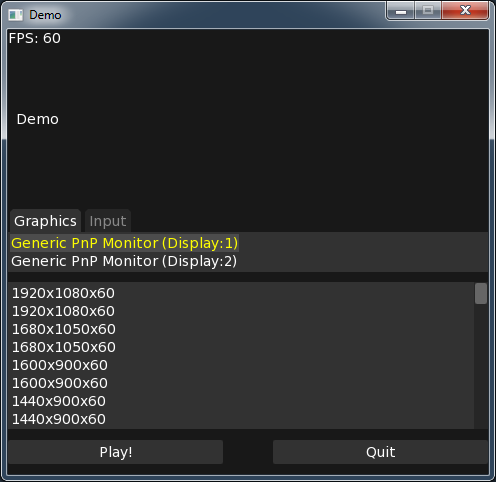
I wanted to give the option of which resolution the game started at, to the user, much like Unity games do. After this is finished I would like to post it to the code library but I am having small issues currently (mainly two).
- When I click which display I want to use, it will populate with which resolutions are supported (via SDL2 command) but when the Launcher first starts it’s a blank resolution list because no display is selected. How do I invoke/select the first item in the DisplayList?
- I am still learning mojox so if anyone has any “you should actually do it like this” tips I would greatly appreciate it. The big thing that stands out to me are the buttons. I just want the same padding(?) all the way around it OR have both buttons all the way to the right with similar padding(?). Also I would like the programmers to be able to use a banner/image for their game but am unsure what the best approach is for it.
Monkey123456789101112131415161718192021222324252627282930313233343536373839404142434445464748495051525354555657585960616263646566676869707172737475767778798081828384858687888990919293949596979899100101102103104105106Namespace myapp#Import "<std>"#Import "<mojo>"#Import "<mojox>"#Import "<sdl2>"Using std..Using mojo..Using mojox..Using sdl2..Class ResolutionDialog Extends WindowMethod New()Super.New( "Demo",480,444 )Local DisplayList:ListView = New ListViewLocal ModeList:ListView = New ListViewFor Local i:=0 Until SDL_GetNumVideoDisplays()Local name:String = String.FromCString( SDL_GetDisplayName(i) )DisplayList.AddItem( name + " (Display:" + (i+1) + ")" )NextDisplayList.ItemClicked+=Lambda( item:ListView.Item )ModeList.RemoveAllItems()Local DisplayNumber:=DisplayList.IndexOfItem( item )Local mode:SDL_DisplayModeFor Local i:=0 Until SDL_GetNumDisplayModes(DisplayNumber)SDL_GetDisplayMode( DisplayNumber, i, Varptr mode )ModeList.AddItem( mode.w + "x" + mode.h + "x" + mode.refresh_rate )NextEnd'How do I invoke the first item to be selected?Local DisplayView:DockingView = New DockingViewDisplayView.AddView( ModeList, "bottom", "75%" )DisplayView.AddView( DisplayList, "top" )Local Tabber:=New TabView()Tabber.AddTab( "Graphics",DisplayView )Tabber.AddTab( "Input",New TextView( "This is WIP." ) )Tabber.CurrentIndex=0Local PlayButton:=New Button( "Play!" )PlayButton.Clicked=Lambda()Local mode:SDL_DisplayModeLocal index:=ModeList.IndexOfItem( ModeList.Selected )SDL_GetDisplayMode( 0, index, Varptr mode )Print "User wants to play at " + mode.w + "x" + mode.hEndLocal QuitButton:=New Button( "Quit" )QuitButton.Clicked=Lambda()App.Terminate()EndLocal Splitter:DockingView = New DockingViewSplitter.AddView( New Label("Demo"), "top", "40%" )Splitter.AddView( Tabber, "top", "50%" )Splitter.AddView( PlayButton, "left", "45%" )Splitter.AddView( QuitButton, "right", "45%" )ContentView=SplitterEndMethod OnUpdate()App.RequestRender()EndMethod OnRender( canvas:Canvas ) OverrideOnUpdate()canvas.DrawText( "FPS: " + App.FPS,0,0 )EndEndFunction Main()New AppInstanceNew ResolutionDialogApp.Run()EndAttachments:
-
AuthorPosts
Viewing 1 post (of 1 total)
You must be logged in to reply to this topic.