Forum Replies Created
-
AuthorPosts
-
if there is a crashes in the original ted2 then the fault is definitely in the mojox code then – As Said, Ted21 was based on the original mojox, but rewritten.
AH – wait a minute though
Ted2 was rewritten by mark with the new mojox stuff too. I agree that you need to have some more concrete bug reproduction system.
A suggestion here would be to create a log system with future ted2go. loggng major edits being done( cut, copy, paste, change document, etc) and constantly save this to disk before the action is carried out. When a crash occurs you will be able to see what was being done. Not a perfect solution, but it might be the best way forward for you?
@day – further to what aerobat said:
What (generally) are you doing when the official Ted crashes?
Editing, loading, cut, copy?
Ted21 is based on the original V1.02 codebase. This was the code that existed before Mark pulled Mojox into a modules and he rewrote the Ted2 code to make it more extensible. So I can’t help with any of the crashes you might be having ;(
I do know the original source very well, and it needed quite a lot of work to stop it crashing at the time. But it was usable and generally stable. My thoughts are that there is something nasty going on inside the new mojox and having it as a module has not helped this..
How is everyone getting on with Ted21?
no probs.
couple of things for you:
- Escape closes find and help pages.
- #jump text – will add a jump position to the overview (it’s ignored by the compiler)
- the first run/check button needs some mods to mx2cc so won’t work
No problem. Bug in page display. all fixed now and you should be able to download and access the page.
Note
Windows version fully operational, but not fully tested (I develop on MacOS)
ok. I’ve upped both versions to test.
https://adamstrange.itch.io/ted21
Let me know how you get on. This does not have any form of intelligence!
Really a test for DaY to see if it crashes with many files open
Ted21 macOS Sierra build sorted. just doing a windows version and then I’ll post the links
I’ll see about getting you Ted21. It’s rock solid here with no crashes – been running weeks now
yep, you need to jump up, move and then jump down ….

@day you on mac or windows?
what did you you not like about the controls? I can add rebinding for you?
I wold always go with never assume anything until properly checked.
I’ve just updated it to operate with samples, but found a bug in the monkey2 sound sources – reported
What is really cool is having the chipfx applied to sound samples. I never intended it, but it gives some very interesting fx with little size in assets.
confirmed 1.0.91 gives an error
1.1.03 does not give an error
Hi Mark – I know this is an odd one. BTW it’s MacOS just so you know.
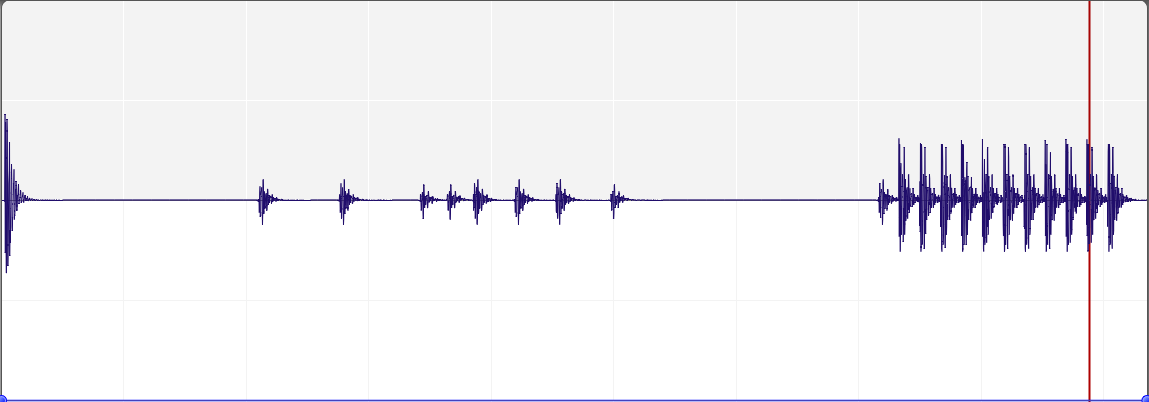
Right, you will need an audio editor to view this as I saved it as a mp3 for space. An audio editor is also a great tool to really show what is going on, so I’ve posted a screenshot as well
The first sound is the kick drum being played from the file browser.
The second is the loaded kick drum being played by Sound.Play(). you can see that the played sound is definitely not playing the full sound and clipping the beginning – resulting the ‘muffled’ sound I was hearing. it seems to be about 0.02 seconds of the file isn’t being played.
The third is the loaded kick drum being played as a loop Sound.Play( true ). Now this is interesting as you can see the beginning is missing but the loops plays correctly, going back to the start and playing all the sample. as can be seen and heard.
Here’s the code I used:
Monkey12345678910111213141516171819202122232425262728293031323334353637383940414243444546474849505152535455565758596061626364Namespace myLetterboxApp#Import "<std>"#Import "<mojo>"Using std..Using mojo..#Import "assets/kick.wav"Const Size := New Vec2i( 640,360 )Function Main()New AppInstanceNew MyWindowApp.Run()EndClass MyWindow Extends Windowfield sound:Soundfield channel:ChannelMethod New()Super.New( "My Window", Size.X, Size.Y, WindowFlags.Resizable )Layout = "fill"sound = Sound.Load( "asset::kick.wav" )EndMethod OnRender( canvas:Canvas ) Overridecanvas.Color = Color.Blackcanvas.DrawRect( 0, 0, Width, Height )canvas.Color = Color.Whitecanvas.DrawText( "z to play, x to play looped", 10, 10 )EndMethod OnKeyEvent( event:KeyEvent ) OverrideSelect event.Typecase EventType.KeyDownSelect event.KeyCase Key.Zsound.Play()Case Key.Xchannel = sound.Play( True )End Selectcase EventType.KeyUpSelect event.KeyCase Key.Xchannel.Stop()End SelectEnd SelectEndEndAnd also the kick drum sample.
I haven’t tested on windows.
But have tested a completely different method using the vsynth demo. It played correctly.
-
AuthorPosts