Forum Replies Created
-
AuthorPosts
-
no worries, but it was something I thought I would raise…

kill Bob,
Marry Jim
Move in with Mary…
anyone here? Mark, any concepts or hints as to how the shaders for materials will be dealt with?
I can tell you it’s a standard stereo 16bit uncompressed wav file. so… in theory it should load.
Confirmed. wav not loaded!
one thing I’ve found is to NEVER use #Import”assets/”. always import each asset individually otherwise there is a tendency of multiple duplications on compile.
OK. Checking the wav file itself reveals the header is reporting 0 channels and 0 bits. Monkey dumps this sample as the needed header information is not compatible. So you have a technical error with your wav file.
The next best thing to do would be to write your own wav loader that deals correctly with this situation as there is other info about the wav file and its contents which would correctly return the channel and bit information
I think it’s windows 7 that is the issue. certainly it was a 7 user and windows 10 seems ok…
I thought that you didn’t need to install anything apart from the exe plus it’s dlls.
I’m using V1.0.9 monkey2. which version statically links against openal?
anyone having issues with the openal.dll on windows?
thanks guys. The best things about speed is having the right tools for you.
I use photoshop, but it’s not really productive for working on tiny minimal bitmaps and sprite maps. Hence I created the sprite editor and palette editor.
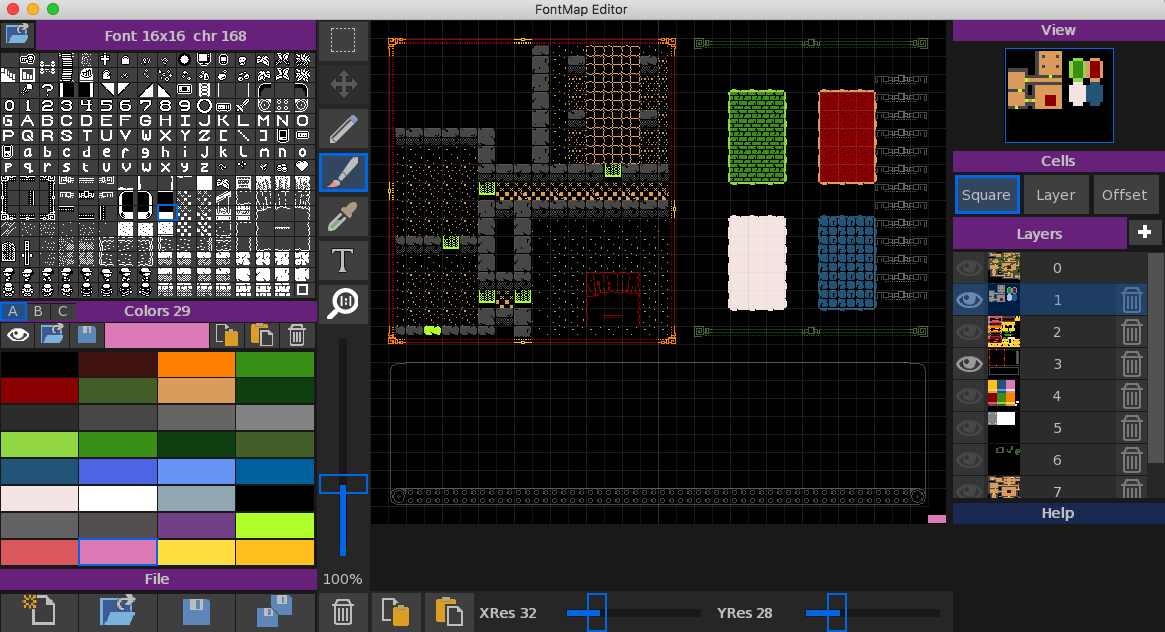
But… The best thing is the map editor. It uses 9 different maps – each different resolutions and each one being used in multiple ways. both storing the maps, the UI and UI elements.
I can then focus on the actual code and not worry about the display. I even use different palettes per map for display and collision – just by using a different palette.
Here’s a close up of one of the maps with UI elements…
and a shot of the map editor showing two map layers being viewed (default card backs and map test plus the final UI layer).
Yep, I made my own one, Mojox just doesn’t work.
Ted21 uses this new layout system for the custom controls as wells as mt font editor, map editor, sprite editor, and palette editor.
Check them out here:
Both the font and palette editor have no mojox anywhere near them – apart from the internal stuff that Mark moved into Mojo.
In essence I took the Mojo view and started from scratch from their building a proper flexible control and layout system.
Well. The question would be: what do you want an IDE to be? or do?
I personally don’t use Ted and never did – hence why I created Ted21
possible give Ted21 a try. So far people can’t crash it. Mac and Win versions
https://adamstrange.itch.io/ted21
ok, so now we have it not crashing and everyone is happy. thoughts, suggestions. There are four new editors which will be integrated into it at some stage:
fontsprite editor
map editor
chip voice editor
chip tune editor
There is currently no documentation about all the new stuff either
Can I ask what version monkey you are using. I can then provide the updated files needed for compile/test – but not build
OK
I’ve updated Ted21 to prevent the browser from auto updating. basically I put in a switch for you.
https://adamstrange.itch.io/ted21
Let me know if it does anything odd. Both macOS and WiN version are upped
ok, no problem. I’ll get it implemented for you and report when completed.
@day First off sorry to hear about your situation. I’ll try my best to sort things out on the Ted21 front for you.
OK. Just so i’m clear at this end.
Left panel (contains the file, view, debug and help) is called the browser.
I’m assuming you are viewing some help file of some sort, and when you select a source file the browser changes to View?
And you would like a switch to stop it doing this?
@day Anything you miss, would like, want more of int Ted21?
-
AuthorPosts