Forum Replies Created
-
AuthorPosts
-
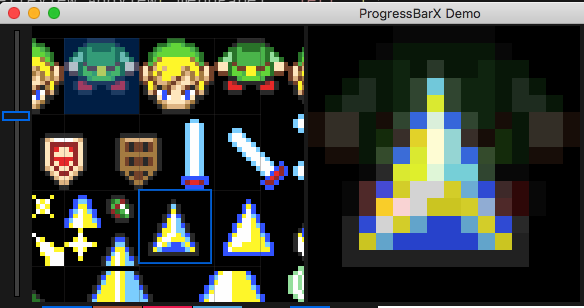
Main sprite atlas view is now zoomable with the mouse wheel or the zoom slider.
The altar can be moved just by clicking and dragging.
Clicking twice on an alias position will activate/deactivate ghost/onion skin mode. this can be seen with the ‘arrow’ selected (blue framed) for editing and the ‘body’ (blue transparent). in the main sprite view you can see the arrow with the body shown faded over the top.
There will be a slider to change the amount of alpha for the amount of transparency.
Next up will be different views for the current sprite, tiled, etc
Attachments:
ok, took some digging and experimenting.
open modules/std/graphics/color.monkey2 and add this:
Monkey1234Function ColorI:Color( red:Float, green:Float, blue:Float, alpha:float = 255 )Return New Color( red / 255, green / 255, blue / 255, alpha / 255)Endsave and rebuild std
Now when you want a color
Just use ColorI(255,0,0) instead of Color(1,0,0)
Here’s the code from std/color.monkey2
Monkey123456#rem monkeydoc Converts the color to 32 bit ARGB format.#endMethod ToARGB:UInt()Return UInt(a*255) Shl 24 | UInt(r*255) Shl 16 | UInt(g*255) Shl 8 | UInt(b*255)EndGreat. But it really should be this:
Monkey1Return UInt(a*255) Shl 24 | UInt(b*255) Shl 16 | UInt(g*255) Shl 8 | UInt(r*255)where the first byte is the red byte, the second green, third blue and finally alpha
This makes it really ABGR. but you read from right to left so it is actually RGBA which is the proper representation.
If I recall correctly, Microsoft had to rewrite an entire windows codebase because of this (long before xp).
i think i used something like colout:uint = colin.ToARGB and it never set.
The other thing was when I looked at the code I expected it to be ABGR and it wasn’t it was the reversed ARGB. which looks fine on paper, but is actually reversed in code.
OK Saving and using color palettes of different sizes – no problem. Here’s a few different ones. I tried to be as flexible as I could be. It also shows where the grid properties are used.
Attachments:
Here’s a thing. I did initially write the input/output with ToARGB and FromARGB.
But… for some really odd reason ToARGB never gave the correct output, so I went with just writing the direct values instead.
the gridx and gridy values can be completely ignored. They are there for display only and to prevent problems with counts that could be multiples. E.G. a count of 36. is that 6×6 or 4X8 or 3×12, etc
similarly a count of 12 is that 3×4 or 4×3.
So to just read the colors,
read the header, the count and then ignore the next two read in numbers and then just read the colors.

Here’s a shot of the new palette grid view in operation with Ted21. You can see the color panel is also open. pressing “use color” will change the current selected color in the palette and make the document “dirty” so it is automatically saved
Attachments:
simple. speed
grid is the uxcolorgrid control
as to not using .json:
text is a very poor storage format for anything other than text. you need to parse it and it also needs carful construction.
It is also editable. which means unknown errors creep in
finally. There is no reason for the color table to be readable by humans. its a color! in the same way as a sound is stored in the best format for it, etc
They can be opened in ted2. but Mark will have to provide that.
let say the read file has a grid of 7,3
the shown grid will be 7 cell wide, and 3 cells high with a total of 21 color cells
It would look like this:
Attachments:
Ted is just a text editor, and Ted21 is also the same. Mark changed the way mojoX operated so compiling ted21 you will need V1.02.
But everything else is fully there. Ted21 was started because Ted2 was not the best editor.
Regardless of current state, Ted21 remains a proper alternative with much more powerful features.
Mark seems not to want any outside involvement with ted2, so ted21 remain an offshoot for use by anyone. Of course if ted21 does things differently and people want those features, then hopefully Mark will be up to integrating Ted21 concepts back into Ted2.
I was very careful after the MojoX debacle and have made sure these new components play well with the new Mx2 modules.
Here is a pic showing both ted21 compiling and running V1.03 mx2 with the new controls:
Attachments:
yep ted21 is fully compatible with the new mx2 version 1.03
I’m just doing a full test on these new controls to see how they perform and fix anything that needs it.
I should point out that these controls are NOT a module. They are based directly from the MojoX module. They will Not Ever become a module!
This means they will remain open and usable/modifiable by all
I think the best thing now is to directly integrate the paint control back into ted21
From there have two new document types:
palette – collection of colors up to 256 entries. palettes can be loaded by the paint control and also created and saved by it too.
brush – 256 x 16 pixel size, which is 16 brushes. these can then be edited and saved. And also loaded by the paint control.
In essence the brush document is a fixed size horizontal sprite atlas.
I suppose next up would be to make a sprite atlas/sprite document next with would be a simple case of extending the above brush document.
Behind the scenes I’ve also adde functions into mojo/graphics/canvas for full support of the brushes and atlas functions, including non square sprite rendering (deformations) – if anyone is interested
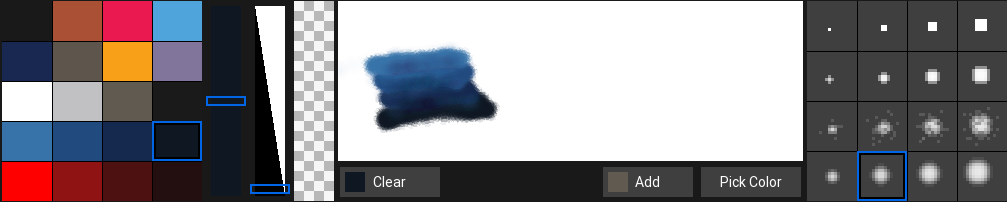
just been implementing some basic brush styles there are four types:
normal, alpha, scatter, scatter alpha
I’ve also implemented loading of images into the paint palette, so you can pick up colors, or even paint back onto the image (although it’s really meant for color mixing)
simple answer
private
anything that is private can’t be directly accessed by extending
The other thing is to do with actually learning how a system works. taking code and extending is fine if you know the code you are extending. Otherwise it is much better to augment the original or create a brand new code base.
Also. the documents are just wrappers around lower classes. and all these things are interlinked.
I wouldn’t recommend anyone going into mojox now it is a module!
Just to show something different can be done.
Here is a base prototype synth UI – Yep I redid the label control now as well
It’s based on the Roland Juno 60 design
Attachments:
Added panel and more controls
This shows the flexibility of Mojox as a control system.
Here are some file additions and new palette sizer. There was a bit of crashing until I found I needed Update() after hiding/unhiding controls. after that it all went smooth
Also added image buttons and image checkbuttons
The grid need a little tidying, but it all works very smoothly
The only minus is to do with GUI complexity. the more you add the more things get messy. But that is a problem all GUI’s have: there is more code dealing with the GUI than with the actual meat of the program.
MojoX goes some way to making this a simple thing
nope, but I can create a new control label with this if you want it?
I come from windows controls and traditional page layout. so left aligned text is on the left, right aligned is on the right, centered or middle is in the middle
similarly vertical align is top middle or bottom
So top left = ALIGN_TOPLEFT
or bottom right = ALIGN_BOTTOMRIGHT
I should add that all this stuff does not touch mojox controls. these are new.
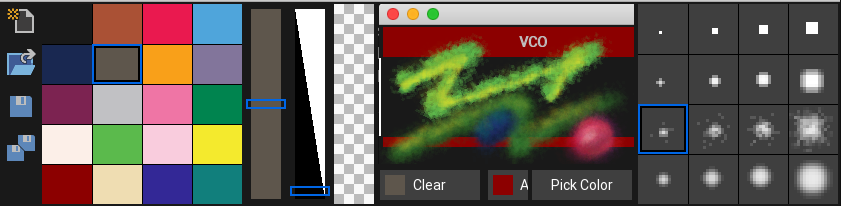
Slight update. added ability to pick a color from the canvas and put it in the base palette:
This is consistent with the Quantel systems (Paintbox, Harry, etc)
Loading saving of palettes will be the last before everything starts to get integrated directly into ted21
textalign = ALIGN_LEFT – yep
textalign = gravity(0, 0) – nah
I’ll stick with align
-
AuthorPosts