Forum Replies Created
-
AuthorPosts
-
I did not try but looks like what you asked
https://kripken.github.io/emscripten-site/docs/getting_started/downloads.html
Good.
Also note, that all your TextView now will have such font.
To separate them, use inputView.Style = inputView.Style.Copy().
You can use theme file to setup fonts and other views related stuff in json format, similar to css, look at assets/themes/ folder of you compiled app to see what theme file is, default.json.
But you need to create and set your own theme file based on that default given from mojox.
Your screen looks like there are two intersected labels.
You didn’t assign loaded font, so it didn’t changed.
Correct way:
inputView.Style.Font = Font.Load("asset::calibri.ttf", 20)
Option1 – is already here – screenshot.
Option2 – no, let’s use existing stuff, ctrl+alt seems like overhead for me, sorry.
Attachments:
Feature advice – to show marker (like blink cursor) at the tapped place on screen to see where we going to insert digits/symbols.
A new one to extract int-based enums:
Monkey123456Class JsonObject ExtensionMethod GetEnum<T>:T( key:String,defValue:T )Local json:=SelfReturn json.Contains( key ) ? Cast<T>(Int(json[key].ToNumber())) Else defValueEndEndExample
Monkey1234567Enum HoleFormsCircle,Square,DiamondEndLocal form:=json.GetEnum( "hole-form",HoleForms.Circle )Are your textures loaded with Filter flag? (I’m not sure this is the reson, but…)
Did you look at tests folder of mojo3d module?
For example, there is an animation demo here: /monkey2/modules/mojo3d-loaders/tests/ninja.monkey2
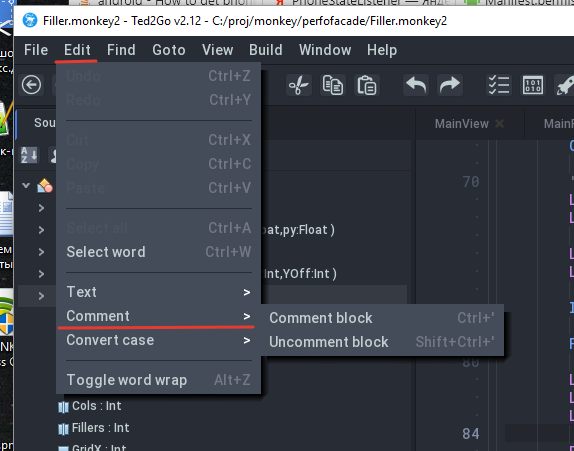
Here’s an improved way to handle commenting behavior. Looks like is the same as Sublime.
Everything is based only on toggling behavior, however the only last case is where Ctrl+Shift+’ is used which is forced uncomment.
I see no difference with current ted2go behaviour – there are also ctrl+’ to comment and shift+ctrl+’ to uncomment.

And if you have selection you can just press ' to comment seleted lines (I’m not fully glad with that but nobody complain).
Fullscreen Editor is not really full screen. It is letterboxed to a 4×3 ratio and is even smaller than a non fullscreen editor.
fullscreen editor is 70% of desktop width, to be centered. are you really need very long code lines?
Problem with that solution is 1) I still get the icons and menu at top, so the vertical space is shorter,
what version of ide do you use? there is no icons and menu at top in latest version
and 2) It is much easier to switch from Fullscreen editor and back with Shift-F11, instead of doing Alt-1-2-3-4-5-6-7 to switch back and forth.
you can back from fullscreen editor by pressing Esc key
 (or press Shift+F11 again)
What would be a nice feature is to allow any dock to become fullscreen. At times I will try and read the documentation and have to drag the window up into the editor to see more at a time. Would be handy to switch between views with a single key combination.
I agree.
But have no time to do that, sorry.I just pushed improvements to github.
Look at new demo-multivalue.monkey2.
Now we can register custom value-providers to override behaviour.
As far as there is Null value for String type is empty string and empty string can be valid value,
I created a bit monstrouse function defenition with Bool Ptr (omg!) to have two return values.
Monkey1providerFunc:String( key:String,eaten:Bool Ptr )if such provider func set eaten=True then we get/found actual value and must return it even if it’s an empty string.
For example, we want to censoring all texts by keys, for example by key “java”.
Monkey1234567891011Locale.Load( "asset::translation.ini","en" )Locale.RegisterValuesProvider( Lambda:String( key:String,eaten:Bool Ptr )If key.ToLower().Contains( "java" )eaten[0]=TrueReturn "[censored]"Endifeaten[0]=FalseReturn ""End )Now all keys containing word “java” will return “[censored]” string.
There is no .dll support yet.
Monkey2 provides similar functions, so I don’t know would that be useful or not.
Replace MainWindow.OnFileDropped( arg ) with your code .
Ted2go is supporting drag-into-exe. You can test it on win and mac.
The code
Monkey12345678910App.Idle+=Lambda()' open docs from argsLocal args:=AppArgs()For Local i:=1 Until args.LengthLocal arg:=args[i]arg=arg.Replace( "\","/" )MainWindow.OnFileDropped( arg )NextEnd -
AuthorPosts