Forum Replies Created
-
AuthorPosts
-
It’s easy. Write in your widow constructor
Monkey123App.FileDropped+=Lambda( path: String )Print pathEndWorks fine on Windows, don’t know about osx.
Thanks!

I found my mistake for that:
I spent some time to force it saving into /0/Pictures/ etc – but it can’t. Looks like such folders isn’t accessible for NDK apps – I don’t know exactly.
To use any folder under /storage/emulated/0/ we must request permissions for android api 23+, or set api less level.
There is the topic about permissions: http://monkeycoder.co.nz/forums/topic/android-permissions/
But I can’t make permissin requester work on my galaxy s7, api 26, need more research why.
I choose the second way – set less api level: open \android-save-file.products\Android\app\build.gradle and set targetSdkVersion 21, that’s all.
Now we can use common monkey2’s file operations like `CreateDir( “/storage/emulated/0/MX2/” ).
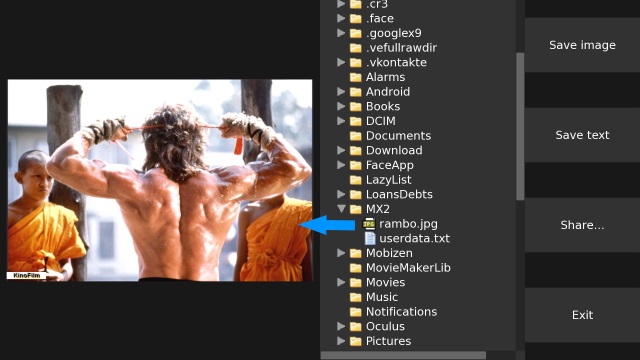
New sources with FileBrowser are here: https://yadi.sk/d/dsyMDk3p3Zuhuf
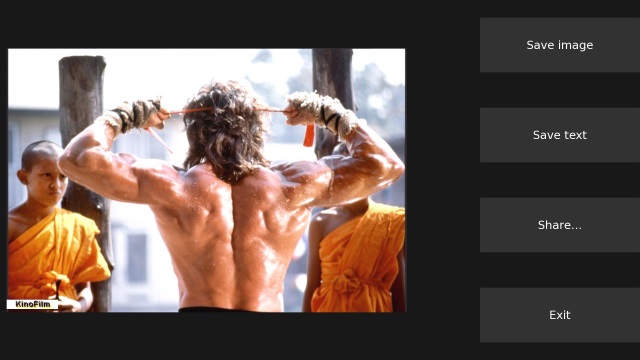
Tap on image in files tree to open it. Tap on Share button to share latest opened image.
Attachments:
There is the PlayMusic() function in monkey2 that streaming music file, so it can easily playing super-big files, I think.
3. Could in-IDE docs allow text selection and copying?
Improving of htmlview class is required. It’s not easy task but profit is great.
I created example for android (not familiar with ios dev yet).
What inside:
- Saving image from assets into external app folder /storage/emulated/0/Android/data/… I spent some time to force it saving into /0/Pictures/ etc – but it can’t. Looks like such folders isn’t accessible for NDK apps – I don’t know exactly.
- Saving text into Android/data/….
- Sharing – open Share… dialog for just saved file – via native java code
- Closing app by hardware Back button
- Little example of building UI based on mojox.
Sources: https://yadi.sk/d/XWa6bRoj3ZuEce
Sources + prebuilt project ( 69 mb): https://yadi.sk/d/EvAP-qEl3ZuEe7
Not exactly what you want but useful anyway (I hope).
Attachments:
Not for mobile devices.
you have to pick build apk and not just rip the apk after pressing the green play button.
Yes, green button creates kind of patch to run as quickly as possible. Size of patch is smaller.
Permissins are required, but as far as I see they already added into manifest by default:
Monkey12345<uses-permission android:name="android.permission.INTERNET" /><uses-permission android:name="android.permission.ACCESS_NETWORK_STATE" /><uses-permission android:name="android.permission.READ_EXTERNAL_STORAGE" /><uses-permission android:name="android.permission.WRITE_EXTERNAL_STORAGE" /><uses-permission android:name="com.android.vending.BILLING" />Java also use STR_LENGTH+STRING (afaik).
ReadPascalString name is not good.
Maybe
- ReadString – for len+string
- ReadZeroTerminatedString – for string+0
Would be easy to read and understand.
- Maybe \0 is needed for strings? fprintf(f, "%s", "HELLO\0");
- Why don’t you write such generator in mokey2?
Try to do that:
Monkey1234Local scores:="player1=100, player2=50"SaveText( scores,ExternalDir()+"/scores.txt" )Local testScores:=LoadText( ExternalDir()+"/scores.txt" )Print testScoresI have no installed android environment.
I tried as well PeekCString to see if it works but it gives the same number (which is 7 ).
It is true for latin locale, not for whole utf.
Look at this example with russian text:
Monkey123456789101112Namespace myapp#Import "<std>"Using std..Function Main()Print "Hello World".LengthPrint "Hello World".CStringLengthPrint "Привет Мир".LengthPrint "Привет Мир".CStringLengthEndIt prints: 11, 11, 10, 19.
Wow! Need to have 6 monitors!
Useful function!
I made this func a bit universal – by using generic for any number types.
Monkey1234567891011Function TransformRange<T>:T (input_value:T, from_min:T, from_max:T, to_min:T, to_max:T) Where T Implements INumeric' Algorithm via jerryjvl at https://stackoverflow.com/questions/929103/convert-a-number-range-to-another-range-maintaining-ratioLocal from_delta := from_max - from_min ' Input range, eg. 0.0 - 1.0Local to_delta := to_max - to_min ' Output range, eg. 5.0 - 10.0Assert (from_delta <> Null, "TransformRange: Invalid input range!")Return (((input_value - from_min) * to_delta) / from_delta) + to_minEndNote 1: I replaced Assert (from_delta <> 0.0,... with Assert (from_delta <> Null,... to have comparison with _0_ for int-based and 0.0 for float-based types.
Note 2: Seems that comparison floats with any concrete number is a bad idea, because 0.0 is about 0.0000000001 or so. But it works!
Note 3: Bad idea to use it for integers because of division operation… so maybe better where-clause would be Where T=Float Or T=Double.
- You poke string but peek cstring. Is it correct?
- There is a CStringLength property of String type. Can be useful to set proper offset.
-
AuthorPosts