Forum Replies Created
-
AuthorPosts
-
The First
I tried to render codemap into image by textview changed only.
You can look and try it grabbing codemap_dev branch.
I see that this version eat more CPU when scrolling doc. Because of creation new canvas every render (or why?)
Or maybe I took mistake somewhere?
The Second
Why are you looking at task manager? Please wait for a while (10 sec or more) – ide parse all modules at startup and use extra cpu for that.
If we do nothing – cpu usage can be significatntly less because of SDL_WaitEvent().
But if we just move mouse pointer – there is some extra work.
One design concept I disagree is relayout whole app each frame. Maybe that’a a drop in the sea..
I’ve also just experimented a bit with adding optional clip rect params to App.RequestRender
It sounds super-cool!
If you’ll use Min( clipRect,appClipRect ) inside of TextView to decrease rendered lines..
So I’m waiting what do you do in the result.

I always liked the Blitz help being on a tab in the IDE, rather than having to launch a separate browser and wait for the page to load, etc
There is a Help tab near to project browser, where you can type words to find.
CPU usage… There is a method in ted2go sources:
Monkey1234567891011121314151617Method OnAppIdle()_docsManager.Update()_fileActions.Update()_editActions.Update()_findActions.Update()_buildActions.Update()_forceStop.Enabled=_buildConsole.Running Or _outputConsole.Running_saveItem.SetIcon( _fileActions.save.Enabled ? 1 Else 0 )_saveAllItem.SetIcon( _fileActions.saveAll.Enabled ? 1 Else 0 )App.Idle+=OnAppIdleGCCollect() 'thrash that GC!Endwhich runs every time app is idle (endless “game loop” is here).
What will happen if I comment GCCollect() ?
I’m unable to create new files via the tree view.
fixed.
Also, searching selects found text a bit weird
probably, there is my optimization – I don’t search again if there is the same text in ‘find’ field. Try to change text and press ‘find next’.
To compare, in my home desktop ted2.exe eat 25% of cpu – whole one core of four. Two instances – 50%, etc.
Need to optimize mojox.TextView class. Look at its rendering code – there are many things happen, split by words before render – just for visible rect , but this rect is huge for code map..
I think the CodeMap needs some work next.
It’s still pretty weird when clicking and dragging.I understand your concept – map should jump to the code block under cursor.
It was harder to do than I expect, and I done ‘simple’ realization.
And it also eats a lot of CPU!
Did your measure it? Current version render map by one pass, should be better than v2.4.
Next goal is “Fast dev” – implementing some useful actions with shortcuts following android studio – card in trello.
Hey! I just finished v2.5 (trello todo list).
What’s new shortly:
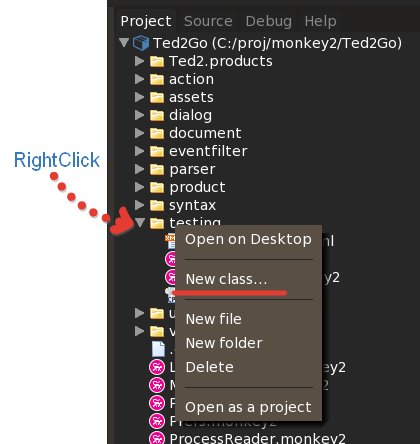
- ! Added “Generate class” dialog – right click on any folder in Project browser.
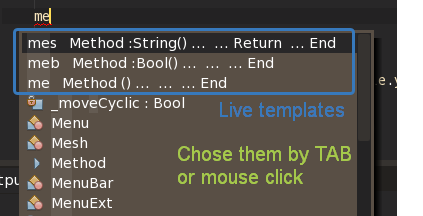
- ! Live templates feature – you just type short combination (like ‘prop’), press TAB and get whole code constuction (for ex. property with setter and getter).
- Added cut / copy / paste / save buttons (save with ‘dirty’ marker) into main toolbar. Also there are all new icons (from icons8.com).
- CodeEditor – added context menu by right click with cut / copy / paste items.
Live (code) templates
Them shown in completion list (you can on/off it in Preferences — Completion section).
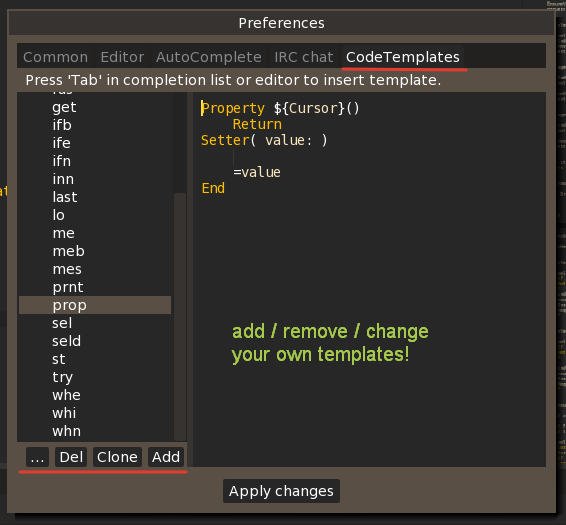
For example, there is ‘prop’ template which insert that code block for us:
Monkey123456Property ${Cursor}()ReturnSetter( value: )=valueEnd${Cursor} will be repleced with real cursor marker.
You can add your own templates right inside Preferences dialog.
And generate whole classes by a few typed letters!
Hezkore, tx!
everything seems to scale nicely and looks sharp, except the line height in autocomplete list is not adjusted
fixed now.
Please give me or pull to the repo new images.
Yeah I see it all the time, even if I change theme a few times, restart Ted2Go etc…
Try to resave progress image.
1) seems weird to have a Save All icon but not a Save icon (I don’t always want to save all) and
added now.
2) could it store whether or not the window is maximised when it exits? It opens up at the right size but I always have to maximise it manually!
Do you use Win10 and start Monkey2 (Windows).exe by desktop shortcut?
If yes – please create shortcut directly to \bin\ted2_windows\ted2.exe.
I can’t solve that. I tried send these events:
Monkey12SendWindowEvent( New WindowEvent( EventType.WindowRestored,Self ) )SendWindowEvent( New WindowEvent( EventType.WindowGainedFocus,Self ) )And even added new window flag – SDL_WINDOW_SHOWN.
But have no effect.
Oh, and I don’t really understand the two separate Help menu options, Browse Manuals and Online Help… they seem to go to slightly different versions of the docs pages, and I can’t tell why (or which one I should use at any give time)! Is it maybe something that’s been left in error?
There is no error.
Browse Manuals – opens local docs in your browser. Rebuild docs give you a fresh version of docs here (useful when grab newest version from github).
Online Help – opens similar page but stored on the server. I don’t know what about actual state here.
For some reason, all my new themes have a messed up loading bars…
It’s strange – I can see that one time, and now it looks normally. Do you see that all the time now? If chenge theme or just at run with current theme?
The abort button background also isn’t transparent anymore.
Fixed now via theme’s attribute “backgroundColor”:”transparent” for StatusBarButton.
Hey Nero, could you add
done.
Btw the clicking & crash problem is still there
fixed.
Hezkore, Please grab the latest monkey2 develop branch and update modules (especially std) – there are changes in json parser.
-
AuthorPosts