Forum Replies Created
-
AuthorPosts
-
Hm. There is only merged patch in the repository. Then waiting for the guru.
1. Today or yesterday Mark fixed something like that bug. Try to use newest develop sources.
2. Fields initialized with default values automatically. Not need to write =Null for objects types or =0 for int.
I plan to release new version about once a month..
Waiting for $upport.

Just pushed v2.2.2 to github. Hope this is ‘release’ version now.
- Fixed theme changing for editor fonts;
- Word wrap shortcut is Alt+Z (is it good for macos?);
- Comments on macos by ctrl+backslash, not usual slash;
- New “Smooth warm” theme.
I noticed the same when switching themes. Only GUI colors are changed,
not the syntax highlighting colors within the editor. I’m also using macOS.I broke it… fixed now. will push to git sooner.
Here’s a new theme for you!
for us.
is this default-ted + new colors, or this is hezkore+new colors ?How can I move the treeview sidebar to the left side?
And I would like to always show “Source” after start,Have no option to move sidebar yet. Added to todo.
The shortcut for remove comments, Command+Shift+/ is already reserved for the OS
Do I use right slash ? I use ‘\’ but VSCode use back ‘/’ (like c++ comments). Maybe need to change to backslash and it fix conflict?
Toggle logic.. maybe.
Command+Arrows (home/end) works! But Alt+Arrows (navigate to previous/next word) doesn’t.
Need to fix core mojox.textview. So I have no garantee to do that.
Changing themes changes the bg colors, but doesn’t apply the text colors right away, only after restarting the app.
I have this working properly. Have anyone the same bug with theme colors?
Can you make the completion popup window to always open
_under_ the current line, if possible?yes, added in todo.
1. Width – you can catch onLayout processing by extending mojox view. But when I tried to do that I got endless onLayout queue…
2. Mouse click – look at OnMouseEvent (or OnContentMouseEvent) but need to extend mojox view to use this way.
3. Have no on the box. Hm, maybe we can write theme extension class to get that stuff.
4. Remove spaces – small fix in textview needed. Maybe I’ll create patch..
Wow!! Supercool! I want to watch live video with that.
@hezkore Tell me how the dot completion to interfere you. I can move it into options. And notify me if you complete icons pack.
I’ll try to play with IDE-font-system next time. I think, we need to change editor font only inside of IDE. For other mojox widgets – using current theme system.
I get the following error
oh, my copy-paste code (for macos). fixed.
The fonts in “ted2go/assets/fonts/” are not copied into the final executable.
thanks, I’ll check it too.
Some fixes in dev branch:
- editor actions copy-paste
- disable ctrl+w shortcut for word wrapping (does it need shortcut at all?)
- whitespaces typo
Another little bug, Edit > Word Wrap has the same shortcut as File > Close Tab
Oops.
Is there a chance that we could perhaps get to customize the font the IDE uses?
Yes, by replacing fonts and changing theme’s files inside of assets/themes/ folder.
Small update v2.2.1
- Added option to show whitespaces – on/off it in File -> Preferences;
- Closing tabs by Ctrl+W
For customizing whitespaces color use this theme color key: “textview-whitespaces” (default color is #2aaa).
Attachments:
Thanks for notes, Adam.
Here’s some thoughts about the icons bar:
I’m not an artist. If someone have nice-lookink icons and want to see it here – give it to me.
2 disks is usually save as. one disk is save. is it save as or save?
This is “Save all” not “Save as”.
All these icons I got from NetBeans IDE. They looked not good for dark themes, but it’s all I have.
You asked me “what is it?” – All icons have a hint text to help understanding.
New version 2.2 is on github.
Amazing changes inside!
- AutoCompletion:
- show items accordingly with ‘using’ directive (so unused modules items aren’t figured in list);
- choose items by dot-char and space (space is optional, you can off it in prefs);
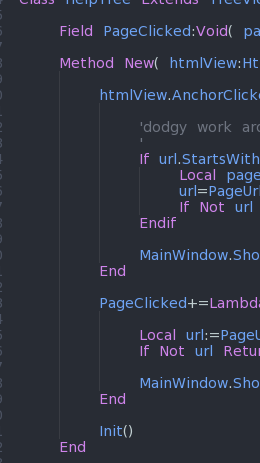
- auto-add lambda definition (work only for = and +=, don’t work inside of params);
- added preprocessor consts __TARGET__, __MOBILE_TARGET__, etc.
- fixed list Y-position;
- choose items by single mouse click.
- Added macos shortcuts (not tested, please test it and give me feedback).
- New theme color “textview-cursor-line” to customize selected line under cursor.
- Main Toolbar
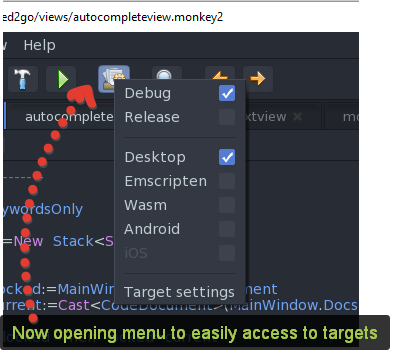
- quickly access to debug/release and targets – now open menu by “Target settings” button;
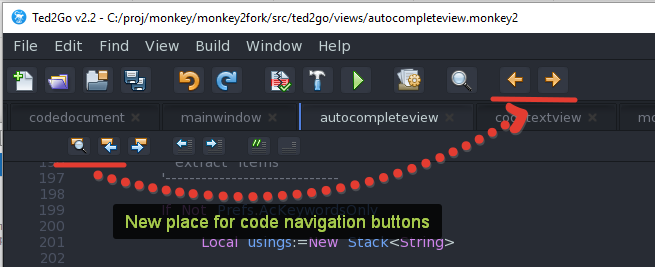
- move ‘navigate back / forward’ buttons from editor toolbar into main.
- Find in projects: show line number in results instead of char position.
Press ctrl+space while completion list is opened to switch to all items or using-based items.
Filtering by ‘using’ will work after mx2cc update (I notified Mark about it).
Test it. Enjoy it.
Attachments:
There is a file Monkey2 (Windows).exe right inside of monkey2 folder if you use release version.
If you use github, you should to compile sources by running script: monkey2/scripts/rebuildall2go.bat
Also you can replace all files in your monkey2/bin/ted2_windows folder with ones from this archive: download the latest win version (dropbox).
-
AuthorPosts