About Monkey 2 › Forums › Monkey 2 Projects › Ted2Go IDE
This topic contains 596 replies, has 46 voices, and was last updated by  nerobot 3 months ago.
-
AuthorPosts
-
November 25, 2017 at 4:41 am #11959
Thanks for feedback!
Would it be possible to make a separate ‘hint’ for colours?
Like, say you’re typing ‘New Color()’ and as you enter inside the ‘()’ a colour wheel pops up and you can preview the colour.
Wheel… not in a near future, I think. But I want to draw colored line under Color declaration to see each color right in the editor area.
I love the editor, but one feature i still miss. Local vars not parse. See Gif.
Local vars is a pain for me too. If anyone remember, my early versions of ted2go can show locals as well, but not always shown correct types. I plan to working on parser a bit later, so I will combine existing parser with my old version for locals.
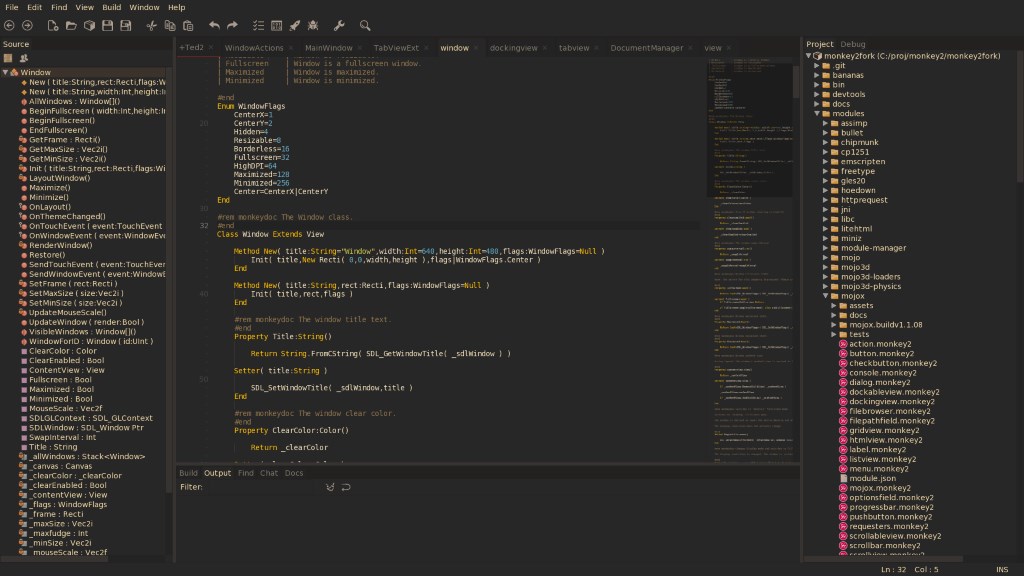
And is it possible to make a fullsreen mode, like Sublime Text
It seems easy to implement, I will see. (F11, are you waiting for me?)
November 25, 2017 at 1:58 pm #11971Wheel… not in a near future, I think. But I want to draw colored line under Color declaration to see each color right in the editor area.
I might be able to add a colour wheel later

I think a line might blend into the background colour too much, or confuse the user; making him think there’s an error if the line is red for example.November 25, 2017 at 4:33 pm #11973I think a line might blend into the background colour too much, or confuse the user; making him think there’s an error if the line is red for example.
Will see if we’ll do that.
So, I done with “Hint for parameter” and pushed it into dev branch.
Also, there is the new option “Show parameters hint” in preferences – you can disable it.
Known issue: hint works for single-line parameters only (and I don’t want to fix that in near future).
November 25, 2017 at 5:05 pm #11976Very nice!
Good workI’d recommend hiding the hint as you hover the mouse over it; it’s currently blocking me from clicking the above line.
November 26, 2017 at 6:12 am #11985Thanks!
I’d recommend hiding the hint as you hover the mouse over it; it’s currently blocking me from clicking the above line.
Now hints closed by mouse click. But you need to do additional click to jump to line – I can’t normally send event from hint to editor.
It looks like a semi-temporarily solution, I hope we can live with that.
November 27, 2017 at 6:56 am #12003Some new stuff:
- Fullscreen mode – by F11 or menu Window — Fullscreen mode.
- Json documents:
- Enabled monkey2’s highlighter for .json files.
- Added ability to jump to values by clicking on Source tree view nodes – not accurate results in some cases, but should be better than nothing.
- Fixed – can’t read the last item in completion list.
Json is our friend.
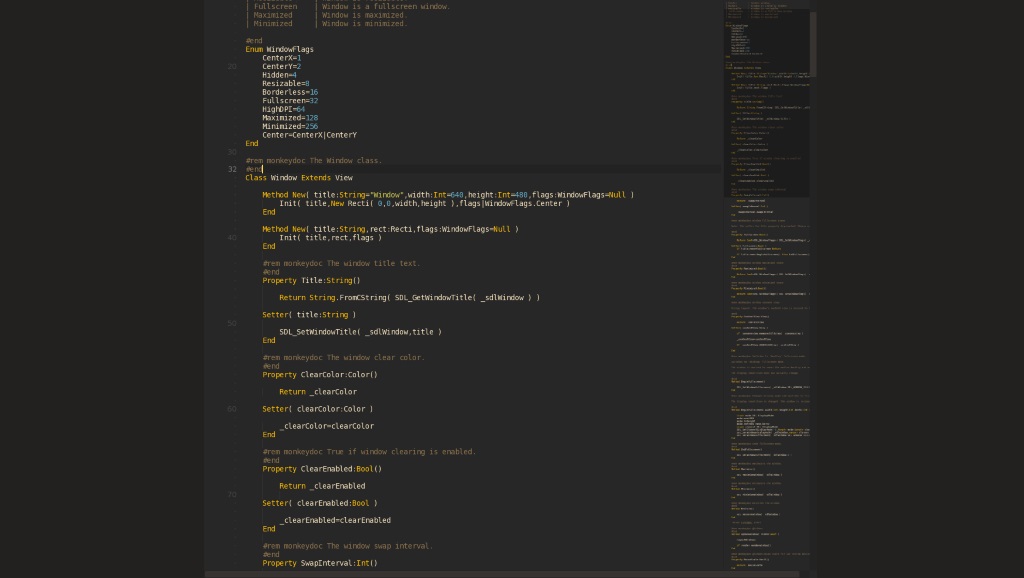
November 29, 2017 at 7:54 am #12014Now, Ted2Go has two fullscreen modes:
- Fullscreen window – it’s an usual fullscreen, just a borderless maximized window;
- Fullscreen editor – also borserless&maximized, and in this mode we have only current document shown in the window area; docView.width is limited by 0.7*desktopWidth here.
You can press Shift+F11 (on windows) again or just Esc to exit fullscreen-editor mode.
Let me know if 0.7x koef. is bad.
Attachments:
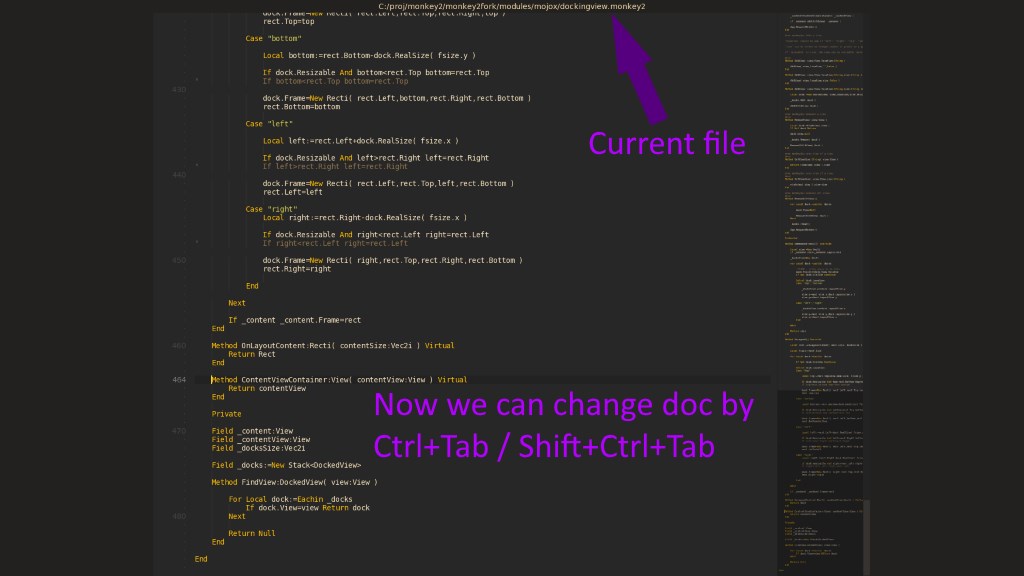
November 29, 2017 at 8:42 am #12017Upd.
- Added ability to change docs by hotkeys – Ctrl+Tab / Shift+Ctrl+Tab – while fullscreen mode;
- Added current doc path.
Attachments:
November 29, 2017 at 3:15 pm #12021nice
November 30, 2017 at 8:51 am #12033I really like Ted2Go, but I’m often struggling way to much with pretty basic things.
Some of these are (this is on Max OS High Sierra) :
- Help does not work.
F1 or fn+F1 does not show any help, so most of the time I press F2, and that takes me to the monkey code, that I then decipher.
Also: “Browse manuals” does nothing. Is this a path issue?
2) Code completion is hit and miss, often it show up, but often it does not. I have not had the patience to decipher why.
3) Numpad drives me crazy: If I type it and numlock is off, the cursor jumps to the somewhere in the code. one char up, down or to the bottom or top of the code. It also enters the number I pressed, at that position, and if I undo; I have to do it twice, loosing my last code entry.
4) Also: 0 on the numlock toggles insert mode, but not if in numlock mode. If I accidently hit 0 on the numpad, I’m forced to enter 00 to toggle insert, and the erase the 0.
5) I don’t understand the interface: Besides the Build/output etc window is another window that just takes up space:
The same error is shown in the Build window and in this window, in two slightly different ways:
Build window: [400] : Error : Expecting end of line , the other window: “Expectiong end of line…..”
6) The little window at the right does not let me copy text, and the build window will only let me copy text from the menu, not with [CMD]+C.
7) Sometimes Ted2Go will open monkey module code, when I’m trying to open something else. I’ll try and find out exactly when this happens at some point.
[EDIT] 8: Find/Replace shortcuts are not standard Mac OS
November 30, 2017 at 11:03 am #120341) Help does not work.
F1 or fn+F1 does not show any help, so most of the time I press F2, and that takes me to the monkey code, that I then decipher.Also: “Browse manuals” does nothing. Is this a path issue?
Hm, I can see the docs. Try to Rebuild documentation.
2) Code completion is hit and miss, often it show up, but often it does not. I have not had the patience to decipher why.
Sorry, but I try to improve it from time to time.
3) Numpad drives me crazy: If I type it and numlock is off, the cursor jumps to the somewhere in the code. one char up, down or to the bottom or top of the code. It also enters the number I pressed, at that position, and if I undo; I have to do it twice, loosing my last code entry.
4) Also: 0 on the numlock toggles insert mode, but not if in numlock mode. If I accidently hit 0 on the numpad, I’m forced to enter 00 to toggle insert, and the erase the 0.
I don’t face this problem on Windows. Does it happen with code files only or with plain text files too?
Check it, please.
5) I don’t understand the interface: Besides the Build/output etc window is another window that just takes up space:
The same error is shown in the Build window and in this window, in two slightly different ways:
Build window: [400] : Error : Expecting end of line , the other window: “Expectiong end of line…..”
This window named “Error list”.
It allows us to jump to error line we clicked in this list.Error texts are the same here – just re-arranged words.
It’s a semi-temporarily solution to jumping by click. You can expand this list by dragging vertical separator, and use it instead of plain text output.
Or make it smaller to hide.
6) The little window at the right does not let me copy text, and the build window will only let me copy text from the menu, not with [CMD]+C.
Yes, undone things are here… On windows I can copy from build plain text area by selecting text and pressing Ctrl+C.
7) Sometimes Ted2Go will open monkey module code, when I’m trying to open something else. I’ll try and find out exactly when this happens at some point.
I suppose, there is an intellectual ident checking issue – for example, when we type lst we will see also List, ListView, FileStream, etc – this is cool feature if you don’t remember exactly what you want.
I will see is it a reason or not.
[EDIT] 8: Find/Replace shortcuts are not standard Mac OS
I have no macos device and even experience with it, so let me know proper / preferred shortcuts, please.
November 30, 2017 at 11:12 am #12035Thanks for all feedback, guys!
I decided to open my patreon page for Ted2Go.
To make Ted2Go’s future a little happier.
November 30, 2017 at 1:33 pm #12038Patreon’d! Great piece of work, thanks for all your efforts.
November 30, 2017 at 1:53 pm #12039Will see how it would increase my enthusiasm.
December 1, 2017 at 10:17 am #12053Patreon’d, keep up the good work
-
AuthorPosts




You must be logged in to reply to this topic.