
Forum Replies Created
-
AuthorPosts
-
Sorry, can’t post the code… getting a “403 Forbidden:A potentially unsafe operation has been detected in your request to this site.” error.
Has anyone else had this problem?
There isn’t a “complete” solution yet, but some IDEs out there show a lot of promise.
The Atom M2 package works really well, the main problem right now is the lack of a debugger (and it kinda freezes in MacOS when the app crashes in debug mode last time I was using it).
Mollusk is great, the only things missing are debugger support and better autocomplete.
Ted2Go is coded in Monkey2, is evolving fast, has good autocomplete and feels designed specifically for M2 (because it is!). I often switch to it when I need a debugger. It still doesn’t have the best text editing in MacOS (lacks some standard keyboard MacOS shortcuts) and crashes occasionally. The top menu UI needs some work too, but that could be a MojoX problem.
Cheers.
I get an “Array index out of range” on the Gltf2Loader class, in the LoadModel method. The error goes away when loading one of the files provided with Mojo3d instead of mine, which makes me think those were created in a specific way that works, which is why I want to know how they were created. I’ve provided a file that crashes for me, so that anyone interested can try on their own.
Bottom line is, has anyone successfully loaded their own gltf files?
Thanks, that worked!

I still can’t load gltf files. Mark, how did you make the files from your examples?
Some “player object” system (sometimes called “Arcade Physics”, since it’s designed for non-realistic movement) that still collides/reacts to some degree with physics objects would be amazing! It was one of my main gripes with Unity3D, dealing with Physics and “Character Controller” movement didn’t feel like a fully integrated system.
Thanks Mark! Keep up the good work.
That looks like what I’m seeing, I don’t see the original environment image reflected in the donut, just a sharp, 1×1 version of it seemingly without filtering. But that paper seems to indicate it as resolved?
As for the gamma, I think what’s confusing me is not the fact that it’s linear (which is absolutely the way to go!), but the fact that I’m getting inconsistent results depending on where I use the values.
I made a texture in Photoshop with values from 0.1 to 0.5, brought it in as a sprite, and it looks in Mojo3d exactly like what it should! But drawing a rect in Mojo with Color(0.2, 0.2, 0.2) and using the same color as the scene.ClearColor gives me different results, which feels unintuitive. Here’s a screenshot:
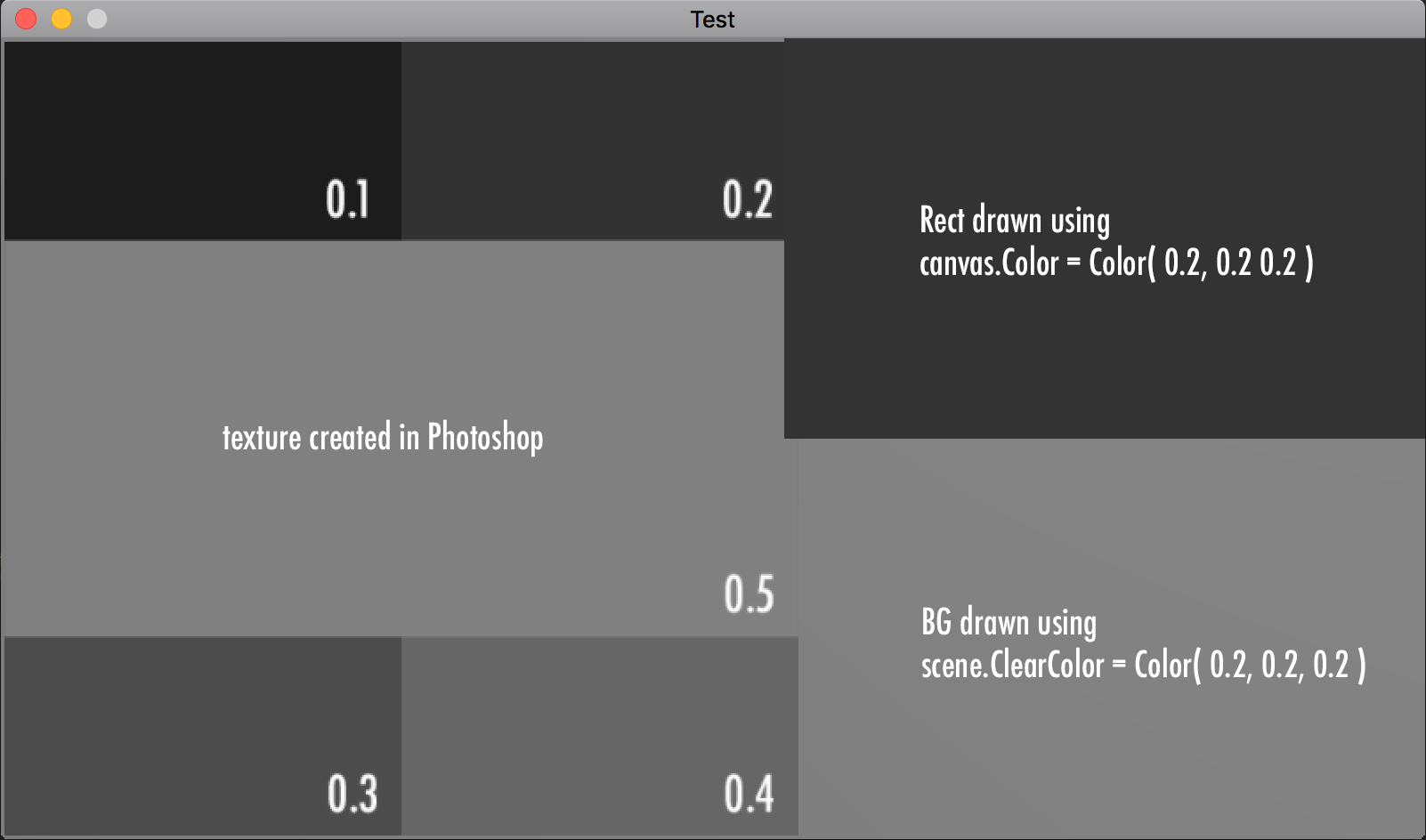
Shouldn’t a gamma curve be applied to the Color class before rendering in Mojo3d (so it’s always assumed to be sRGB gamma), so it matches a texture with the same values?
Cheers!
Here’s a simplified code that does the same thing:
Monkey12345678910111213141516171819202122232425262728293031323334353637383940414243444546474849505152535455#Import "<std>"#Import "<mojo>"#Import "<mojo3d>"Using std..Using mojo..Using mojo3d..Function Main()New AppInstanceNew GameApp.Run()EndClass Game Extends WindowField donut:ModelField mainCam:CameraField keyLight:LightField scene:SceneConst degToRad :Double = Pi / 180.0Method New()Super.New( "Test", 1066, 600 )'Scenescene = Scene.GetCurrent()scene.ClearColor = Color.Blackscene.AmbientLight = Color.Black'CameramainCam = New CameramainCam.Near = 0.1mainCam.Far = 100mainCam.Move( 0, 5, -5 )mainCam.Rotate( 45 * degToRad, 0, 0 )' 'Default Light' keyLight = New Light' keyLight.RotateX( 45 * degToRad )'Donutdonut = Model.CreateTorus( 2, .5, 48, 24, New PbrMaterial( Color.Black, 0.0, 1.0 ) )EndMethod OnRender( canvas:Canvas ) OverrideRequestRender()donut.Rotate( 0.03, 0.01, 0.01 )scene.Render( canvas, mainCam )canvas.DrawText( "Width="+Width+", Height="+Height+", FPS="+App.FPS,0,0 )EndEndThis time I tried using a material with the color set to Color.Black, and it looks surprisingly like light grey when the light is on, instead of the black matte look I was expecting, which is why I think something is wrong with the gamma. Same thing with the bg colors: setting the background to (0.2, 0.2, 0.2) looks like a medium grey, instead of dark grey.
This is what it looks like with clearcolor ( 0.2, 0.2, 0.2 ), a Color.Black material and no lights:

Since it’s all physically based and we’re using non-float, non-hdr textures, shouldn’t we do something with either the input or the output gamma? Like this: https://renderman.pixar.com/view/LinearWorkflow
With the light off it looks like the image I posted before.
Cheers!Thanks Mark! That does the trick. It’s nice that I can set the environment for the whole scene, instead of per material.
I absolutely agree with the “everything is shiny” approach, but as someone with 20 years of CG experience, something seems a little off to me. Shouldn’t the roughness affect how “blurry” the environment seems?
But the main thing is how intense the reflection looks like, it’s almost as if the gamma is off somewhere, as you can see in the image I sent. Do the textures use the same gamma curve as the renderer? Can we control that somehow?
Anyway, I don’t mean to sound negative, I’m really enjoying Mojo3D so far!
Cheers.Ambient light is zero. No other light sources.
Hi,
Which tutorial are you talking about? Can you post a link?
These cover a lot of ground: http://monkeycoder.co.nz/forums/topic/monkey-2-examples-github/Are you sure your installation is working properly? What are the errors you’re getting? I can compile the examples without issues here.
I have the exact same issue, MacOS as well. 1.1.04 works. I started to notice this issue on Ted2Go 2.3.2, before Monkey 1.1.05 was released.
Hmmm, couldn’t figure it out with List… here’s how I do it with Stacks, though.
Monkey1234567891011121314151617181920212223242526272829#Import "<std>"Using std..Struct MyStructField value := 0.0EndFunction Main()Local myList := New Stack< MyStruct >'Populates listFor Local n := 0 Until 20myList.Add( New MyStruct )Next'Set value, copy struct back into listFor Local n := 0 Until myList.LengthLocal s := myList[n]s.value = Rnd( 100.0 )myList[n] = sEnd'read valuesFor Local n := 0 Until myList.LengthPrint myList[n].valueEndEndYay, code snippets! Thanks for sharing.
Hi,
If you look in the “src” subfolder you’ll find the renderwindow.monkey2 file that contains the RenderWindow class (which is an extension of the Window class), as well as other classes like Player and Actor. It adds some features I need like simple to use parallax, layers, mouse coordinates in world space, etc. I’ve made many changes to it since then, will probably push those changes to Github eventually.
I made that test when I had just started to learn Monkey2, so don’t take it as a good example on how to do things in the best way possible!

-
AuthorPosts
