
Forum Replies Created
-
AuthorPosts
-
You can use Properties with Getter and Setter when:
- You want an attribute to be “read only” (just the getter, not the setter). The property can do as little as returning a private field, but whoever is accessing the class won’t have access to write anything in the field (i.e. won’t break anything in your class).
- You want something else to happen when you get or set a value. For instance, you can have a “Color” property in an entity, but when you set it it also sets the Color property of all the entity’s children, etc. A simple field can’t do that.
I’m sure there’s other cases as well, have to go now!
Cheers.It’s hard to tell from the screen grab. If you could reproduce the problem in an example without loading any assets it would be helpful.
Other than possible asset issues, I don’t see anything the could be wrong at a glance. Maybe driver issues? Windows doesn’t seem to like Open GL sometimes.
January 22, 2019 at 9:53 am in reply to: My controls change when I rotate my player in my 3D game #15993Monkey123456789101112131415161718192021222324252627282930313233343536373839404142434445464748495051525354555657585960616263646566676869707172737475767778798081Namespace myapp#Import "<std>"#Import "<mojo>"#Import "<mojo3d>"Using std..Using mojo..Using mojo3d..Class MyWindow Extends WindowGlobal _camera:CameraField _scene:SceneField _light:LightField _ground:ModelField Man:ModelField Jack_in_the_Box: ModelField _animator:AnimatorField speed: Float = 1.0Field turn: Float = 1.0Method New( title:String="The World Doesn't Apply to Him",width:Int=800,height:Int=600,flags:WindowFlags=WindowFlags.Resizable )Super.New( title,width,height,flags )_scene=New SceneMan=Model.CreateBox( New Boxf(-2.5,-2.5,-2.5, 2.5, 2.5, 2.5 ), 1, 1, 1, New PbrMaterial( Color.Yellow ) )Man.Position = New Vec3f(0, 2.5,10)_camera=New Camera( Man)_camera.View = Self_camera.Near= 2_camera.Far=100000_camera.Position = New Vec3f(0, 25,-10)_camera.PointAt( Man )'_light=New Light_light.Rotate( 45,150,0 )_light.CastsShadow=True_ground=Model.CreateBox( New Boxf( -100,-1,-100,100,0,100 ),1,1,1,New PbrMaterial( Color.Green ) )_ground.CastsShadow=FalseJack_in_the_Box=Model.CreateBox( New Boxf(-2, -2, -2, 2, 2, 2 ), 1, 1, 1, New PbrMaterial( Color.Red ) )Jack_in_the_Box.Move( 0,2,30)EndMethod OnRender( canvas:Canvas ) OverrideRequestRender()If Keyboard.KeyHit( Key.Space )Else If Keyboard.KeyDown( Key.Up )Man.MoveZ( speed, False )Else If Keyboard.KeyDown( Key.Down )Man.MoveZ( -speed, False )EndIf Keyboard.KeyDown( Key.Right)Man.RotateY( -turn, False )Else If Keyboard.KeyDown( Key.Left )Man.RotateY( turn, False)End_scene.Update()_camera.Render( canvas )EndEndFunction Main()New AppInstanceNew MyWindowApp.Run()EndJanuary 22, 2019 at 9:42 am in reply to: My controls change when I rotate my player in my 3D game #15992Had to modify the code to run without the assets, but it seems that if you change the Move and Rotate commands to be in local space the problem is solved. Works here.
Example:
Man.MoveZ(0.2, False)
Man.RotateY(1, False)
(uses “false” instead of “true”)As far as I can tell, Mojo3D’s rotation and translation commands’ object space are inverted – True should mean local space, but means world space. If you want the motion to always be relative to where the player is pointing, it need to be in local space (“False”, although it should be “True”).
January 9, 2019 at 9:46 am in reply to: My Character Runs into the Skybox.How do I make my Skybox Large and further Away #15869Seems like you’re hitting the camera far clipping plane. Try setting _camera.Far to a much higher value, like 1000 or 10000.
While you’re at it, you may want to check your model’s scale. Ideally, you should keep 1 unit = 1 meter. Some apps like Maya seem to default to 1 unit = 1cm, which makes everything 100 times larger than it should and causes all sorts of precision issues in large scenes (not just in games, even in pre-rendered stuff like feature films).
Cheers.
Really cool!
Had never heard of the FairLight, watched a couple videos about it. Used in lots of nostalgic 80’s songs!
Cheers.
You need to compare the current mouse coordinates with the coordinates in the previous frame (stored in a variable), and only apply that difference multiplied by a “mouseSensitivity” variable. If you’ve already reached the rotation you want to limit to, don’t rotate anymore! (something like: If Entity.Rotation.Y < limit Then RotateFunctionGoesHere() )
Not on my laptop, but you can specify the mouse coordinates using Mouse.Location = New Vec2f, I think.
My old code that handles first person mouse look is this (out of context):Monkey1234567891011121314151617181920212223If firstPerson'De-initializes mouselook if escape is pressedIf Keyboard.KeyHit( Key.Escape )_prevMouse = NullMouse.PointerVisible = TrueEndIf _prevMouse'Only starts updating if _prevMouse is initializedLocal deltaX := ( Float(Mouse.Y) - _prevMouse.Y ) * mouseSensitivityLocal deltaY := ( Float(Mouse.X) - _prevMouse.X ) * -mouseSensitivityEntity.RotateY( deltaY )If firstPersonCamerafirstPersonCamera.RotateX( deltaX )EndElse'initializes _prevMouse only if mouse is clicked and _prevMouse is nullIf Mouse.ButtonHit( MouseButton.Left )_prevMouse = New Vec2f( Float( Mouse.X ), Float( Mouse.Y ) )Mouse.PointerVisible = FalseEndEndEndAnd at the end of the update, it resets the mouse location like this:
Monkey123456789101112131415Method OnEndUpdate() OverrideIf firstPerson'Mouse centering. Does not run if _prevMouse is not initialized (first click hasn't happened)If _prevMouseLocal threshold := App.ActiveWindow.Height / 10Local center := New Vec2i( App.ActiveWindow.Width/2, App.ActiveWindow.Height/2 )Local limit := New Recti( center.X - threshold, center.Y - threshold, center.X + threshold, center.Y + threshold )If Mouse.X < limit.Left Or Mouse.X > limit.Right Or Mouse.Y < limit.Top Or Mouse.Y > limit.BottomMouse.Location = New Vec2i( center.X, center.Y )End_prevMouse = New Vec2f( Float( Mouse.X ), Float( Mouse.Y ) )EndEndEndI’m in the process of cleaning up and rewriting a CharacterController component that can be used in first person games, but the old version is here:
https://github.com/DoctorWhoof/FPSTestCheers.
That’s a great hands on intro to Mojo3D. Can we get it pinned, or linked to somewhere in the main website?
Monkey1#Import "<bah.humbug>"Sorry for the confusion, I didn’t mean to imply that Monkey WASM and Electron apps would be the same thing. I believe a Monkey WASM app would still feel like a Monkey app as far as the end user is concerned, while Electron apps are essentially web pages running locally, with an html+css interface, etc.
What I was trying to point out is that both things would share one benefit, which is easy portability, and I believe that answers the original question – Will it run on Android and IOS?
My two cents:
There are other solutions out there that allow JS on desktop and mobile (Electron, etc.), and one of their biggest selling points tends to be that they are an “easy” 100% multi platform, without requiring complicated setups (different compilers, etc) for each platform. The exact same code just runs on a different “player”, so to speak, on each platform.
Those solutions are currently very popular with apps . Go to https://electronjs.org, scroll down to see a bunch of “heavy hitters” like Skype, Slack, GitHub Desktop, VS Code, etc. To me this seems to validate this type of technology, at least for Desktop apps. And some (most? all?) of those aren’t even WASM yet, they’re just straight JS, and still seem to perform really well.
So I don’t see why going WASM would cut platforms off Monkey3 (If that’s the name), if anything it would make it easier to support more, since there’s technically only one target, instead of a plethora of moving targets. I don’t know which “player” solution Mark has in mind, though, I hope it’s something he won’t try to maintain himself.
The biggest question remaining is performance, but as far as games are concerned, WASM could run at half speed compared to compiled c++ and you would probably still be using less than 10% of the cpu, so… not really a problem, I think?
Cheers.
Did you try deleting all the build folders (including modules) and rebuilding everything? Kinda defeats the point of downloading binaries from itch.io, I know…
Now that I’m getting a bit more into 3D shaders, I’ve updated the plane demo to use a Forward renderer by default (and use a new Water material that actually renders in the forward renderer).
Looks the same, but when I render it at full resolution (key “/” to toggle render resolution) I get about 50% more fps on my laptop, yay! Makes me wonder why Mark made the current Water Material for deferred renderer only.
Latest commit here: https://github.com/DoctorWhoof/Plane-Demo
Sorry, haven’t tried mobile at all yet. Hopefully someone who has can reply.
Updated it, and now in addition to GuiComponents it has an early, largely untested class called GameComponents. It provides collision events like OnCollisionEnter( body ) , OnCollisionStay( body ) and OnCollisionLeave( body ). You need to use the “GameBody” class instead of the regular “RigidBody” to achieve that.
https://github.com/DoctorWhoof/GameComponents
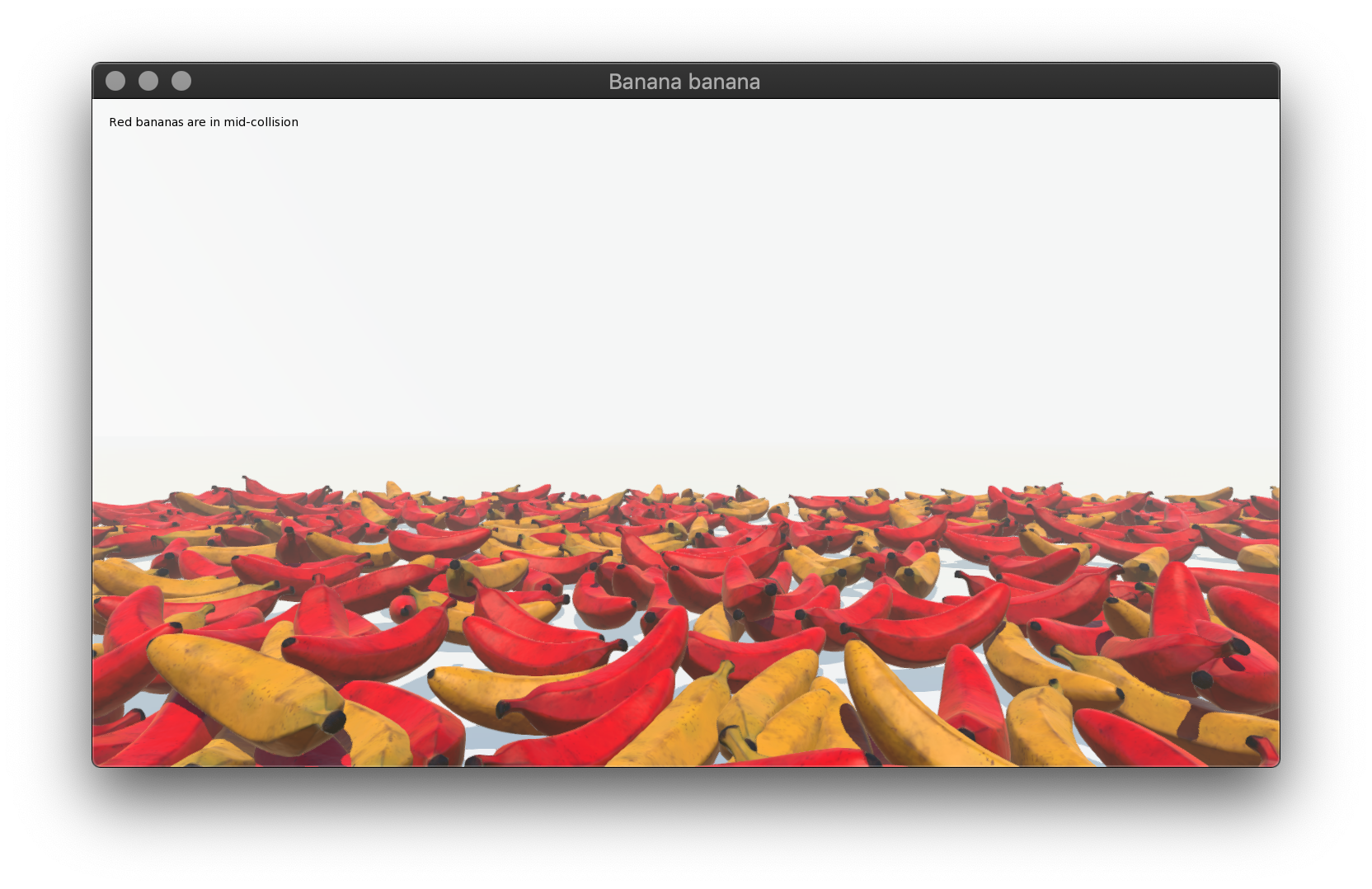
There’s even a… uhh… bananas demo!
 It showcases a simple GameComponent:Monkey123456789101112131415Class CollisionColor Extends GameComponentMethod New( e:Entity )Super.New( e )EndMethod OnCollisionEnter( body:RigidBody ) OverrideEntity.Color = Color.RedEndMethod OnCollisionLeave( body:RigidBody ) OverrideEntity.Color = Color.WhiteEndEnd
And here it is in action:
The repo was renamed GameComponents to reflect the changes. Will probably post it in the Code Library section once I’ve tested it some more. Will also include an “Arcade Physics” style Character Controller (based on Mark’s QCollide demo) that uses the exact same Collision Events as the physics system. Take that, Unity3D!

Cheers. -
AuthorPosts
