Forum Replies Created
-
AuthorPosts
-
Not using the dev branch yet, but this seems fine to me. Thanks.
I’ve been using TextureFilter per image, instead of setting the canvas. I’m still on V1.1.04, though.
What browser? OS version? Googling suggests it may be a chrome thang.
I’m seeing this problem on both Chrome and Safari, MacOS Sierra 10.12.4.
I also tested several of the “bananas” examples, same thing. I thought it could be a script blocker extension, but I have disabled it.<edit> Testing again, the bananas examples now work on Safari, but not on Chrome. My own project gives the same error on both. Will investigate more tomorrow, need some sleep.
Mostly working!

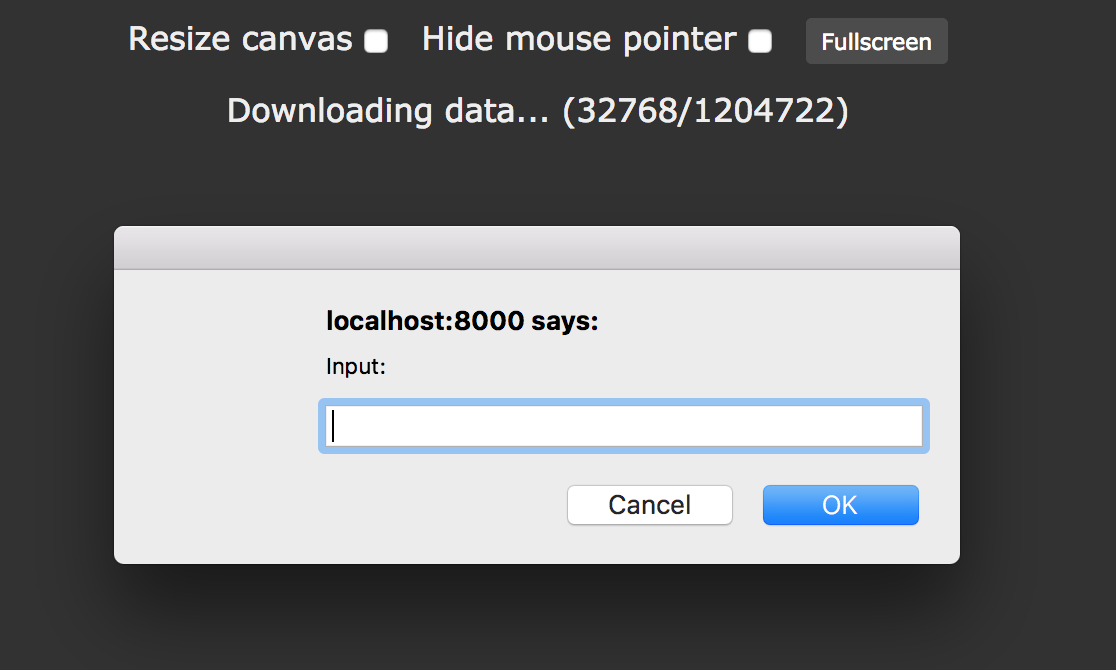
When I try Wasm or Emscripten it successfully compiles, but when I try to launch the page I get this window requesting input popping endlessly. If I cancel it, I get this error:
Monkey12345Could not create canvas: Could not create a WebGL context, VENDOR = 0x1002, DEVICE = 0x6821, Sandboxed = no, Optimus = no, AMD switchable = no, Reset notification strategy = 0x0000, GPU process crash count = 0, ErrorMessage = bindToCurrentThread failed: Failed to collect gpu information, GLSurface or GLContext creation failed.,:(,{"antialias":true,"alpha":false,"depth":true,"stencil":true,"majorVersion":1,"minorVersion":0}SDL_GetError=Could not create EGL contextFATAL ERROR: SDL_GL_CreateContext failed{{!DEBUG!}}On MacOS. Tested with Mserver and a simple Python server. Desktop target seems to be working fine.
Cheers.Attachments:
Hmm bummer, didn’t know about that. An error message would be nice in a case like this.
How would you deal with this situation, where I need a single stack and each item in the stack needs to call its own “Update” method? I’m creating a render queue (so I can sort the drawing order based on coordinates) where each item in the queue can be of a different type (“Image quad”, “text”, etc.).
The reason I’m using structs is that a large number of those are created each frame and discarded on the next.
I guess I’ll create a single Struct with a “style:Int” field, and use 0 for quads, 1 for text, etc, and the Update method will select the appropriate rendering style for each item.
Thanks!
Awesome, that is more than sufficient!
I’m on MacOS, but I’m away from home right now and can’t tell you which font it is yet. Regardless, I really appreciate your effort. Thanks!
<edit>Works brilliantly. Thanks again!
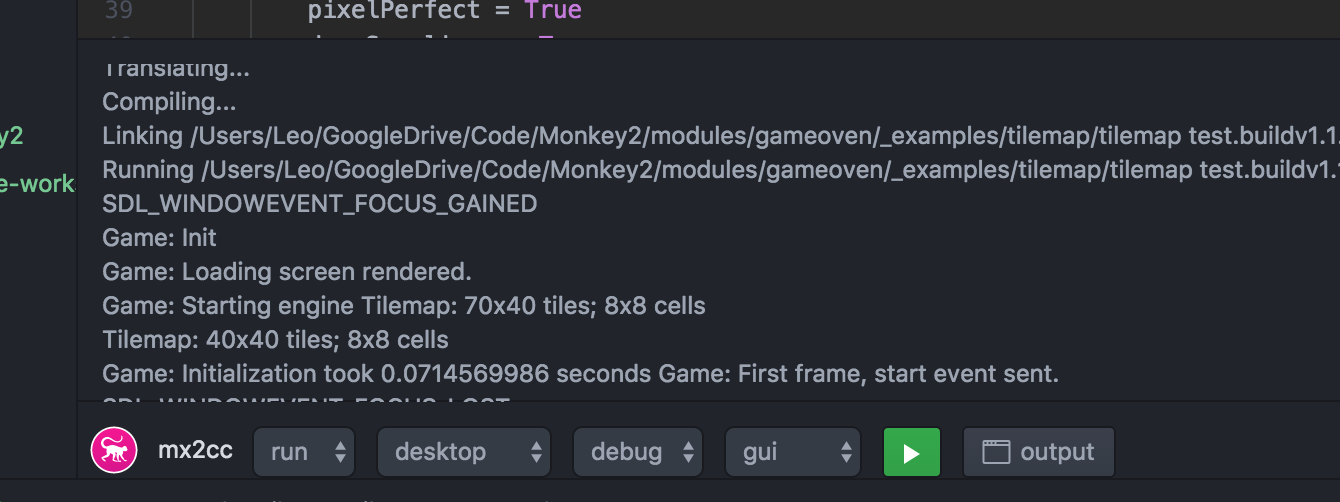
Strangely, in some of my tests the end of line is ignored in the output panel (multiple prints end up in the same line), but in some it isn’t. Importing Mojo and printing from within the Window class seems to be what makes a difference?
On that same note, the little toolbar at the bottom is overlapping the bottom of the output panel, like in this screenshot (I can’t scroll past that point to see the last printed line).
Thanks!
Attachments:
Considering how much Command+C and Command+V are the standard in Mac OS, I believe a much better solution would be implementing user defined shortcuts. That way anyone with specific requests would be able to map their own custom shortcuts.
Cheers!
Works here, V1.1.03 on Mac OS.
I added a ‘Main’ function so I could test it.
Monkey123456789101112#import "<std>"Using std..Alias Offset:Vec2iglobal offsets:Offset[] = New Offset[8]Function Main()Local test := New Offset(150, 200)offsets[2] = testPrint offsets[2].XPrint offsets[2].YEndAre you sure the problem is not elsewhere?
Yay, that worked! (after I cleaned it up and fixed another issue, the Vec class had X and Y fields capitalized, while the json file didn’t… took me forever to catch that one…
 )
)Here’s the cleaned up json file:
[/crayon]Monkey1234567891011121314[crayon-5cba9f85667fc110563570 inline="true" ]{"bob":{"name":"Bob","class":"test.Entity","sort":0,"layer":1,"animation":"idle","category":"npc","position":{ "class":"test.Vec", "x":100, "y":50 },"size":{ "class":"test.Vec", "x":30, "y":20 }}}And here’s the example that uses it:
[/crayon]Monkey123456789101112131415161718192021222324252627282930313233343536373839404142434445464748495051525354555657585960616263646566676869707172737475767778798081828384858687888990919293[crayon-5cba9f8566801361828717 inline="true" ]Namespace test#Import "<std>"#Import "<reflection>"#Import "test.json"Using std..Function Main()LoadFromFile( "asset::test.json" )For Local e := Eachin Entity.alle.List()NextEnd'************************************************************************************************************************'Function LoadFromFile( path:String )Local json := JsonObject.Load( path )If jsonFor Local entry := EachIn json.ToObject().KeysLoadFromMap( json[ entry ].ToObject(), entry )NextEndEndFunction LoadFromMap:Variant( obj:StringMap<JsonValue>, objName:String )Local inst:VariantLocal objClass:= obj["class"].ToString()Local newObj := TypeInfo.GetType( objClass )If newObjLocal ctor := newObj.GetDecl( "New" )inst = ctor.Invoke( Null, Null ) 'This is the instance we'll assign the field values to.For Local key := EachIn obj.KeysIf key = "class" Then ContinueLocal d:= newObj.GetDecl( key )'If the field is an object, recursively call LoadFromMap.If obj[key].IsObjectLocal o := LoadFromMap( obj[key].ToObject(), key )If o Then d.Set( inst, o )End'Now let's try to set the other fields.If obj[key].IsString Then d.Set( inst, obj[key].ToString() )If obj[key].IsNumber Then d.Set( inst, obj[key].ToNumber() )If obj[key].IsBool Then d.Set( inst, obj[key].ToBool() )NextElsePrint( "Error: Class " + objClass + " not found" )EndIf inst = Null Then Print( "Error: Nothing to return" )Return instEnd'************************************************************************************************************************Class EntityGlobal all:= New Stack<Entity>Field name:StringField animation:StringField category:StringField layer:DoubleField sort:DoubleField size:VecField position:VecMethod New()all.Push( Self )EndMethod List()Print "Entity:"Print "name = " + namePrint "animation = " + animationPrint "category = " + categoryPrint "layer = " + layerPrint "sort = " + sortPrint "size = " + size.x + "," + size.yPrint "position = " + position.x + "," + position.yEndEndClass VecField x:DoubleField y:DoubleEndMark, if you think this is good enough, feel free to use it as an example for the Reflection module (or for the Json module).
Do you think Reflection will ever allow generics? I’ll make special non-generic classes for now.
Thanks!Ok, still having some trouble, this time when trying to read the fields from a .json file and assign the values to the class fields.
It works fine if I just print the values and don’t actually assign them, but if you uncomment the lines that do the assignment I keep getting Memory access violations.
Here’s the json file. The class names are set for each Json object, in this format: “objectName:namespace.Class”
Monkey1234567891011{"bob:test.Entity":{"sort":0,"layer":1,"animation":"idle","category":"npc","position:test.Vec":{ "x":100, "y":50 },"size:test.Vec":{ "x":30, "y":20 }}}And here’s the Monkey2 code. Forgive me if it’s a little messy, I was in the middle of experimenting with this.
Monkey1234567891011121314151617181920212223242526272829303132333435363738394041424344454647484950515253545556575859606162636465666768697071727374757677787980818283848586878889Namespace test#Import "<std>"#Import "<reflection>"#Import "test.json"Using std..Function Main()LoadFromFile( "asset::test.json" )End'************************************************************************************************************************'Function LoadFromFile( path:String )Local json := JsonObject.Load( path )If jsonFor Local entry := EachIn json.ToObject().KeysLoadFromMap( json[ entry ].ToObject(), entry )NextEndEndFunction LoadFromMap:Variant( obj:StringMap<JsonValue>, objType:String )Local inst:VariantLocal entry := objType.Split(":")If entry.Length <> 2 Then Print( "Error: Invalid format, entries should be 'name:Class'")Local newObj := TypeInfo.GetType( entry[1] )If newObjPrint( " ~n" + "New " + objType )Local ctor := newObj.GetDecl( "New" )'This is the instance we'll assign the field values toinst = ctor.Invoke( Null, Null )For Local key := EachIn obj.KeysLocal d:= newObj.GetDecl( key )'If the field is an object, recursively call LoadFromMapIf obj[key].IsObject'Lets create the object, and return it so we can assign it to the appropriate fieldLocal o := LoadFromMap( obj[key].ToObject(), key )If inst = Null Then Print( "Error: no instance" )If o = Null Then Print( "Error: no object" )'If o Then d.Set( inst, o ) '<--- This fails, even though 'inst' and 'o' exist'If o Then d.Set( Cast<Entity>( inst ), Cast<Vec>( o ) )'<--- Just testing , didn't work eitherEnd'Sweet! Now let's try to set the other fields!If obj[key].IsStringPrint( entry[0] + "." + key + ":String = '" + obj[key].ToString() + "'" )d.Set( inst, obj[key].ToString() )EndIf obj[key].IsNumberPrint( entry[0] + "." + key + ":Number = " + obj[key].ToNumber() )'d.Set( inst, obj[key].ToNumber() ) '<------------------------ This fails unless there are no other fieldsEndNextElsePrint( "Error: Class " + objType + " not found" )EndIf inst <> NullReturn instElsePrint( "Error: Nothing to return" )Return NullEndEnd'************************************************************************************************************************Class EntityField name:StringField animation:StringField category:StringField layer:DoubleField sort:DoubleField size:VecField position:VecEndClass VecField X:FloatField Y:FloatEndAny help appreciated!
Cheers.One thing I also noticed is that the Reflection module doesn’t seem to be included at all in the “Modules Reference” page, so it’s hard to figure out which methods, properties, etc. are available.
Thanks Mark!
If you look inside Monkey2/bananas/viewLayout there’s a complete demonstration on how to use virtual resolution and layouts. The basic idea is that the Window method “OnMeasure:Vec2i()” should return the resolution you want, and the “Layout” property controls things like stretching, letterboxing, etc.
Here’s a much simplified version that shows only what you want, scale the window to see the letter boxing in action:
[/crayon]Monkey12345678910111213141516171819202122232425262728293031323334[crayon-5cba9f8576f30426755878 inline="true" ]#Import "<std>"#Import "<mojo>"Using std..Using mojo..Class MyWindow Extends WindowField virtualRes:=New Vec2i( 320,240 )Method New( title:String,width:Int,height:Int,flags:WindowFlags=WindowFlags.Resizable )Super.New( title,width,height,flags )Layout = "letterbox"Style.BackgroundColor = Color.DarkGreyClearColor = Color.BlackEndMethod OnRender( canvas:Canvas ) OverrideApp.RequestRender()canvas.DrawText( "Hello World!",Width/2,Height/2,.5,.5 )EndMethod OnMeasure:Vec2i() OverrideReturn virtualResEndEndFunction Main()New AppInstanceNew MyWindow( "Simple Window Demo!",640,512 )App.Run()EndAh, I had not looked into the examples.
Looking at it from Github now, seems like it will work like a charm.Thanks!
This is working great. Thanks!!!
My only two cents are:
– Hitting the shortcut for “build” doesn’t save the file automatically (or save all files, which would be ideal)
– Printing anything seems to ignore end of line characters in the output panel (everything is printed at the same line)
– Can’t change size of output panel?Cheers!
-
AuthorPosts