Forum Replies Created
-
AuthorPosts
-
Yes, it doesn’t work.

Waiting for Mark’s implementation of utf-8.

Thanks!
I’d recommend hiding the hint as you hover the mouse over it; it’s currently blocking me from clicking the above line.
Now hints closed by mouse click. But you need to do additional click to jump to line – I can’t normally send event from hint to editor.
It looks like a semi-temporarily solution, I hope we can live with that.
I think a line might blend into the background colour too much, or confuse the user; making him think there’s an error if the line is red for example.
Will see if we’ll do that.
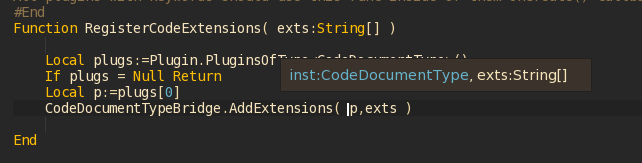
So, I done with “Hint for parameter” and pushed it into dev branch.
Also, there is the new option “Show parameters hint” in preferences – you can disable it.
Known issue: hint works for single-line parameters only (and I don’t want to fix that in near future).
I really like that monkey2 work with raw bytes to create resourses like images, strings, fonts.
I’m going to add font loading from pack file.
Thanks for feedback!
Would it be possible to make a separate ‘hint’ for colours?
Like, say you’re typing ‘New Color()’ and as you enter inside the ‘()’ a colour wheel pops up and you can preview the colour.
Wheel… not in a near future, I think. But I want to draw colored line under Color declaration to see each color right in the editor area.
I love the editor, but one feature i still miss. Local vars not parse. See Gif.
Local vars is a pain for me too. If anyone remember, my early versions of ted2go can show locals as well, but not always shown correct types. I plan to working on parser a bit later, so I will combine existing parser with my old version for locals.
And is it possible to make a fullsreen mode, like Sublime Text
It seems easy to implement, I will see. (F11, are you waiting for me?)
I almost done new cool feature – hint for parameters types!
You can try it out by pushing params_hint branch (will be in dev soon).
Click on GIF image to see more details.

Attachments:
Searching solution I found _wfopen() method (brother of fopen() ), but it requires wchar_t * , and I can’t to convert monkey’s string into wchar_t Ptr .
I gave up..
Thank you for explanation!
I made simple demo and add it as an issue here: https://github.com/blitz-research/monkey2/issues/277
There is a method inside of Texture class:
Monkey12345678910111213141516171819202122Method ClearTexImage2D( glTarget:GLenum )glCheck()Local width:=_size.x,height:=_size.yglTexImage2D( glTarget,0,_glInternalFormat,width,height,0,_glFormat,_glType,Null )If Not IsDepth( _format )Local image:=New Pixmap( width,1,Format )image.Clear( Color.Magenta )For Local iy:=0 Until heightglTexSubImage2D( glTarget,0,0,iy,width,1,_glFormat,_glType,image.Data )NextglFlush() 'macos nvidia bug!EndifglCheck()EndIt seems there is a place where default color is used: image.Clear( Color.Magenta )
Simple solution here can be to add global var like DefaultFillColor into Texture,
then we can set it before creating any images and avoid re-clearing.
I’ve added a textureFlags param to Font.Load in develop branch
The only note here is – other methods with shader and textureFlags parameters have signature texFlags,shader but font now have shader,texFlags. Maybe you will fix that to be more consistent?
With little sorry if someone started to use that (it’s easy to fix).
Edited: hmm, Image.Load also have shader,texFlags.
Don’t know what you do, but maybe my example will be useful.
I took mojo’s sprite shader, removed unused vars and added TestColor into fragment section.
Monkey123456789101112131415161718192021222324252627282930313233343536373839404142434445464748495051525354555657585960616263646566Namespace myapp#Import "<std>"#Import "<mojo>"Using std..Using mojo..Class MyWindow Extends WindowMethod New( title:String="Simple mojo app",width:Int=640,height:Int=480,flags:WindowFlags=Null )Super.New( title,width,height,flags )Local shader:=New Shader( "painter",shaderData,"" )image=New Image( 100,100,,shader )image.Handle=New Vec2f( .5 )EndMethod OnRender( canvas:Canvas ) Overrideimage.Material.SetColor( "TestColor",New Color( Mouse.Location.x/Float(Width),.5,Mouse.Location.y/Float(Height),1 ) )App.RequestRender()canvas.DrawImage( image,Width/2,Height/2 )EndField image:ImageEndFunction Main()New AppInstanceNew MyWindowApp.Run()EndConst shaderData:="//@renderpasses 0,1,2//@vertexattribute vec4 a_Position;uniform mat4 r_ModelViewProjectionMatrix;void main(){gl_Position=r_ModelViewProjectionMatrix * a_Position;}//@fragmentuniform vec4 m_TestColor;void main(){gl_FragColor=m_TestColor;}"The same result via canvas extension:
Monkey123456789101112131415161718192021Class Canvas Extension' func - is a function that will do needed drawing stuff' it is affected with translate/rotate/scaleMethod DrawFunc( func:Void(canvas:Canvas),x:Float,y:Float,rot:Float=0,sx:Float=1,sy:Float=1 )Local canvas:=Selfcanvas.PushMatrix()canvas.Translate( x,y )canvas.Rotate( rot )canvas.Scale( sx,sy )' call our drawing functionfunc( canvas )canvas.PopMatrix()EndEndand adapted buildable example:
Monkey12345678910111213141516171819202122232425262728293031323334353637383940414243444546474849505152535455565758596061626364656667686970717273747576777879Namespace Myapp#Import "<std>"#Import "<mojo>"Using std..Using mojo..Class Myapp Extends WindowMethod New()Super.New( "Window",800,600,WindowFlags.Resizable )EndMethod OnRender( canvas:Canvas ) OverrideIf Keyboard.KeyReleased(Key.Escape) Then App.Terminate()Local x:Float = App.MouseLocation.x ' x position of rectangleLocal y:Float = App.MouseLocation.y ' y position of rectangleLocal r:Float = Millisecs()*.0003 ' Rotation in radiansLocal sx:Float = Cos( Millisecs()*.0003 ) ' x scaleLocal sy:Float = Sin( Millisecs()*.0003 ) ' y scale' draw cross at cursorcanvas.DrawLine( x,0,x,Self.Height )canvas.DrawLine( 0,y,Self.Width,y )' use our extension function herecanvas.DrawFunc( DrawAll,x,y,r,sx,sy )App.RequestRender()End' all our drawing logic that will be translated/rotated/scaled' here: draw single rectangleMethod DrawAll( canvas:Canvas )Local w:Int = 500 ' Width of rectangleLocal h:Int = 100 ' Height of rectangleLocal rx :Float = -(w * 0.5) ' Calculate the handle for x (0.5 = middle)Local ry :Float = -(h * 0.5) ' Calculate the handle for y (0.5 = middle)canvas.DrawRect(rx,ry,w,h)EndEndClass Canvas Extension' func - is a function that will do needed drawing stuff' it is affected with translate/rotate/scaleMethod DrawFunc( func:Void(canvas:Canvas),x:Float,y:Float,rot:Float=0,sx:Float=1,sy:Float=1 )Local canvas:=Selfcanvas.PushMatrix()canvas.Translate( x,y )canvas.Rotate( rot )canvas.Scale( sx,sy )' call our drawing functionfunc( canvas )canvas.PopMatrix()EndEndFunction Main()New AppInstanceNew MyappApp.Run()End FunctionI’ve made a minor change to the theme ‘Hollow’ (json only)
Thanks, added.
Oh and I still think there should be a “Please restart Ted2Go” alert message when switching theme.
I think there is something wrong in mojo itself. Will try to understand.
@phatpeter thanks for ideas
Yes pls!
There is a problem – if you want to look at other members – you can’t because of fiter, if you removed filder – you need to find desired item by hand in docs tree. Therefore I decided to left whole list. You can press Enter to goto next found item.
And pls add the Autocompletion thing i mention befor (would be so usefull)
Give me a link to your post, please.
I like extensions, and here is one more candidate:
Monkey123456789101112Class Image ExtensionMethod Save:Bool( path:String )Local image:=SelfLocal canv:=New Canvas( image )Local pix:=canv.CopyPixmap( New Recti( 0,0,image.Width,image.Height ) )Return pix.Save( path )EndEndFor Ted2Go I use my own versions of TabView and TabButton (copied from mojox) to be able to change them for my needs.
-
AuthorPosts