Forum Replies Created
-
AuthorPosts
-
I’m a bit behind on my developments but I will be getting to networking very soon. Just a FYI/Update.
but I think I’ll give up on try to make a ‘clean’ list class and just concentrate on trying to duplicate bmx’s/monkey1’s quirks instead!
Applause.
 I look at this issue as how best can MX2 provide continuity and how can MX2 provide intensives for BlitzMax users to climb on-board. One way is by including often used legacy commands and syntax where possible. I’m not selling the idea of backpedaling but making a case for simpler conversions of legacy code.
I’m in the middle of solidifying my converted code base, but when that is done I intend to explore Stac’s and determine where best to use them and what limitations they hold. I like List’s and when used properly it is a nice feature to have. After converting a ton of legacy code Monkey 2 has proven to be friendly to the process and support of List’s and some of the past quirks is a good Idea to further smoother legacy conversions.
I’ll give the above samples a try. I’m cool with the fact that this this is how it has to be. I’ll adapt.

Thanks!
Well. I’ll give that a try…. but.
This issue is particularly confusing when converting Monkey X code. When Monkey 2 compiles code it will error on list.Remove() with no line reference in debug and just crashes the compiled application in release. So a user who does not know this is an issue is in some cases going to have a tough time figuring out what is going wrong. Believe me, I had a tough time narrowing the issue down with my large code base.
Anyway for continuities sake it might be a good idea to have Monkey 2 work as Monkey X did in this case.
Aww.. I totally missed that. Well cool.
I am hoping to use it for user accounts. Where I access a database and verify a valid account. Mark must have been listening when we all were making our requests early on in MX2 development.
Fun with light.
Starting to get a handle on making normal and specular maps. The normal and specular maps used in the attached images were done with Gimp and a normal map plugin/filter. Gimp does a good job rendering the normal maps. I can also easily make specular maps in Gimp.
I have also started to implement layered lighting in my framework. This is turning out to be fairly easy as Monkey 2’s lighting architecture makes it easy. More about this soon.
Attachments:
Beats the hell out of the old ‘renderer’ system doesn’t it?
OMG Yes! It’s flexible enough to just sort of plugin to my window frameworks render. Layering it ought to yield some cool effects.
but that’s generally what you want if you’re doing ‘layers’.
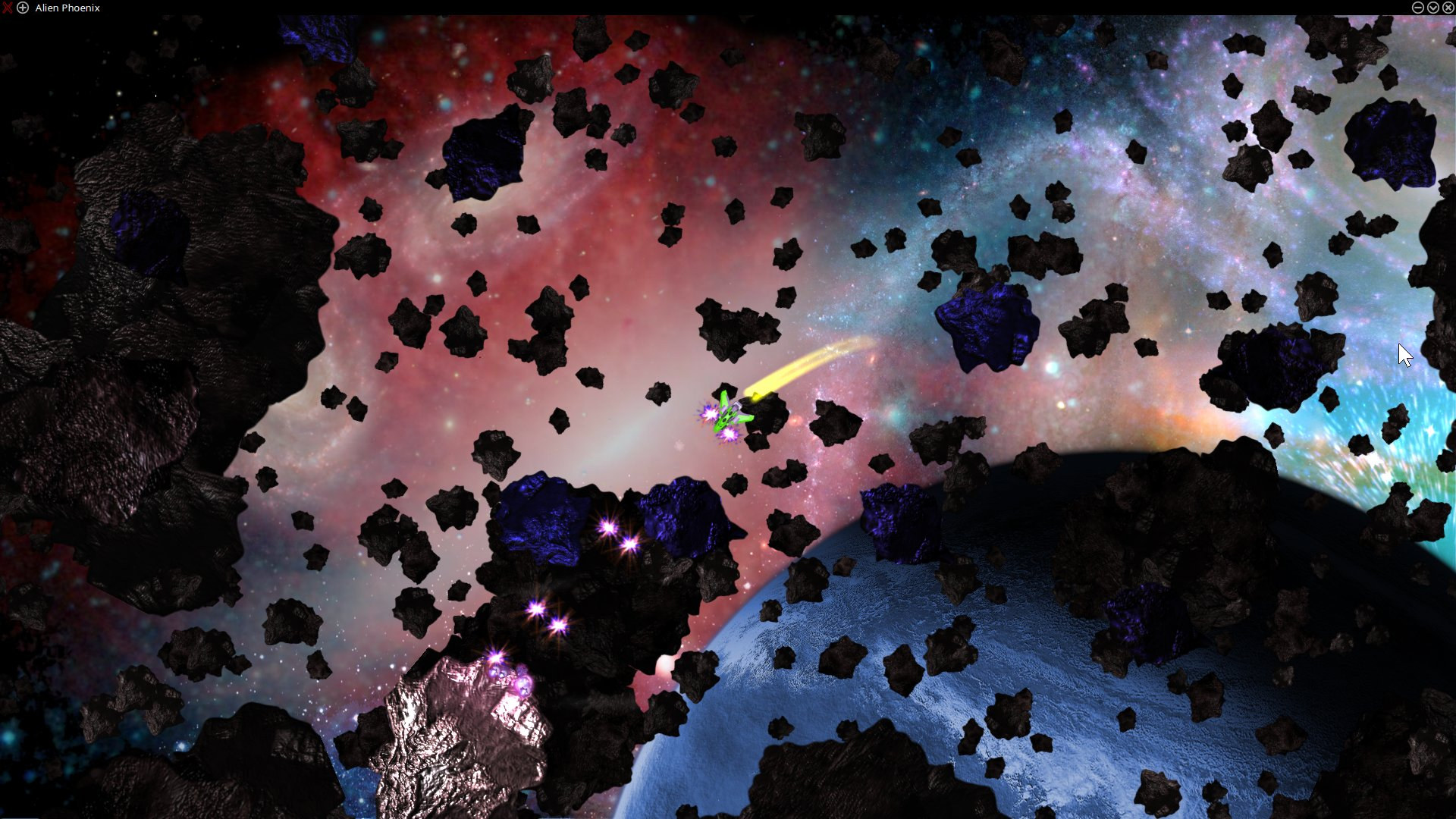
It is. For example, in my case, I can layer impact lighting among five layers of asteroids. That should add to depth. Time to experiment.
The above does seem to work. In the attached image I have lighting applied to two separate layers of asteroids. You can see that this so because the bright light of the weapons impact does not effect the blue lighted layer of asteroids below. It is awesome to be able to layer lighting this way.
I have encountered an issue where a light will wink out based on map position. I am not sure why this happens yet but I am able to get the light to stop winking out by moving my particle effect out of lighting (Begin/End Lighting). I’m not altering viewport or scissors with particles (uses non-bumped images) and I am able to draw other non-bumped images with no issues while lighting is on.
I will try to duplicate this issue and post some code assuming layering lighting in this way is proper.
Attachments:
That’s still pretty cool!
It is! Mojo’s lighting performance seems to be outstanding. I’m anxious to see what performance I get on Android.
how about using a real light for the first bullet fired after some timeout, eg: 1 second?
I will do some experimentation and see what I can come up with. The issue will be the independent nature of each bullet entity as each bullet is free to move independently with it’s movement guided by inertia physics. Unlike a lot of games where the bullets fly in a straight path, my approach (and Subspace) let’s the bullets move according to the environment. With soon to come features like repel (a staple of Subspace/Continuum) bullets are likely to move in all sorts of directions. This limits some of the trickery I can pull off.
But, the fun for me is in coming up with ways to overcome the limitations of hardware and whatnot. So I bet with a little research and thought I can come up with something cool.
Speaking of which I’m am at the moment experimenting with light to give the asteroid field a bit more depth. Since I use layers of map spaces (one drawn on top of the other) I am fairly sure I can pull of a really nice depth and lighting effect for the background elements. I have to say, having lighting in the mix really opens up a path to custom styling and just enhances the overall look of a project. I’m loving it! As soon as I started posting images of lighting implementation I noticed a definite up-tick in interest from followers. It seems eye candy does help sell a project. For those following lighting. I did some testing on lighting and GPU usage. Lighting, when used judiciously yields very acceptable results. In testing my demo of Alien Phoenix (1080p) with per-bullet lighting off (impact and other lighting is on) results in a 15% GPU usage on my GTX 950. Adding in per-bullet lighting quickly spikes usage and with 100 or so lighted bullets the GPU usage will zoom to 65%. This of course is to be expected and I can see that every bullet cant be lighted, at least for my Phoenix USC game project where I would expect in some scenes 100’s of bullets to be in view.
I’ve added some fake lighting to the bullets which when combined with impact lighting (a real light) looks and feels just fine. My plan is reserve per-bullet lighting to special weapons that tend to be a single bullet object.
All in all I am ‘very’ happy with the results using Monkey 2’s lighting framework. It is way easy to use and really makes a project pop visually.
Neat! I want to see more.
This fix looks to be working great! Thanks.
Hi,
Got to love Monkey 2 / mojo lighting.

I have incorporated mojo lighting into my framework. For now lighting is either on for everything or off. Non-bumped images seem to work great with it on so I don’t see a problem having lighting setup this way. I’ll bee doing some analytics on the GPU’s performance and make sure the way I’m implementing lighting has no adverse effects.
I’m nearly there with lighting and the only bit that remains is adding a separate list of shadow caster vertices. I was using a collision vertices list for shadow casters but this just is not cutting it.
Anyway checkout the pretty lighting images with bumped images.
The second image shows lighting scaled in a window (thanks to Mark for the quick fixes).Rock on!
Attachments:
OK.. got it. I’ll give this a try today. Thanks!
-
AuthorPosts