Forum Replies Created
-
AuthorPosts
-
@Matthew Q. how are you constructing the vector shapes? graph paper and data or using some other editor?
I’m just about to start work on a vector editor and wondered what approach you took?
If you’re like I can add italics and some other bits n bobs?
Excellent!
I’ve done some tests with bmGlyph exported fnt and it works. I did need to make some modification to the code though.
Here’s the code modified into a more compact class:
Monkey123456789101112131415161718192021222324252627282930313233343536373839404142434445464748495051525354555657585960616263646566676869707172737475767778798081828384858687888990919293949596979899100101102103104105106107108109110111112113114115116117118119120121122123124125126127128129130131132133134135136137138139140141142143144145146147148149150151152153154class BitmapFontclass BitmapGlyphmethod New()End methodField id:IntField x:IntField y:IntField width:IntField height:IntField xOffset:FloatField yOffset:FloatField xAdvance:FloatField page:IntField characterName:StringEndField font:Map<Int, BitmapGlyph>Method New( fontName:string )font = New Map<Int, BitmapGlyph>LoadFont( fontName )End methodProperty Name:String()Return fontNameEndProperty Height:Float()Return fontHeightEndProperty CharacterCount:int()Return charsCountEndMethod TextWidth:Int(text:string, xscale:float = 1 )Local width:int = 0For Local char := Eachin textLocal glyph := font.Get(char)If glyph <> null Thenwidth += glyph.xAdvanceElsewidth += 8EndifNextReturn width * xscaleEnd Methodmethod LoadFont( fontName:string )fontName = StripExt( fontName )Local text:string = LoadString( fontName+".fnt" )If text = Null Print "unable to load text"Local img:string = fontName+".png"_fontImage = Image.Load( img )Local lines := text.Split( String.FromChar(10) )For Local line := Eachin linesSelect TrueCase line.Contains( "info face" )Local i:int = 10If line[i] = 34i += 1Local n:String = ""While line[i]<>34n += line.Mid(i,1)i+=1WendfontName = nEndifsize = Int(GetString(line,"Size="))Case line.Contains("common")lineHeight = Float(GetString(line,"lineHeight="))atlasWidth = Float(GetString(line,"scaleW="))atlasHeight = Float(GetString(line,"scaleH="))pages = Float(GetString(line,"pages="))atlas = New Image[pages]Case line.Contains("page id")atlasName = GetString(line,"file=")atlasName = atlasName.Mid(1,atlasName.Length-2)atlas[0] = Image.Load("asset::"+atlasName)If atlas[0] = Null Print "invalid image "+atlasNameCase line.Contains("chars count")charsCount = Int(GetString(line,"chars count="))Case line.Contains("char id")' Print Int( GetString(line,"char id="))Local glyph:BitmapGlyph = New BitmapGlyph()glyph.id = Int( GetString(line,"char id=") )glyph.x = Int( GetString(line,"x=") )glyph.y = Int( GetString(line,"y=") )glyph.width = Int( GetString(line,"width=") )glyph.height = Int( GetString(line,"height=") )If glyph.height > fontHeight Then fontHeight = glyph.heightglyph.xOffset = Int( GetString(line,"xoffset=") )glyph.yOffset = Int( GetString(line,"yoffset=") )glyph.xAdvance = Int( GetString(line,"xadvance=") )glyph.page = Int( GetString(line,"page=") )glyph.characterName = GetString(line,"letter=" )glyph.characterName = glyph.characterName.Mid( 1, glyph.characterName.Length-2 )font.Add( glyph.id, glyph )End SelectNextEnd MethodMethod Render(canvas:Canvas, txt:String, x:float, y:Float, xscale:float = 1, yscale:float = 1)canvas.TextureFilteringEnabled = FalseFor Local char := Eachin txtLocal glyph := font.Get(char)If glyph = Null ThenPrint "Invalid Character in text " + txtElsecanvas.DrawRect( x + (glyph.xOffset*xscale), y + (glyph.yOffset*yscale), glyph.width * xscale, glyph.height*yscale, _fontImage, glyph.x, glyph.y, glyph.width, glyph.height )x += glyph.xAdvance * xscaleEndifNextEnd MethodprivateField fontName:stringField size:FloatField lineHeight:FloatField atlasWidth:FloatField atlasHeight:FloatField pages:FloatField charsCount:IntField atlas:Image[]Field atlasName:stringfield fontHeight:int = 0field _fontImage:ImageMethod GetString:String( line:String ,s:String )Local index:Int = s.Length + line.Find( s )Local text:String = ""While line[index] <> 32 And index < line.Lengthtext += line.Mid(index, 1)index += 1WendReturn textEnd MethodEndit’s basically the same but with the font rendering moved about a bit and the class names renamed so they don’t clash with any mojo stuff
P.S. I’ve also added the ability to scale in the x and y direction and corrected the height property
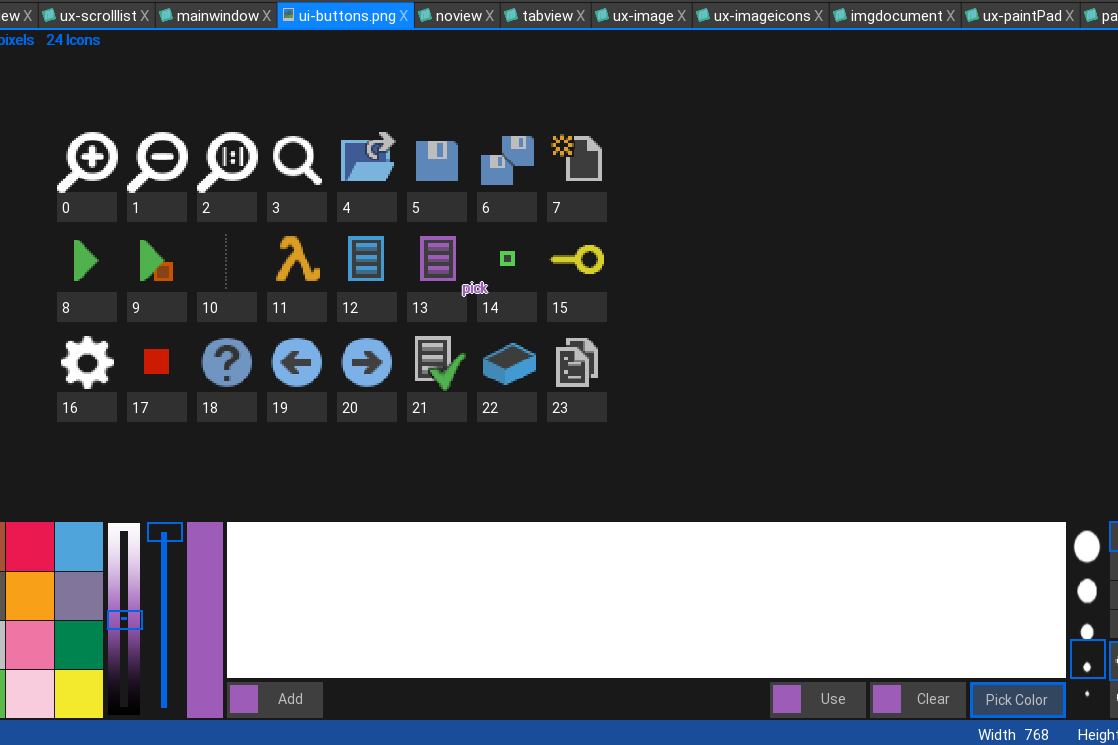
heres a shot of the color picking from an image (viewed as icons).
note that the image is both zoomed and offset and the “pick text still shows the correct color – this was not as simple as it looks.
Note also the mouse is not shown due to the screen capture – but you can see the pick text in purple (the color the mouse is over) outlined in white.
in the palette canvas the pick text behaves the same (the text shows the color it will pick) except it is outlined in black.
Attachments:
Small update on this
Work going well. lots of backend integration making sure everything is seamless.
I’ve also been directly integrating the image view with the palette mixer. When you press ‘pick color’ there is now ‘pick’ text that changes color on the mixer canvas and also does the same for the images. so you can directly pick colors from open images.
This is the first step to a full sprite editor.
I am curious, do you think M2 can replace Max for you?
Definitely yes. Main reason for this would be the updated core codebase being moved to 64bit.
Similar to Wiebow, I too bought M1 and immediately went back to Max for desktop.
One thing though. I really wouldn’t call the current version of Monkey2 V1 it still has a long way to go and feels much more like a 0. release.
I say this because too much is still in flux. it is not a mature product.
What I’ve seen of pyro ‘looks’ very nice, but… I wouldn’t use anything like that without a great editor to do all the front end stuff. The best solution would be to have it completely seamlessly integrated into the monkey2 editor. but you are going to need a lot of help with that.
small update to this:
I have renamed the code browser “view” as it gives a view of the code when viewing code. but when viewing anything else will give other information.
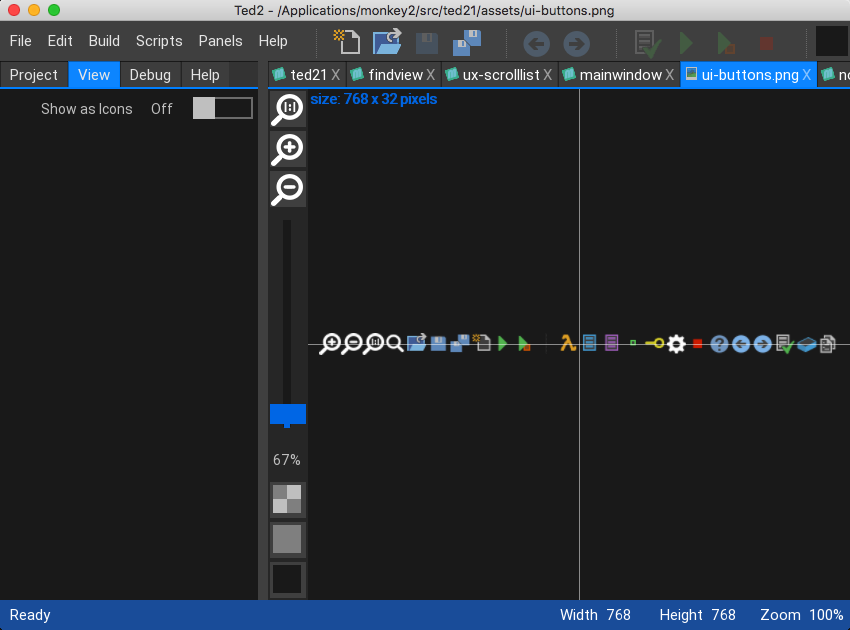
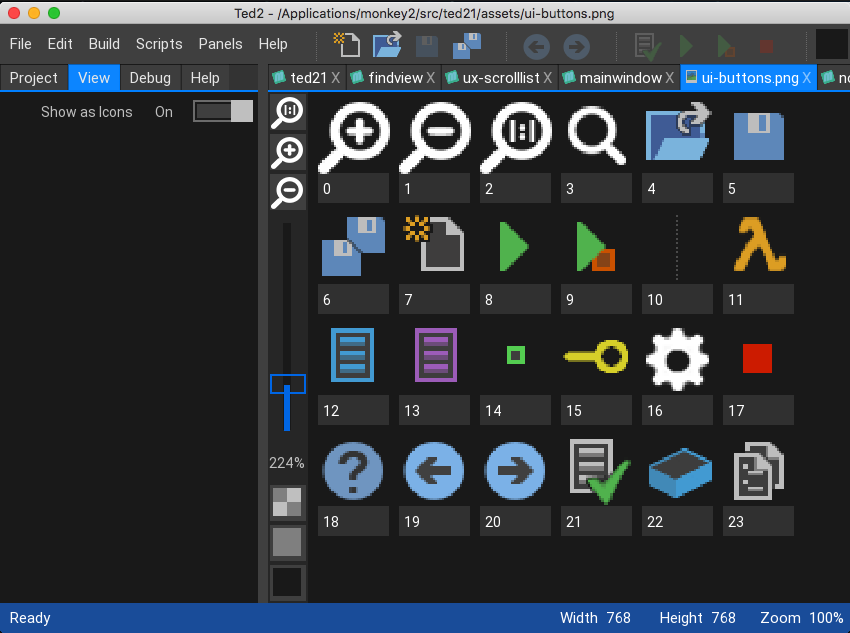
In the case of an image you now get the option to view it as a straight image or as an icon strip.
An icon strip is a single horizontal set of packed images, where the image width is the same as it’s height.
Each ‘icon’ is shown separately with it’s icon number
Here’s a couple of images of this in operation
You can see that the zoom slider works with both the image and the icon view
not sure what the issue is, as far as I could see the .fnt file looks ok. But the code is a bit mangled.
Here’s a simpler version which reads the file byte by byte and reconstructs each line. gives a very different output:
Monkey12345678910111213141516171819202122232425262728293031323334353637383940414243444546474849505152535455565758596061626364#import "<mojo>"#import "<std>"Using mojo..Using std..#import "mygliph.fnt"Function Main()LoadMyFont("mygliph")End FunctionFunction LoadMyFont(url:String)Local str:String = "aset::"+url+".fnt"Print str+"**********"Local text:String = LoadString("asset::"+url+".fnt")If text = Null thenPrint "unable to load text"ReturnEnd IfLocal k:intLocal line:stringLocal char:stringFor k = 0 To text.Lengthchar = text.Mid( k, 1 )If char < " " ThenPrint lineline = ""Elseline += charEnd IfNext' Local lines:= text.Split(String.FromChar(10))' lines[4] = lines[4].Replace(" ","")' For Local i:Int = 4 Until lines.Length' Local s:String = ""' Print s' For Local j:int = 0 Until lines[i].Length' If lines[i][j] = "@"[0] exit' While lines[i][j] <> 32' s += String.FromChar(lines[i][j])' j+=1' Wend' While lines[i][j] = 32 And j < lines[i].Length' j+=1' Wend' j -= 1' s+=","' Next' Print s' NextEnd functionThanks – your fork looks good too!
some weird little things are now being fixed plus some deeper integration stuff like live current line tracking
basic concept is now finished and operational – need further testing and some tweaks before being let loose.
So how does it work and how is it different?
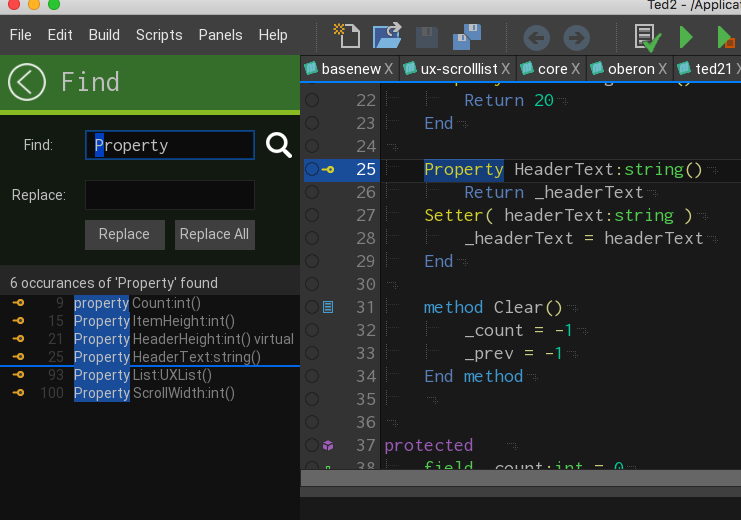
Basically it is similar to other find systems, apart from one main detail. When you find, ALL results are listed!
In the case shown. ‘Property’ was double clicked (selected) and then cmd+f. The dialog appears and automatically begins search for ‘property’ in the current file.
It has found 6 occurrences of ‘property’
These are then listed with the line icon (if one is present for that line), the line number and text highlighting where it was found.
The thin line is sort of where your current cursor is in relation to the find results.
Clicking a find result will take you to that line
Like the code view, this gives you a good feeling for where you are and what the find will give you. it also allows you to decide which (if any) find results you want to jump to…
Attachments:
small bug fixes throughout – not many just code catching
Added class extends to the code view. So any extended classes also show which classes they are extending.
The new find/replace system is almost finished and also the initial new dialog. I have also completely commented the 3 base monkey2 files, so anyone who knows nothing will get lots of help about what is going on.
Attachments:
tiny update on this.
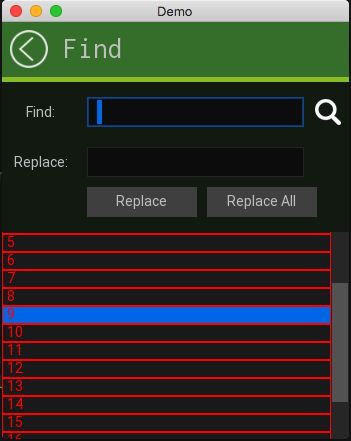
Needed to work on implementing a scroll list system (vertical scrollbar supporting a list)
Here’s is the dev work. All mouse operations are fully functional, need to do keyboard ones next.
You can see the default list and list items in red. The scrollbar hides and resizes as needed.
This is the stand alone version while I work on the list control. then it all gets integrated into ted21
Already got the keyboard tracking and text input fully debugged with cut/copy etc
Attachments:
question which version of monkey2 do I need to compile?
V1.02 and v1.04 just give loads of errors.
I’m very interested in how you implemented the autocomplete
No problem. I’ll repost to github with all current fixes (minor color modifications)
AHA. The extended colors are not present in the default build. MARK CAN WE HAVE THEM PLEASE?
Basically there are number of additions to the core monkey code that need to be added. I have an idea for a work around until Mark adds them.
-
AuthorPosts