Forum Replies Created
-
AuthorPosts
-
Thanks monkeyplotter2 , here’s a little insight into progress.
Working on part of the gameplay on the “transport” layer of the game.
Here we are highjacking other cars and collecting jewels.–
Very useful, thanks!
I’m thinking a good place to store the file would be in SDL_GetPrefPath() (is in MX2 now) like in
What do you think?
I really like Ted2Go, but I’m often struggling way to much with pretty basic things.
Some of these are (this is on Max OS High Sierra) :
- Help does not work.
F1 or fn+F1 does not show any help, so most of the time I press F2, and that takes me to the monkey code, that I then decipher.
Also: “Browse manuals” does nothing. Is this a path issue?
2) Code completion is hit and miss, often it show up, but often it does not. I have not had the patience to decipher why.
3) Numpad drives me crazy: If I type it and numlock is off, the cursor jumps to the somewhere in the code. one char up, down or to the bottom or top of the code. It also enters the number I pressed, at that position, and if I undo; I have to do it twice, loosing my last code entry.
4) Also: 0 on the numlock toggles insert mode, but not if in numlock mode. If I accidently hit 0 on the numpad, I’m forced to enter 00 to toggle insert, and the erase the 0.
5) I don’t understand the interface: Besides the Build/output etc window is another window that just takes up space:
The same error is shown in the Build window and in this window, in two slightly different ways:
Build window: [400] : Error : Expecting end of line , the other window: “Expectiong end of line…..”
6) The little window at the right does not let me copy text, and the build window will only let me copy text from the menu, not with [CMD]+C.
7) Sometimes Ted2Go will open monkey module code, when I’m trying to open something else. I’ll try and find out exactly when this happens at some point.
[EDIT] 8: Find/Replace shortcuts are not standard Mac OS
Thanks, – should have mentioned it seems to be a Mac only thing.
Awesome, thanks! This is exactly what I was asking!
Will give it a try when I get home later today.and then you’ll come hang out with us on #monkey2 on https://freenode.net/ like you used to!

Hey! Well spotted, an overlay of sorts maybe…
Wicked bruteforce AI tree search
–
I’ve noticed that http://monkeycoder.co.nz/forums/topic/a-simple-applet-framework/ uses SDL_GetPrefPath to find a place for settings.
I think Mark put it in the develop version of MX2
I’m planing to use that for my savegames, and precomputations, across platforms.
Thanks Pakz, glad to inspire

The tracks are drawn in Illustrator and saved as SVG files. I wrote a SVG parser, that makes everything into shapes, path segmets, lines etc. Then I triangulate that, and then DrawPrimitives(). The tesselator also makes the lines with thickness. In this case I’ll keep the tracks as vector objects, but for buttons, I render the SVGs to an image, based on device resolution. It’s a nice way to cator for Retina screens and what have you.
I carefully name some of the shapes in illustrator, so that I can use them for boundaries and collision detaction.
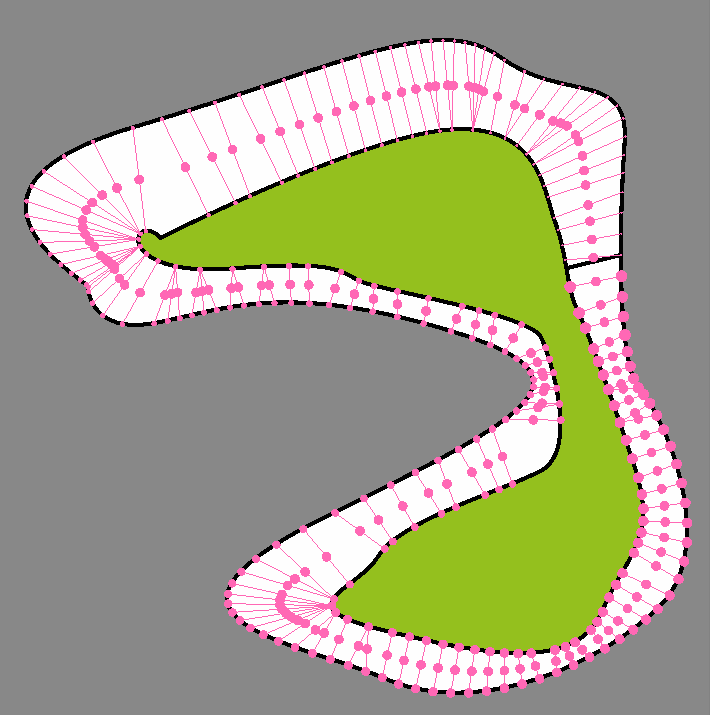
Preparing for AI, and crash/on off track detection in general.
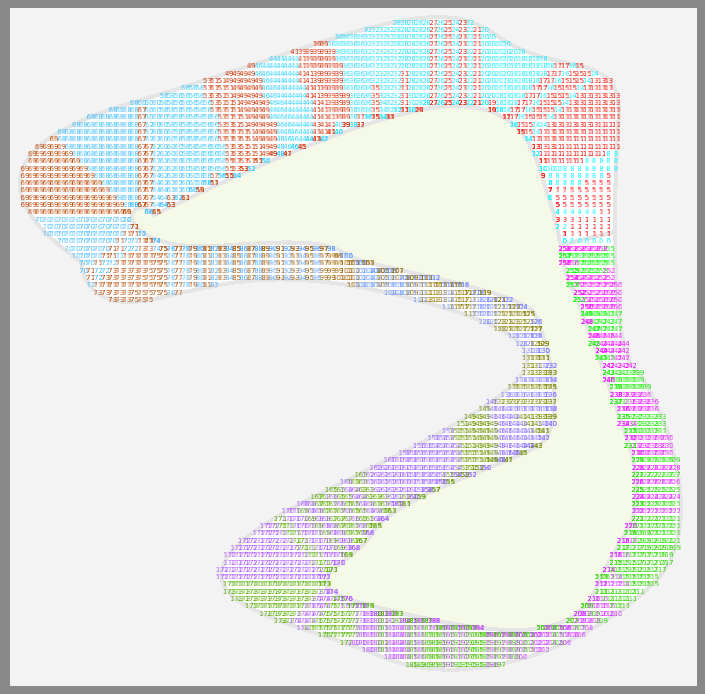
Because PaperRacers is inherently grid based, the common approach of making zones ( see video below) can probably be exchanged for a dot based system.
Dot grid creation and detection of dots on the track are in. Now to see if I can come up with an algorithm for numbering these dots in a zone like manner…
http://scheutz.dk/paperracersreloaded/to-zone-or-not-to-zone
I’m thinking you could maybe modify this to generate outlines, by drawing the image in black.
http://monkeycoder.co.nz/forums/topic/poor-mans-antialias/
Made a Blog : http://scheutz.dk/paperracersreloaded/sketching-the-cars
Thanks for explaining. Yes I think I’m talking about Finalizers, but I get why that won’t work If the subject still keeps a reference to the listener.
I get now that in order not to have objects, that cant be GC’ed, I must remember to call
Monkey1SomeFunctionpointer -= MyListenerbefore my object goes out of scope, there is no automatic magic cleanup.
Sounds like I just have to keep this in mind from http://gameprogrammingpatterns.com/observer.html
This is such a common issue in notification systems that it has a name: the lapsed listener problem. Since subjects retain references to their listeners, you can end up with zombie UI objects lingering in memory. The lesson here is to be disciplined about unregistration.
Have a go at GameController.bananas too, it would be nice to know that works and if it detects your controlles correctly.
Just some info on SDL 2.0.7 on Mac:
Sdl2+Mojo works out of the box, after completing the steps described above, and doing a “rebuild modules” for sdl2 and mojo.
I tried the new SDLSDL 2.0.7 because my noname controllers are only recognised as Joysticks on Mac OS, not SDL_IsGameController(), so I can’t test the new Monkey GameController interface with them.
If SDLGameController won’t work with these trouble makin’ controllers, maybe that’s all for the best. I’m sticking with using GameController for input from now on.
My PS3 controller DOES work on Mac as GameController with latest Monkey develop version.
Note however that it will show up as two controlles if it’s connected via both Bluetooth and wired.
Only the Bluetooth instance will get input. I think this is standard behaviour, and has nothing to do with monkey.
-
AuthorPosts