
Forum Replies Created
-
AuthorPosts
-
Just tried using my SpriteTools Atlas class, and it fixes the problem by working its magic behind the scenes…
https://github.com/DoctorWhoof/spriteTools
Minimal changes to your code, and unchanged texture file.
Monkey123456789101112131415161718192021222324252627282930313233343536373839404142434445464748495051525354555657585960Namespace myapp#Import "images/"#Import "<std>"#Import "<mojo>"#Import "../spritetools"Using std..Using mojo..Using spritetools..Const VIRTUAL_SIZE := New Vec2i(320, 200)Class MyWindow Extends WindowField tiles:Image[]Field filterTextures:Bool = TrueMethod New()Super.New("Tile Test", 1280, 800, WindowFlags.Resizable)Layout = "letterbox-int"tiles = New Atlas( "asset::tileset2.png", 32, 32, 0, 0, TextureFlags.FilterMipmap ).CellsEndMethod OnRender(canvas:Canvas) OverrideGameLogic()App.RequestRender()GameRender(canvas)EndMethod GameLogic()If Keyboard.KeyHit(Key.Escape)App.Terminate()EndEndMethod GameRender(canvas:Canvas)canvas.TextureFilteringEnabled = filterTexturesFor Local x:Int = 0 To Width Step 32For Local y:Int = 0 To Height Step 32canvas.DrawImage(tiles[14], x, y)NextNextEndMethod OnKeyEvent(event:KeyEvent) OverrideIf event.Type = EventType.KeyDown And event.Key = Key.Enter And event.Modifiers & Modifier.AltFullscreen = Not FullscreenEndifEndMethod OnMeasure:Vec2i() OverrideReturn VIRTUAL_SIZEEndEndFunction Main()New AppInstanceNew MyWindowApp.Run()End“Free rotation” sprites (instead of upright or billboard) would be nice, specially for things like effects with tons of sprites.
Installing Emscripten can be a pain, so if you don’t need it (it allows the app to run in a web browser) you can just turn it off when rebuilding modules.
Problem solved, here’s Mark’s explanation in case anyone runs into the same issue.
https://github.com/blitz-research/monkey2/issues/402
I hope to post the finished Character Controller eventually to the code library section, since it’s such an essential component when you’re making action games.
Cheers.
Ok, I figured why the sliding behavior depended on movement axis and fixed it. Also added more collision shapes.
The sphere is the only one not behaving correctly, seems like a bug to me! It looks like the collision result is using the diameter value as if it’s the radius, or something like that. Will file a bug.
Here’s the updated code. Hit space to toggle different collision shapes.
Monkey123456789101112131415161718192021222324252627282930313233343536373839404142434445464748495051525354555657585960616263646566676869707172737475767778798081828384858687888990919293949596979899100101102103104105106107108109110111112113114115116117118119120121122123124125126127128129130131132133134135136137138139140141142143144145146147148149150151152153154155156157158159160161162163164165166167168169170171172173174175176177178179180181182183184185186187188189190191192193194195196197198199200201202203204205206207208209210211212213214215216217218219220221222223224225226227228229230231232233234235236237238239240241242243244245246247248249250251252253254255256257258259260261262263264265266267268269270271272273274275276277278279280281282283284285286287288289290291292293294295296297298299300301302303304305306307308309310311312313314315316317318319320321322323324325326327328329330331332333334335336337338339340341342343344345346347348349350351352353354355356357358359360361362363364365366367368369370371372373374375376377378379380381382383384385386387388389390391392393Namespace myapp3d#Import "<std>"#Import "<mojo>"#Import "<mojo3d>"Using std..Using mojo..Using mojo3d..Function Main()New AppInstanceNew MyWindowApp.Run()End'---------------------------------------- Window ----------------------------------------Class MyWindow Extends WindowField speed := 0.1Field _scene:SceneField _camera:CameraField _light:LightField _current := 0Field _collide := TrueField _ball:ModelField _capsule:ModelField _box:ModelField _cone:ModelField _cylinder:ModelField _obstacle:ModelField _controllers:= New Stack<CharacterController>Method New( title:String="Simple mojo3d app",width:Int=800,height:Int=600,flags:WindowFlags=WindowFlags.Resizable )Super.New( title,width,height,flags )EndMethod OnCreateWindow() Override'create (current) scene_scene=New Scene_scene.ClearColor = New Color( 0.25, 0.28, 0.3 )_scene.AmbientLight = _scene.ClearColor_scene.EnvColor = _scene.ClearColor'create camera_camera=New Camera( Self )_camera.Move( 0, 0, -25 )_camera.FOV = 35'create light_light=New Light_light.CastsShadow=True_light.Rotate( 45, 45, 0 )'Green materialLocal material1:=New PbrMaterial( Color.Green, 0.1, 0.1 )'Create ball_ball = Model.CreateSphere(1.0, 24,24, material1 )Local colBall:= _ball.AddComponent<SphereCollider>()colBall.Radius = 1.0Local _controlBall := _ball.AddComponent<CharacterController>()_controllers.Push( _controlBall )'Create Capsule_capsule = Model.CreateCapsule( 0.5, 0.5, Axis.Y, 24, material1 )Local colCapsule:= _capsule.AddComponent<CapsuleCollider>()colCapsule.Radius = 0.5colCapsule.Length = 0.5colCapsule.Axis = Axis.YLocal controlCapsule := _capsule.AddComponent<CharacterController>()_controllers.Push( controlCapsule )'Create cubeLocal boxSize := New Boxf(-.5, -.5, -.5, .5, .5, .5 )_box = Model.CreateBox( boxSize, 1, 1, 1, material1 )Local colBox:= _box.AddComponent<BoxCollider>()colBox.Box = boxSizeLocal controlBox := _box.AddComponent<CharacterController>()_controllers.Push( controlBox )'Create cone_cone = Model.CreateCone( 1.0, 1.0, Axis.Y, 24, material1 )Local colCone:= _cone.AddComponent<ConeCollider>()colCone.Radius = 1.0colCone.Length = 1.0colCone.Axis = Axis.YLocal controlCone := _cone.AddComponent<CharacterController>()_controllers.Push( controlCone )'Create cylinder_cylinder = Model.CreateCylinder( 0.5, 2.0, Axis.Y, 16, material1 )Local colCylinder:= _cylinder.AddComponent<CylinderCollider>()colCylinder.Radius = 0.5colCylinder.Length = 2.0colCylinder.Axis = Axis.YLocal controlCylinder := _cylinder.AddComponent<CharacterController>()_controllers.Push( controlCylinder )'create obstacleLocal material4:=New PbrMaterial( Color.Red, 0.05, 0.2 )_obstacle=Model.CreateTorus( 1, .1, 64, 24, material4 )_obstacle.Rotate( 90, 0, 0)_obstacle.Mesh.FitVertices( New Boxf(-5,-5,-5,5,5,5) )Local obstCol:= _obstacle.AddComponent<MeshCollider>()obstCol.Mesh = _obstacle.MeshLocal obstBody:= _obstacle.AddComponent<RigidBody>()obstBody.Mass = 0EndMethod OnRender( canvas:Canvas ) OverrideRequestRender()_scene.Update()If Keyboard.KeyHit( Key.Space )_current += 1If _current >= _controllers.Length Then _current = 0EndFor Local n := 0 Until _controllers.LengthIf n = _current_controllers[n].Entity.Visible = TrueElse_controllers[n].Entity.Visible = FalseEndNext_camera.Render( canvas )canvas.DrawText( "FPS="+App.FPS, Width-10, Height-10, 1.0, 1.0 )canvas.DrawText( "Hit C to toggle Collision, SpaceBar to change shape", 10, Height-10, 0.0, 1.0 )canvas.DrawText( "Collision:" + _controllers[_current].allowCollision + ", Shape:" + _current, 10, 10 )EndEnd'---------------------------------------- Components ----------------------------------------Class CharacterController Extends BehaviourField speed := 0.15Field turnRate := 2.5Field horizontal := Axis.XField vertical := Axis.YField allowGravity := FalseField allowJump := TrueField allowCollision := TrueField lockXMovement := FalseField lockYMovement := FalseField lockZMovement := TrueMethod New( entity:Entity )Super.New( entity )EndProperty OnGround:Bool()Return _ongroundEndProperty OnWall:Bool()Return _onwallEndProperty StepDown:Float()Return _stepDownSetter( stepDown:Float )_stepDown=stepDownEndProtectedField _jumping:BoolField _stepDown:Float=.5 '50 cmsField _onground:BoolField _onwall:BoolField _vel:Vec3fField _col:ConvexColliderMethod OnStart() Override_col = Cast<ConvexCollider>( Entity.Collider )Assert( _col, "~nCharacterController: Error, Entity collider required.~n")EndMethod OnUpdate( elapsed:Float ) OverrideIf Not Entity.Visible ReturnLocal src:=Entity.PositionLocal moving:=FalseIf Keyboard.KeyHit( Key.C )allowCollision = Not allowCollisionEndifIf Keyboard.KeyDown( Key.Left )Entity.MoveX( -speed )moving=TrueElse If Keyboard.KeyDown( Key.Right )Entity.MoveX( speed )moving=TrueEndifIf Keyboard.KeyDown( Key.Up )Entity.MoveY( speed )moving=TrueElse If Keyboard.KeyDown( Key.Down )Entity.MoveY( -speed )moving=TrueEndif' If allowGravity' If _onground _vel.y=-Entity.Collider.Margin' _vel+=Entity.Scene.World.Gravity/60.0/60.0' End' If Keyboard.KeyHit( Key.Space ) And allowJump' _jumping=True' _vel.y=.125' EndifIf Not allowCollision Then ReturnEntity.Move( _vel )Local dst:=Entity.PositionLocal qres:=QCollide( _col,src,dst,True )'moving Or Not _onground )dst=qres.position' If Not _jumping And Not qres.hitground And _onground' src=dst' dst.y-=_stepDown' qres=QCollide( Cast<ConvexCollider>( Entity.Collider ),src,dst,False )' dst=qres.position' Endif_onground=qres.hitground_onwall=qres.hitwallIf allowJump And allowGravityIf _onground_jumping=False_vel.y=0Else_vel.y=dst.y-src.yEndifEnd' Entity.Position=dstIf Not lockXMovement Then Entity.X = dst.XIf Not lockYMovement Then Entity.Y = dst.YIf Not lockZMovement Then Entity.Z = dst.ZEndEnd'---------------------------------------- QCollider ----------------------------------------Struct QResultField position:Vec3fField hitground:BoolField hitwall:BoolEndFunction QCollide:QResult( collider:ConvexCollider,src:Vec3f,dst:Vec3f,moving:Bool )Local margin:=collider.MarginLocal world:=collider.Entity.Scene.WorldLocal start:=srcLocal plane0:Planef,plane1:Planef,state:=0,casts:=0Local qresult:QResultLocal debug:=""RepeatIf src.Distance( dst )<.0001dst=srcExitEndifcasts+=1Local cresult:=world.ConvexSweep( collider, src, dst, 1 )If Not cresult ExitIf cresult.normal.y> 0.7qresult.hitground=TrueEndifIf cresult.normal.y< 0.1qresult.hitwall=TrueEndifLocal plane:=New Planef( cresult.point, cresult.normal )plane.d-=marginLocal d0:=plane.Distance( src ), d1:=plane.Distance( dst )Local tline:=New Linef( src, dst-src )Local t:=plane.TIntersect( tline )If t>0src=tline * tEndifIf Not moving Or t>=1dst=srcExitEndifSelect stateCase 0Local tdst:=plane.Nearest( dst )' If plane.n.y<.1 And tdst.y>src.y' dst=src' Exit' Local t:=(tdst.y-src.y)/(tdst-src).Length' tdst=(tdst-src)*t+src' Print "Here!"' Endifdst=tdstplane0=planestate=1Case 1Local v:=plane0.n.Cross( plane.n )If v.Length>.00001Local groove:=New Linef( src,v )dst=groove.Nearest( dst )plane1=planestate=2ElsePrint "QCollide OOPS2"dst=srcExitEndifCase 2dst=srcExitEndForeverIf casts>3 Print debug.Slice( 2 )+"QCOLLIDE OOPS3 casts="+castsqresult.position=dstReturn qresultEndLooking good!
Hope to have a bit of time to try it soon…And here’s the Python exporter… still needs lots of work, but should work with the free Houdini edition (Apprentice), if anyone wants to try it. Please read the Github readme file so you know which nodes are supported before trying it.
I’m not super familiar with Python, and this is the largest thing I’ve done in it, so expect many rookie mistakes.
https://github.com/DoctorWhoof/Houdini-To-Mojo3D-Exporter

The main roadblock now is the lack of gltf support in Houdini, added to the fact that I can’t get a decent material export from Houdini to any external file format… but at least Houdini Material to Mojo3D PbrMaterial works great!
There’s an option to convert references to .fbx and .obj files to a reference to a .glb file on the mojo3d side, but it’s annoying that I have to create two different files for a single model.
Will come up with better ways to override the material in the .mojo3d file itself. Currently, you can do it if the FBX file is collapsed (“Collapse Hierarchy on Load” option), but you can only assign a single new material – see the green block in the middle of the monkeys, it’s a .glb file that had its material replaced.
Mini update: I’ve been working in the Houdini to Mojo3D Exporter Script, and by “working” I mean I’ve rewritten the damn thing three times now…

I believe I found the best solution, though: no custom Houdini Digital Assets (nodes) at all! I’m simply translating the native Houdini nodes to Mojo3D equivalents via Python script. It expects things to be done in a certain way (Principled Shaders for materials, etc.), but this is actually really fast to update, much faster than maintaining dozens of custom Houdini Digital Assets…
Next steps are: getting textures in materials and, finally, attempting to load an external model in .FBX format. If all succeeds, I’ll figure out a way to add components to entities directly in Houdini.
I have to say, being able to work on those .mojo3d files visually and “hot reloading” them after making changes (no need to recompile anything, just hit a shortcut to reload the current scene) is much, much, much faster than dealing with coding the scene directly… no surprise here though.
Once I have more features in I’ll share the exporter on Github. It’s a single python file, yay! It should also run well on the Free edition of Houdini!

Blender’s Glb converter seems to have stripped out the second uv channel, even though Blender imports it from the fbx… sad trombone…
But at least the AmbientTextureProperty seems to be doing its job well, thanks Mark!
Here with TexCoord1 copied from TexCoord0: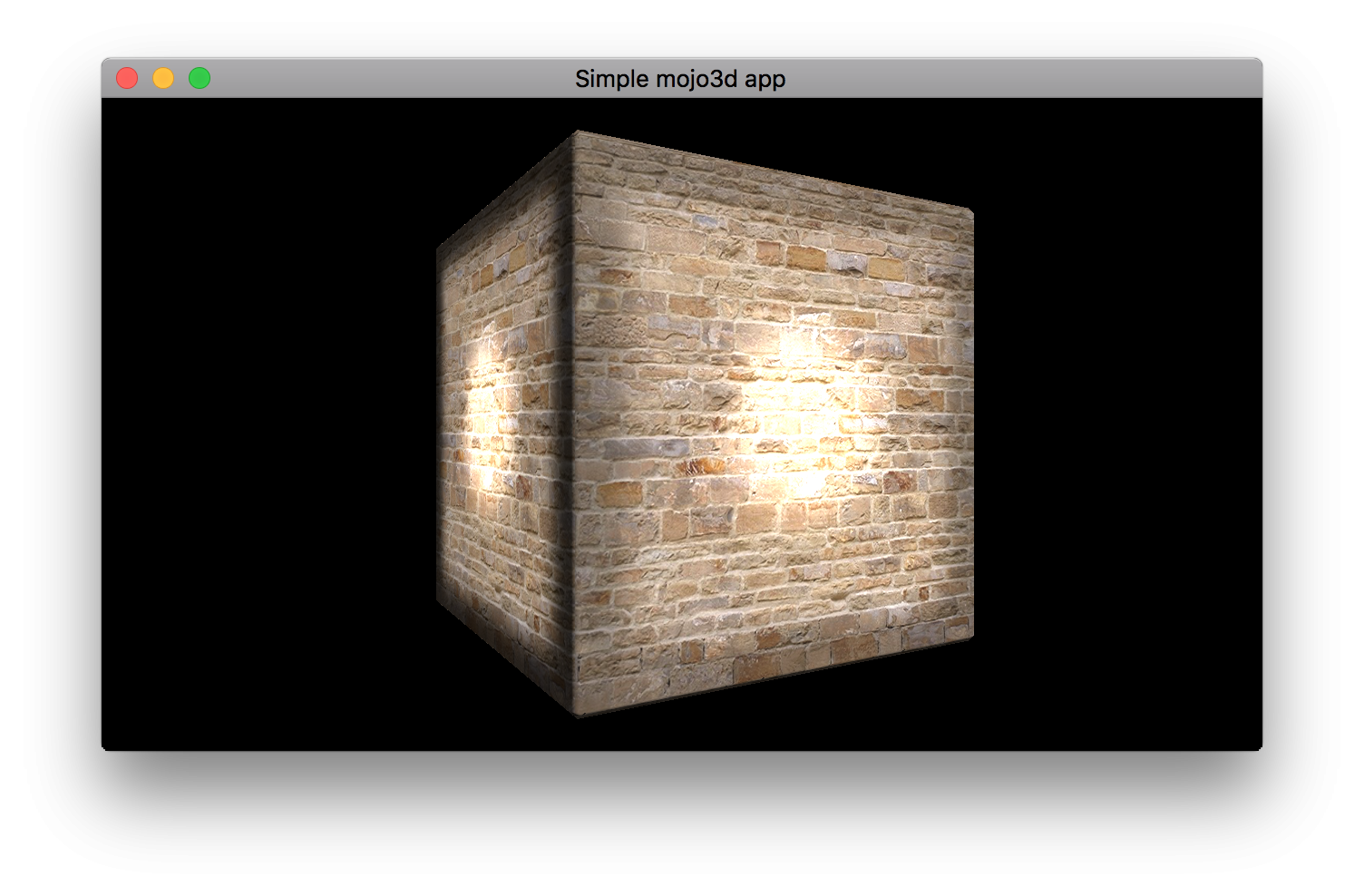
Here’s the ambient texture:

By Using AmbientFactor = 2.0 I was able to use the ambient texture to both darken (ambient color < 0.5) and brighten (ambient color > 0.5 ) the resulting lighting, with grey being neutral. And it apparently plays well with ambient and dynamic lights too! (needs more testing)
Will try to manually export and load the second texture channel tomorrow, maybe using a text file just for that.
Ok, I exported a cube out of Houdini as FBX with two texture coordinate channels, and it can re-import it without losing anything, so the exported file supports 2 uv channels just fine.
Mojo3d-loaders does not seem to be loading the second channel, even though Assimp seemingly supports it. From the Assimp features page: “Loads multiple UV and vertex color channels (current limit is 8)”.
I also wasn’t able to convert to gltf preserving the second uv channel (Clay Viewer doesn’t seem to support it).
Let me try… sigh.. Blender now… (I have Blender allergies).
Yay! testing soon…
Just to make sure I understand, If I have a dynamic light and a box with an Ambient Texture, does the ambient texture add light to the total result (light intensity + ambient texture)? Or does it multiply?
This one ran incredibly slow on Firefox and Chrome (10fps average)… but 60fps on Safari, somehow!

So you’d use AmbientOcclusion2 to use texCoord1?
My only concern is that Ambient Occlusion currently seems to work correctly, “blocking” ambient light and reflections. This new light map shouldn’t take any of that into account (I think…) since usually you spit out JUST the channel you want from the 3d app – I.e. indirect light – and If you use a path tracer to obtain that channel from a static mesh it should be correct, with all color spills, contact shadows, etc, and only needs to be added to the final result, with the ambient occlusion still there preventing things like reflections inside cavities.
I need to test it. Maybe it will be just fine!
Can we get a multiplier (LightMap Factor, or something like that)? It doesn’t make sense for Ambient Occlusion, but it would make sense for light maps, since the value should be able to go above 1.0
Thanks!
<edit> Sorry about my ramblings. The point is: Ambient Occlusion map and Light Map can be useful together, serving different purposes. Cheers!
Super simple demo up and running…
https://ethernaut.itch.io/cube-chamberDownload size is huge for such a small scene, about 50Mb. I hope to keep it much, much lower once we have Lightmap on texCoord1, since I’ll be able to tile the textures on texCoord0 and use a single light map texture on texCoord1. Will also be much sharper!
Still have to find how to bring in those extra texture coordinates, though… will try some of the assimp formats.
Ok, got it working the right way for emissive now (color texture doesn’t show when all lights are off, only the emissive color). Not sure what I was doing wrong… would still welcome the Light map addition, of course!
I hadn’t thought about using static light flags as a way to control light inclusion/exclusion. It works for me, although I’d probably still set my directional light to dynamic and provide only bounce/ambient lighting in the Light map.
Can’t wait to see the new shader stuff. Is it going to be easier to make custom materials?
Thanks! -
AuthorPosts
