
Forum Replies Created
-
AuthorPosts
-
This series will probably teach you way more than you actually need to know about transformations!
Bottom line: a transformed polygon is the original polygon + translation, rotation and scale.
The cool thing about doing things this way is that it’s resolution independent. Pixel checking for collisions in an HD game would be very inefficient, with perhaps millions of checks per frame!
You also get more information out of a polygon collision, like the collision normal (the direction it is pointing at).
Another advantage is that the same methodology applies to 3D, so learning to deal with 2D polygons “prepares” you for some key 3D concepts.
If your game really depends on pixel collision (destructible terrain, etc) you can still use a small rectangular collision area in the character, instead of the whole sprite, and check for pixel collisions just in a handful of coordinates.
Good luck!
There’s no pixel collision out of the box in Monkey2.
Mind if I ask, why do you need pixel collision? If you use something like The Timelinefx module you can get super fast 2D polygonal collision with collision reactions:
Just tested Gridshooter here, and it takes a meager 57Mb (MacOS/Release), and about 8% CPU running at 60FPS on a Laptop from 2015.
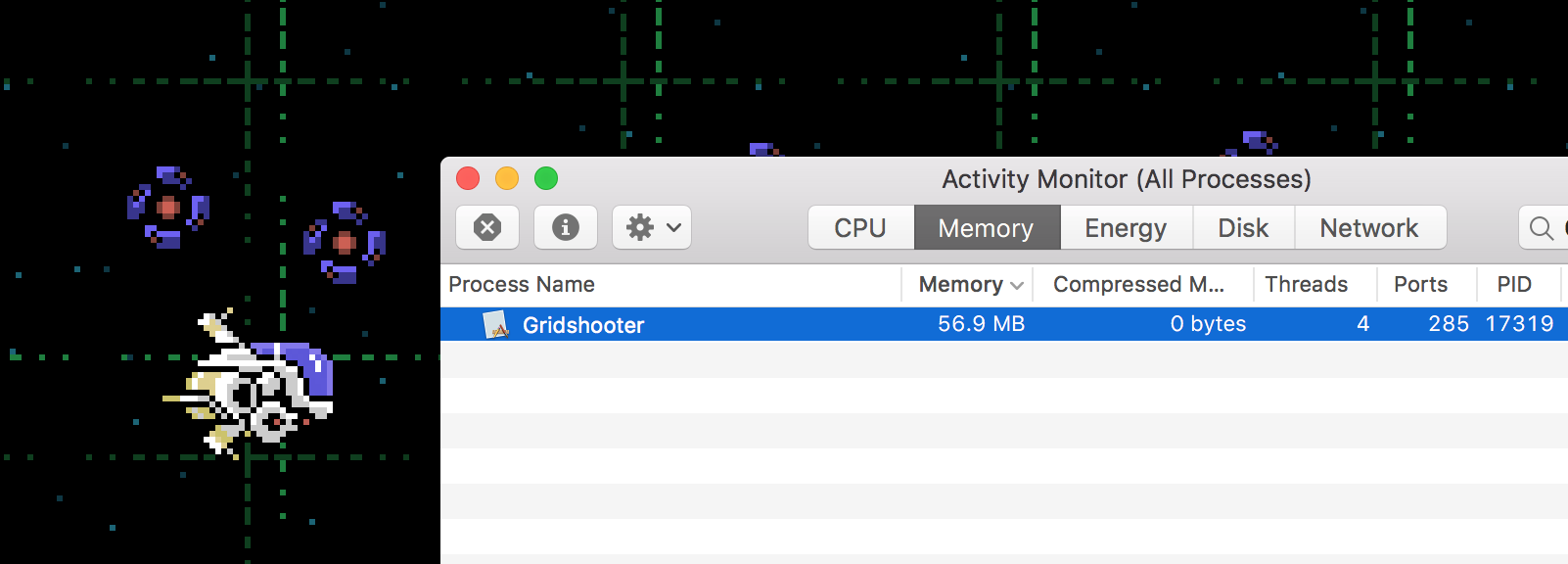
Maybe the slowness you’re seeing is a compiler problem on Windows?
That doesn’t seem right. Os MacOS I rarely go above 200Mb of memory use, and I’m a big fan of Stacks (although not so much of Lists). The only time I went over 1GB was when playing with creating dynamic 5K textures on the fly, and even then the memory use receded when the textures were discarded.
Cheers.
I think part of the problem is that the original demo you’re mentioning was probably written by Mark Sibly himself, while the new demo was written by a clueless non-programmer – me!
That said, I think it would be perfectly possible to wrap mojo3d in a simpler module, possibly even design it in a non object-oriented way. it’s not in my to do list, though. I’m happy with the direction mojo3d is headed.
Source: https://github.com/DoctorWhoof/Plane-Demo
Cheers!Hmm, good question. I don’t think there’s a way currently with PbrMaterial to apply a decal or a layer like that.
One stopgap solution would be to create a damage “card” and place it slightly offset from the surface you’re damaging. It’s actually quite flexible, since you could place the damage texture in any orientation for more variety, if needed.
The other way would be generating pre-damaged textures in the spritesheet, and just switch the texture coordinates accordingly, with the obvious downside of having to generate a ton of combinations – but that can be automated with Monkey2 code and creating new texture from pixmaps! This would be faster than cards for large scenes.
One thing that can help you is my Atlas class. You can load spritesheets, and it even creates a “color expanded border” (to prevent flickering around edges) around each texture on the fly, via pixmap manipulation. You could take a look at the code and create damaged textures after loading the main textures, via code. Heck, you could even modify it to load individual textures and combine them into spritesheets in memory only!
https://github.com/DoctorWhoof/spriteTools
There’s a bug right now in this version, though. I have a more up-to-date version at home. Will update it later.<edit> Atlas code is updated in the repository.
Not near a computer with Monkey right now, so I may overlooking important details, but the main two ways are:
1. (Simpler to make the textures, more expensive to render) Create multiple materials, each one with its own color textures, and add them to Model.Materials[], and then specify the material index for each triangle.
2. (More complicated to create the textures, less flexible, but cheaper to render). Create a single material with a single color texture, but arrange the texture map in a sort of “spritesheet” containing all other “subtextures”. When creating the vertices, specify the texture coordinates for each subtexture. Example: If there are 4 subtextures in a 2×2 grid, the coordinates for the first one are (0,0), (0.5,0), (0.5,0.5) and (0,0.5).
Will look for examples when I get home.
Cheers!I also noticed the specular map was not aligned with the other two, that alone is a good candidate to be the cause of the problem! Give a look and let us know.
Just out of curiosity, can you try these? I removed the alpha from the specular map and re-generated a new normal map using a method that’s probably different than the one you used. Will probably make no difference, but worth trying.
You can probably ignore the color texture and just use yours, I accidentally removed all saturation and saved over it…
(You may need to invert the normals in the Image.LoadBump function)
Attachments:
Is the problem the flickering that’s visible around the 40 second mark? It’s really hard to figure out what’s wrong without more info, like:
– What’s the texture resolution? And the canvas (virtual) resolution Vs. the window resolution?
– Can we look at one of the problematic textures?
– Is the texture transparency premultiplied by alpha? Seems like it’s turning white around transparent areas, which is usually related to non-premultiplied textures. What software are you exporting from?
– Are you rendering to a texture? What are the flags in that texture? Or are you just using “straight” Mojo window layouts?But one thing I’d try out of the gate is using “TextureFlags.FilterMipmap” on everything, instead of just filtering. It will give you better downscaling if the texture size on screen is smaller than the original texture. It won’t fix non-premultiplied textures, though.
Mark, “Forward”, “Right” and “Up” properties on entities would be very welcome (or at least just Forward), as it is a lot easier for people looking into this for the first time to understand. Matrices are a little daunting on a first look.
Thanks!
I think you may be missing information in the vertices. Try adding texture coordinates ( (0,0) for bottom left, (1,1) for top right ) and call UpdateNormals() to recalculate the normals on all vertices.
Some good examples here:
https://github.com/blitz-research/monkey2/blob/develop/modules/mojo3d/geometry/meshprims.monkey2We should start gathering those Emscripten demos into a web gallery! It runs incredibly well in a browser…
-
AuthorPosts


