
Forum Replies Created
-
AuthorPosts
-
Brilliant Mark.
Here’s the correct result I was looking for:
Monkey12345678910111213141516171819202122class Camera2 Extends CameraMethod New( parent:Entity = Null )Super.New( parent )Viewport = New Recti( 0,0,640,480 )Fov = 90Near = 1Far = 1000Show()Endmethod Lookat( x:float, y:float, z:float )Local target:Vec3f = New Vec3f( x, y, -z )local up:Vec3f = New Vec3f( 0, 1, 0 )Local k:Vec3f = (target - WorldPosition).Normalize()Local i:Vec3f = up.Cross( k ).Normalize()Local j:Vec3f = k.Cross( i )WorldBasis = New Mat3f( i, j, k )EndEnd classok. I’ll look into that and report

tiny update
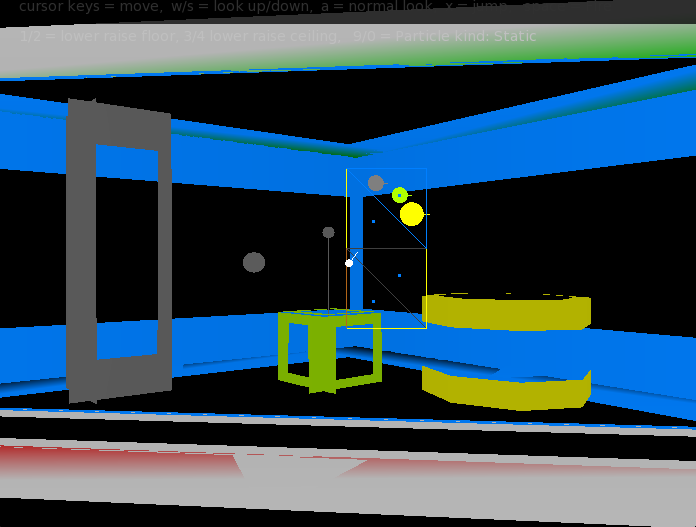
pic shows 3 of the 4 kinds of unit:
grey pillar – can’t pass
lime pickup – just as it says
yellow box. Original it was a box, but I decided a sort of circle made more sense as that is the collision it uses. basically it is something you can jump onto, climb onto, fall onto, etc. it will also stop you if it is too high. and it responds to things being fired, etc
the last one -not shown is ‘ignore’. it is a things that is ignored as if it is not there (collision wise)
all going well. The latest is pillars.
a pillar is a thing that you can’t pass through:
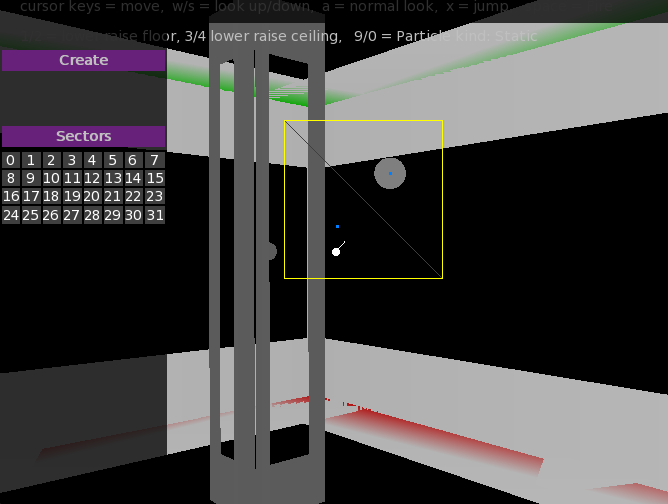
just select a triangle and the “create pillar” and a pillar will appear in the middle of any selected triangles.
You can see a pillar above in grey with it shown on the map as a grey blob.
Pillars automatically adjust to the triangle they are on and collision is automatically handled as well. there will be controls for making a pillar bigger or smaller and moving a pillar around.
Brilliant – thank you
It’s all very impressive – great work
Now that I’ve fixed the steps, I’ve done the same for the ceilings. so for any triangle it can have a separate floor and ceiling height, that can be adjusted in realtime.
I’ve been working on the gui and added dynamic side panels which can either be left or right.
And now for something different…

triangles now have a light parameter from 0 to 1. this sets the overall light a triangle has and allows for doom1 style lighting effects. NOTE: this is NOT lighting and doesn’t use any lights as such.
So given a trigger you could turn on/off lights, flash them, etc
I’m working on a lighting system that will give loads of lights with very little overhead (not deferred either)
no problem – will get it looked at
ok. After a lot of tweaking and dealing with ‘step’ problems. here’s the result:
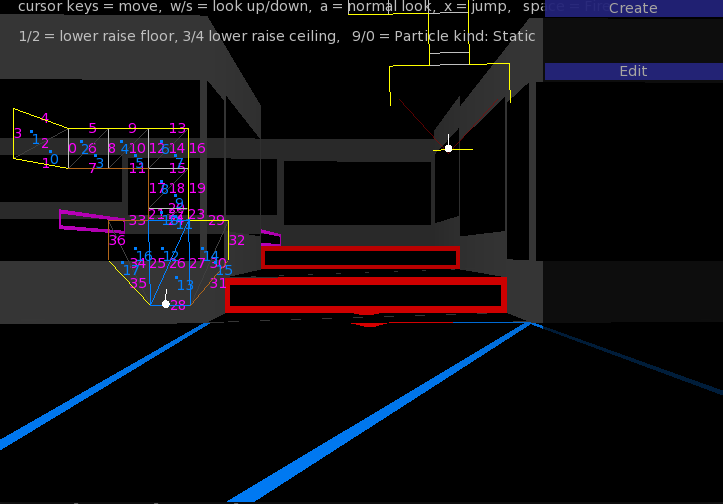
You can see that the default (initial) simple map has gone. This map was created in about 2 minutes.
In essence you click a line (in the map) and decide to extend a triangle or quad – buttons will appear in the left panel gui
You can select vertexes, lines or triangles.
vertexes and lines will allow dragging to change the map
triangles can be multiple selected and their floors raised and lowered – steps will appear automatically and correct and have very little overhead when being recalculated – so platforms, rising stairs is a possibility.
selecting anything one the map and making changes is all done realtime in the 3d view.
It’s a bit like staring in a cube and then carving out the places you can go.
@Paks did you fire (space) and check the particles?
second version for testing is now available. this has basic particles, collision and initial vertex map editing:
https://adamstrange.itch.io/techdemo
Gret to get some feedback on how it works, and your thoughts?
how about:
col = Color.Yellow * 0.5
a question for you…
How are you going to support triggers, doors, movable floors, etc?
Also collision with the map?
is the map above showing the normals?
it’s got nasty. I need to rewrite the triangle and line systems so that it could include floor. This meant getting winding directions or triangles, deciding and manipulating which way a line was facing, etc
So now I’ve got potential floor code and just putting back the wall code, and need to do the same with the steps.
Don’t worry if this all sounds gibberish? You shouldn’t have to think about any of it with a map editor…
I get the first 2 versions on macOS – that last one looks lush.
Seems we have our first nasty bug!
-
AuthorPosts
