
Forum Replies Created
-
AuthorPosts
-
just remember that by using
Controls[KEY_LEFT] = Key.Leftyou can redefine a key at any time with:
Controls[KEY_LEFT] = Key.Right
Controls[KEY_LEFT] = Key.A
Controls[KEY_LEFT] = a key picked by the user, etcYou always reference Controls[KEY_LEFT], so what it is mapped to becomes irrelevant….

and you can also use:
If Keyboard.KeyDown( Controls[KEY_LEFT] ) Then do something
to trap and minitor if the key is being pressed
Couldn’t you just do something like this:
[/crayon]Monkey12345678[crayon-5cba9d80d62d7021269437 inline="true" ]const KEY_LEFT:int = 0field Controls:Key[] = New Key[6]method New()Controls[KEY_LEFT] = Key.Leftetc...That way you can change the controls to any key at any time. none of the ‘map’ stuff getting in the way?
Here’s something to really consider:
where are the examples, the demos and the tutorials?You want to be taken seriously, WTF is “Bananas”?
Maybe the tutorials can be kept in “trees”?
Possible the demos in “sharks bottom”?How about documentation in “flubber” <- this won’t be complete, or actually have any working code, or be able to have functional copy, paste of code.
While we are at it, why not keep changing stuff so that it breaks other stuff further down the line, either intentionally or just for fun

How about a great website that allows cod to be posted, plaice to be eaten and lobsters to be praised? But messes up the output and adds crayons, pens, paint, and fingers along the way?
Maybe even have cut/copy of code that pastes garbage?
Branding – in this case, might be pushing it a bit.
Oh. And I’m really looking forward to be finally seeing the individual hamd-carved, one-of-a-kind, all leather bound set of 600 individually bound manuals that someone promised and bound in reverse font-mangled gilt-lined goodness, and bound – sometime, somewhere, possibly in another dimension!
Seriously, get over it. move on, nothing to see here…
Too much sherry methinks!
AGREES.
It would be great if there was an “#include” or similar to copy an app icon (and maybe other stuff?) to the MacOS bundle. The way it is now, we have to manually add afterwards. For most apps it’s ok, but for frequent compiles (like Ted2Go) it would make life simpler.
+10000 for this and the same for win as well.
TBH this sort of omission makes Monkey2 not look as professional as it should be. and certainly not at the standard of the competition ;/Thanks Richard
convenience features
What have you in mind?
Easily keep reusable things between multiple level files
Again, what are your suggestions on this?
non-tiled map features?
Such as?
Sounds interesting. I’m on Windows.
Hi, just released the editor on itch:
FontMapThis is for both MacOS and Windows
Here is the FileFormat details:
– header –
(4 bytes) int = -9999(4 bytes) int = number of layers
– layer data –
(4 bytes) int = width of layer (0 aligned)(4 bytes) int = height of layer (0 aligned)
starting from top left, data is read down the height, then across to the next x cell and continues down until all data is read
– cell data –
(2 bytes) short = map character (referencing the character font)(2 bytes) short = color reference (referencing the color palette)
and here is the monkey2 code to read in the data
[/crayon]Monkey12345678910111213141516171819202122232425262728293031323334353637383940414243444546474849505152535455[crayon-5cba9d80e821c524529398 inline="true" ] 'a map file can contain up to 32 maps with a resolution of 128x128field _tileMap:short[, , ] = New short[32, 128, 128]field _colorMap:short[, , ] = New short[32, 128, 128]method Load( filePath:string )Print "loading..."Local fStream:Stream = Stream.Open( filePath, "r" )If not fStream ThenPrint filePath + " not opened"ReturnEnd Iflocal id:int = fStream.ReadInt()If id <> -9999 ThenPrint filePath + " ID error"fStream.Close()ReturnEnd Iflocal layers:int = fStream.ReadInt()Local k:intFor k = _mapLayer To _mapLayer+layers-1If k < 32 ThenLoadLayer( fStream, k )End IfNextfStream.Close()End methodmethod LoadLayer( Stream:Stream, layer:int )_loadX = Stream.ReadInt()_loadY = Stream.ReadInt()Print "layer "+layer+" size is "+(_loadX+1)+" "+(_loadY+1)Local rt:shortLocal cl:shortLocal x:intLocal y:intFor x = 0 To _loadXFor y = 0 To _loadYcl = Stream.ReadShort()rt = Stream.ReadShort()If x < 128 And y < 128 Then_tileMap[ layer, x, y] = Clamp( int(cl), 0, 255 )_colorMap[ layer, x, y] = Clamp( int(rt), 0, 255 )End ifNextNextend methodmmmm.
The first example, nice simple readable code
The second ‘extension’ code is really (sorry to say it) horrible. much more complex, going into the ‘information hiding’ territory.I would have thought that code should be simple (for those) to understand?
Here you go…
[/crayon]Monkey123456789101112131415161718192021222324252627282930313233343536373839404142434445464748495051525354555657585960616263646566676869707172737475767778798081828384858687888990919293949596979899100101102103104105106107108109110111112113114115116117118119120121122123124125126127128129130131132133134135136137138139140141142143144145146147148149150151152153154155156157158159160161162163164165166167168169170171172173174175176177178179180181182183184185186187188189190191192193[crayon-5cba9d80f0eff573316112 inline="true" ]Namespace myapp#Import "<std>"#Import "<mojo>"Using std..Using mojo..Const Size:=New Vec2i( 640,480 )Class MyWindow Extends WindowConst FPS:Int = 60Field player:PlayerField timer:TimerMethod New()Super.New( "My Window", Size.X, Size.Y, WindowFlags.Resizable )ClearColor = Color.BlackLayout="letterbox"player = New Player(100, 100)timer = New Timer(FPS, OnUpdate)EndMethod OnRender( canvas:Canvas ) Overrideplayer.Render(canvas)Bullet.RenderAll(canvas)EndMethod OnUpdate()RequestRender()player.Update()Bullet.UpdateAll()EndMethod OnMeasure:Vec2i() OverrideReturn SizeEndEndClass SpriteField x:FloatField y:FloatField r:Float = Pi / 2Field sizeW:FloatField sizeH:FloatField colour:ColorField velocity:Vec2f = New Vec2f(0, 0)Property RotationDisplay:Float()Return r - Pi / 2EndEndClass Player Extends SpriteMethod New(x:Float ,y:Float)Self.x = xSelf.y = ySelf.sizeW = 100Self.sizeH = 50Self.colour = Color.GreenEndMethod Render(canvas:Canvas )canvas.Color = Self.colourLocal xr:float = x + (Sin(r) * 100)Local yr:float = y + (Cos(r) * 100)canvas.DrawLine( x, y, xr, yr )canvas.Color = Color.Bluecanvas.DrawRect(x-5, y-5, 10, 10)' Local matrix:=canvas.Matrix' canvas.Matrix=matrix.Translate( x ,y ).Rotate( RotationDisplay )' canvas.DrawRect(- sizeW / 2.0, - sizeH / 2.0, sizeW, sizeH)' canvas.Color = Color.Blue' canvas.DrawRect(-5, -5, 10, 10)' canvas.Color = Color.Red' canvas.DrawRect((sizeW/2)-10, (sizeH/2)-10, 10, 10)' canvas.Matrix=matrixcanvas.DrawText("r = " +r, 0, 0)EndMethod Update()Local s:Float = 2Local am:Float = 0.08Local factor:Float = 1.5If Keyboard.KeyDown(Key.Up)velocity.x += (Sin(r) * factor - velocity.x) * amvelocity.y += (Cos(r) * factor - velocity.y) * amElseif Keyboard.KeyDown(Key.Down)velocity.x += (-Sin(r) * factor - velocity.x) * amvelocity.y += (-Cos(r) * factor - velocity.y) * amElsevelocity.x *= .99velocity.y *= .99EndIf Keyboard.KeyDown(Key.Left)r += .1EndIf Keyboard.KeyDown(Key.Right)r -= .1Endx += velocity.xy += velocity.yIf Keyboard.KeyDown(Key.Space)thenNew Bullet(x, y, r)EndEndEndClass Bullet Extends SpriteGlobal list := New List<Bullet>Field timeToLive:IntField speed:Float = 5Method New(x:Float, y: Float, r:Float)Self.x = xSelf.y = ySelf.r = r' Print x+" "+y+" "+rLocal gunPosX:Float = x + (Sin(r) * 100)Local gunPosY:Float = y + (Cos(r) * 100)Self.x = gunPosXSelf.y = gunPosYSelf.timeToLive = 40Self.sizeW = 10Self.sizeH = 10Self.colour = Color.RedSelf.list.AddLast(Self)EndFunction UpdateAll()If Not list ReturnLocal it := list.All()While Not it.AtEndLocal b:Bullet = it.Currentb.Update()If b.timeToLive <= 0it.Erase()Elseit.Bump()EndEndEndMethod Update()Local dx:Float = Sin(r) * speedLocal dy:Float = Cos(r) * speedx += dxy += dytimeToLive -= 1EndFunction RenderAll:Void(canvas:Canvas)If Not list ReturnFor Local c:Bullet = Eachin listc.Render(canvas)NextEndMethod Render(canvas:Canvas)canvas.Color = Self.colourcanvas.DrawRect(x-5, y-5, 10, 10)' Local matrix:=canvas.Matrix' canvas.Matrix=matrix.Translate( x,y ).Rotate( RotationDisplay )' canvas.DrawOval(- sizeW / 2.0, - sizeH / 2.0, sizeW, sizeH)' canvas.Color = Color.Blue' canvas.DrawRect(-5, -5, 10, 10)' canvas.Matrix=matrixEndEndFunction Main()New AppInstanceNew MyWindowApp.Run()EndThe matrix stuff was making things hard for you, so I took it out so you can see the trig in operation. You can add the matrix stuff back once you get familiar with it
MacOS Confirmed!
use clearcolor for the entire window color
with your ‘own’ window you will need to clear the color to black first
canvas.Color = Color.Black
canvas.DrawRect( 0, 0, Width, Height )then the alpha stuff will fade to black as you wanted
If I remove an Image that 50 sprites reference, then undo that deletion, how do I reconnect those broken references?
seems like two initial options
A. Keep the image, so the references don’t go
B. update the references to the new imagethere is a third (more destructive way):
Code the UI and the backend so as to try and keep what is happening as separate as possible.
it sort of means that the ‘code’ you are showing has all the dependancies with it.or…
you code each UI control for one purpose – possible using a cascade method development (each ‘thing’ depends on another ‘thing’).
Here’s my approach to UI design
– core control – this does most of the housework like the base mouse and keyboard, initial drawing stuff and has all the placeholders
– button extends core – this is the basic button. it really is just the core control but with the mouse over, mouse press, and base drawing. ANY other buttons can just be extended from this with the needed bits added for drawing. the mouse and key code is already fully operational.
– check button extends button. just add a boolean toggle Selected to the core. now you can toggle and draw as needed.
– text extends core. text is the same as button but there is no actual UI interaction
– edittext extends core. much more code to deal with user interaction on editing text
As you progress, some functions like drawing of text will be removed and put in the core so all controls can have access.Here’s part of the import for my core:
[/crayon]Monkey1234567[crayon-5cba9d810bf10261975093 inline="true" ]#import "ux-button"#Import "ux-bitmapfontbutton"#import "ux-imagebutton"#import "ux-imageiconbutton"#import "ux-imageiconduobutton"#import "ux-colorbutton"You can see I decided to have separate controls for each specific task
Here’s a pic of this in operation:
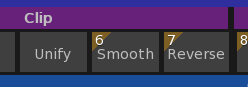
Unify is a normal button
Smooth and Reverse are extensions that have a different drawing method that allows for the orange ‘hot key’ to be addedThe main thing is you are triumphing over one of the nastiest bits of codeing. UI stuff is always difficult and always needs rewriting half way through doing a task…
there is also another way to think about things:
Maybe a list control, or drop down box, or whatever control is NOT the best way to show the inner working of some things.
If that is the case it is VERY reasonable to come up with another type of control that does the job better.An example of this could be shown in iphone and other phone guis that completely took a different approach to what and how a UI should work.
In your example of demeaning a guy in class for designing something over complicated. Was this actually tested? Usually it is the end result that matters not the getting there?
Looking at the last image. it seems that there is a project. is there only one open at a time? if yes, then you can start to simplify:
E.G.
the scene box contains a project. but why not remove the project entirely and just leave the bits that are in the projectHere’s a thought about lists for you:
They inherently grow (usually down), the moment the go below the container box you need scroll bars or some other way of seeing the rest of the list. long lists get messy and humans are not good with long lists of things – they tend to forget what the list is about.If your lists are going to be filled with lots of stuff maybe look at a different approach.
An example of this would be the file list of assets. Lets say 3d objects. Here is a visual and instantly usable way to show assets in a folder:

there are no names, just the assets
-
AuthorPosts
