
Forum Replies Created
-
AuthorPosts
-
I’m having similar issues with my OBJ files though.
And I have the PNG the MTL files asks for in the same folder.
I can’t seem to replace the default material for my loaded OBJ in Mojo3D either, so I can’t load it manually.And PLY (Stanford Polygon Library) files doesn’t seem to load at all?
They’re a single file format.Thanks Adam!
It uses Radians.
Your Degree function does it backwards, it should be.Monkey123Function Degrees:Float (radian:Float)Return radian * (Pi / 180.0)EndOh and my VPN is on while posting this, so it should work.
Oh, I didn’t know bullet had raycasting, that’s even better.
Are bullet raycasting available right now, or will you have to add that later?
I’d love to get started on some player movements!Here’s a video of a Quake 1 map that I rather like:
There are some lightmap issues and flickering, but it’s getting there!
(Can I embed YouTube videos here somehow?)
UPDATE: Yes! I finally can.
That seems like a major waste…
Disable collision, place body at new position, enable collision, seems like a better idea.
But alright, I’m no expert.
There’s no way to add/set velocity or rotation or anything yet though, so I guess “throwing a ball” isn’t possible just yet anyways.Thanks everyone!
Haha okay.
I would recommend firing up any of the Quake games and study their movement style as the base.But let’s say I just want to throw a ball from the camera.
Every time I press the left mouse button, the ball resets to the cameras position and shoots out.
I’d need set position for that too.Well I meant using the bullet module that comes with M2.
But yeah, all that, and also set position, which would be required for positioning the player correctly at start.I’ve made a pull request for chat notifications.
A ! icon is shown next to the chat tab if someone’s said something.
I wanted to make the taskbar flash too, but I’m not sure how.I tried making a player movement class based on physics, but I have almost no control over the physics body :/
Alright, more progress.
Lightmaps are working, but the math isn’t 100% correct yet (hard to find documentation) so they’re a bit weird at places.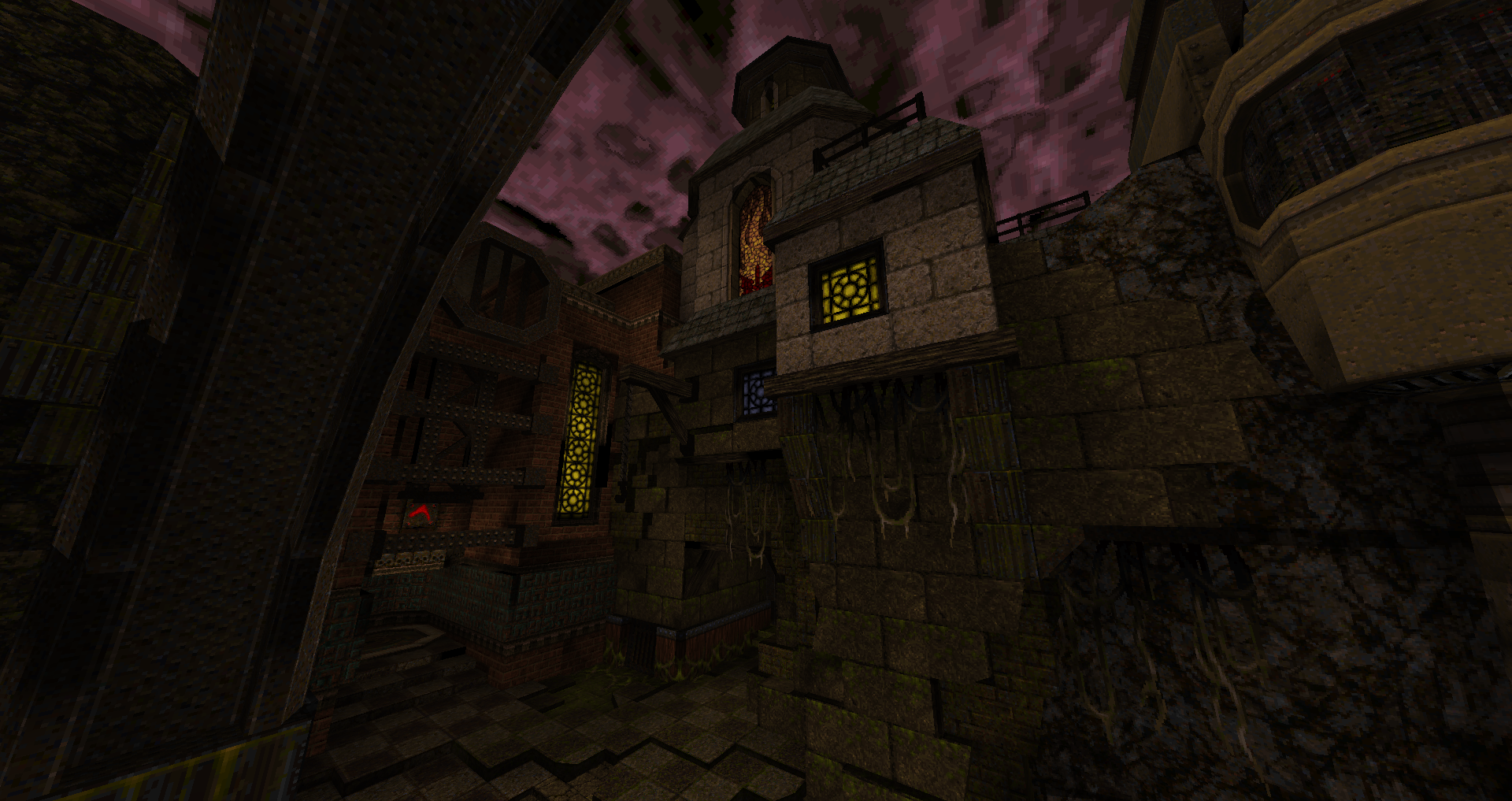
Thanks.
Why is PixelFormat.RGBA32F not default.. infact you’ve commented that out.
Is it for backwards compatibility or something?UPDATE: Looks like it’s been changed in newer Mojo3D, it was just my old version
It was a bit trickier than expected, and had to write custom Mod and Inverse functions for GSLS…
But we’ve got the sky textures working now.
Here’s the code if anyone wants to give it a go themselves.
The “test.png” file is in the first post.Monkey123456789101112131415161718192021222324252627282930313233343536373839404142434445464748Namespace myapp#Import "<std>"#Import "<mojo>"#Import "<mojo3d>"#Import "assets/"Using std..Using mojo..Using mojo3d..Class MyWindow Extends WindowField _scene:SceneField _camera:CameraField _ground:ModelMethod New( title:String="Simple mojo app",width:Int=640,height:Int=480,flags:WindowFlags=WindowFlags.Resizable)Super.New( title,width,height,flags )_scene=Scene.GetCurrent()Local pixmap:=New Pixmap(4,3 )pixmap.Clear( Color.Black )Scene.GetCurrent().EnvTexture=New Texture( pixmap,TextureFlags.Cubemap )_camera=New Camera_camera.Near=.1_camera.Far=100_camera.Move(0,55,0)_camera.RotateX(Pi/2)Local mat:=New PbrMaterial(Color.Black,0,1)mat.EmissiveFactor=Color.Whitemat.EmissiveTexture=Texture.Load("asset::textures/test.png",TextureFlags.WrapST)_ground=Model.CreateBox(New Boxf(-50,-1,-50,50,0,50),1,1,1,mat)EndMethod OnRender( canvas:Canvas ) OverrideRequestRender()_scene.Render( canvas,_camera )EndEndFunction Main()New AppInstanceNew MyWindowApp.Run()EndYeah when dragging the area the scrolling should equal the height of the codemap view, that is correct and mine did that too.
But when you click once outside the area, it should jump to the location clicked, that’s what mine did.
I would also recommend doing “smooth” scrolling as it’s a bit jarring otherwise. -
AuthorPosts
